

Descrição
Tagsmith is a free Google Analytics (GA4) dashboard for WordPress. It shows your GA4 reports inside wp-admin in plain English, emails you a weekly or monthly summary, and adds the Google tag with Consent Mode v2. Your Google data is only read, never changed.
The dashboard opens with what changed, in sentences such as “Organic Search brought 1,204 more sessions than the previous 7 days”, then your key numbers against the period before. It is for site owners who want a plain answer to “how is my site doing?”, and for freelancers who set up tracking on client sites.
What you can do with it
- Know what changed without opening Google Analytics. Then dig into Content, Acquisition, Audience, Engagement, Search, Behavior and Realtime tabs, or glance at the home-screen widget.
- Get a summary in your inbox. Weekly or monthly: key numbers, what changed, top key events and pages, and whether tracking looked healthy. A print-ready copy is one click away.
- See which posts bring readers. A “Views (28 days)” column in the Posts list, and an editor panel with views, channels and searches for the post you are writing (needs pretty permalinks).
- Check that visitors did what you wanted. Key events such as form leads against the previous period, events not yet marked as key events, campaigns, and site searches.
- See the Google searches that find you. Search Console clicks, impressions, CTR and position, site-wide and per post.
- See where visitors get stuck. Microsoft Clarity under the same consent rules and, with a Data Export token, rage clicks, dead clicks and scroll depth by page.
- Set up the Google tag once, correctly. Pick your GA4 property or paste a
G-Measurement ID. Consent Mode v2 (Advanced or Basic), regional defaults, WP Consent API support, and your own visits left out by role. - Run ad pixels behind one consent setting. Meta Pixel, Google Ads, TikTok Pixel, LinkedIn Insight Tag, Microsoft Advertising UET, Pinterest Tag, Snap Pixel and X Pixel. Each stays off until you switch it on and enter its ID, and follows your consent settings. WPForms, Gravity Forms, Fluent Forms and Elementor Pro submissions count as leads, and a preview shows what each pixel would send.
- Trust your numbers. Health finds duplicate tags, a different Measurement ID on your homepage, and connection problems. Tracking stays off on staging sites until you turn it on.
Every feature is free, with no upgrade screens.
Google Analytics, Search Console and the Google tag are trademarks of Google LLC; Microsoft Clarity is a Microsoft product. Tagsmith is not made or endorsed by either.
External services
Tagsmith contacts these services, only for features you turn on.
Google APIs (your site to Google). When you connect, your site calls Google directly to read your Google Analytics reports: analyticsdata.googleapis.com (reports), analyticsadmin.googleapis.com (your properties and web streams), searchconsole.googleapis.com (only if you turn on Search Console) and oauth2.googleapis.com (to revoke access, and to sign in and refresh it if you use your own Google client). Your site sends its access token and the report it wants, and the data comes straight back from Google, never through the plugin author. Google’s sign-in page (accounts.google.com) opens in your browser when you connect.
When you are connected and the health checks run (Settings, Health, and the last setup step), your site also sends one HEAD request to analyticsdata.googleapis.com and only notes whether any answer comes back, with no token, report request or analytics data. It is not sent in tracking-only mode. Google sees your server’s IP address and WordPress’s User-Agent (your WordPress version and site address).
- Terms: https://policies.google.com/terms
- Privacy: https://policies.google.com/privacy
The Tagsmith sign-in relay (connect.shivaatripathi.com). A relay run by the plugin author holds the sign-in secret Google does not let a plugin ship. Your browser is sent to it when you click “Connect with Google”, and your site calls it directly to refresh its access token: about once an hour while you use the reports, and when a health check runs (the plugin’s, or WordPress’s Site Health). It passes the sign-in code and tokens through without storing or logging them and never sees your analytics data. It sees your site address, your IP address (for rate limiting) and the email of the Google account (passed straight back to your site), and keeps none of it on disk. It is served through Cloudflare, which sees requests like any CDN. It is not contacted in tracking-only mode or with your own Google client. Google shows its “unverified app” screen at sign-in while its review of the app is pending.
- Sign-in relay: https://shivaatripathi.com/tagsmith/
- Relay privacy: https://shivaatripathi.com/tagsmith/privacy/
- Relay terms: https://shivaatripathi.com/tagsmith/terms/
Google’s tag (your visitors to Google). When tracking is on, your visitors’ browsers load Google’s gtag.js from www.googletagmanager.com and send page views and events to Google Analytics, plus generate_lead (form plugin and form ID) and contact (kind of link) events when an ad pixel is on and those events are left on. In Advanced mode (the default) the tag loads for every visitor. Visitors whose default is “not agreed” (by default those in the EEA, the UK and Switzerland) send only cookieless pings until they agree, and Google says nothing is stored on their device. In Basic mode nothing is sent to Google before a visitor agrees. A banner that assumes consent until the visitor declines counts as agreed. Excluded roles and non-production sites load nothing, pixels included. Google Ads, if on, shares this gtag.js, sends page views and, as conversions you create, form leads and contact taps, waits for marketing consent like the other pixels (in Basic mode with the Google tag set up, also for its grant) and uses www.googleadservices.com, googleads.g.doubleclick.net and www.google.com.
- Terms: https://policies.google.com/terms
- Privacy: https://policies.google.com/privacy
Microsoft Clarity (only if you turn it on). Visitors’ browsers load Clarity’s script from www.clarity.ms and send Microsoft how they use your pages (clicks, scrolling and mouse movements), with device, browser and approximate location, under the Google tag’s consent, role and staging rules. WordPress context tags (on by default) add the page type, post type, first category, the author’s user ID and login state, never names or emails. With a saved Data Export token, your site also asks www.clarity.ms once a day for aggregated behavior metrics (at most 8 calls a day) and keeps the snapshots for 120 days.
- Terms: https://clarity.microsoft.com/terms
- Privacy: https://privacy.microsoft.com/privacystatement
Ad pixels (only the ones you turn on). Each platform is off until you switch it on and enter its ID in Ads & pixels. Browsers then load its script from its listed hosts and send it page views and the events named in its entry. A form lead is the event only; a contact tap is at most the kind of link, never the number or address. Its script also reads the page address with its query string, the referrer, the IP address and browser details, and sets cookies. Search terms that look like an email address or phone number are dropped, and Tagsmith adds no names, emails or form entries. No other pixel loads until the visitor agrees to marketing cookies where your consent setting asks for it. Google Ads shares the Google tag’s gtag.js, as above. Product names belong to their owners, with no affiliation.
Meta Pixel. Page views, content views (title, category), searches (term), form leads, contact taps. connect.facebook.net, www.facebook.com, www.instagram.com.
- Terms: https://www.facebook.com/legal/technology_terms
- Privacy: https://www.facebook.com/privacy/policy/
TikTok Pixel. Page views, content views (title, category), searches (term), form leads, contact taps. analytics.tiktok.com, analytics-ipv6.tiktokw.us, analytics.pangle-ads.com.
- Terms: https://ads.tiktok.com/i18n/official/policy/business-products-terms
- Privacy: https://www.tiktok.com/legal/page/row/privacy-policy/en
LinkedIn Insight Tag. Page views, and form leads and contact taps as conversions you create. snap.licdn.com, px.ads.linkedin.com.
- Terms: https://www.linkedin.com/legal/user-agreement
- Privacy: https://www.linkedin.com/legal/privacy-policy
Microsoft Advertising UET tag. Page views, content views (title, category), searches (term), form leads, contact taps (the kind of link). bat.bing.com, bat.bing.net.
- Terms: https://about.ads.microsoft.com/en/resources/policies/microsoft-advertising-agreement
- Privacy: https://privacy.microsoft.com/privacystatement
Pinterest Tag. Page views, content views (the visit only), searches (term), form leads, contact taps. s.pinimg.com, ct.pinterest.com.
- Terms: https://policy.pinterest.com/en/terms-of-service
- Privacy: https://policy.pinterest.com/en/privacy-policy
Snap Pixel. Page views, content views (title, category), searches (term), form leads; no contact event. sc-static.net, tr.snapchat.com, tr6.snapchat.com, tr-shadow.snapchat.com.
- Terms: https://www.snap.com/terms
- Privacy: https://values.snap.com/privacy/privacy-policy
X Pixel. Page views, and form leads and contact taps as conversions you create. static.ads-twitter.com, analytics.twitter.com, t.co, ads-twitter.com, ads-api.twitter.com.
- Terms: https://x.com/en/tos
- Privacy: https://x.com/en/privacy
Capturas de tela




Instalação
- Install and activate Tagsmith under Plugins, Add New.
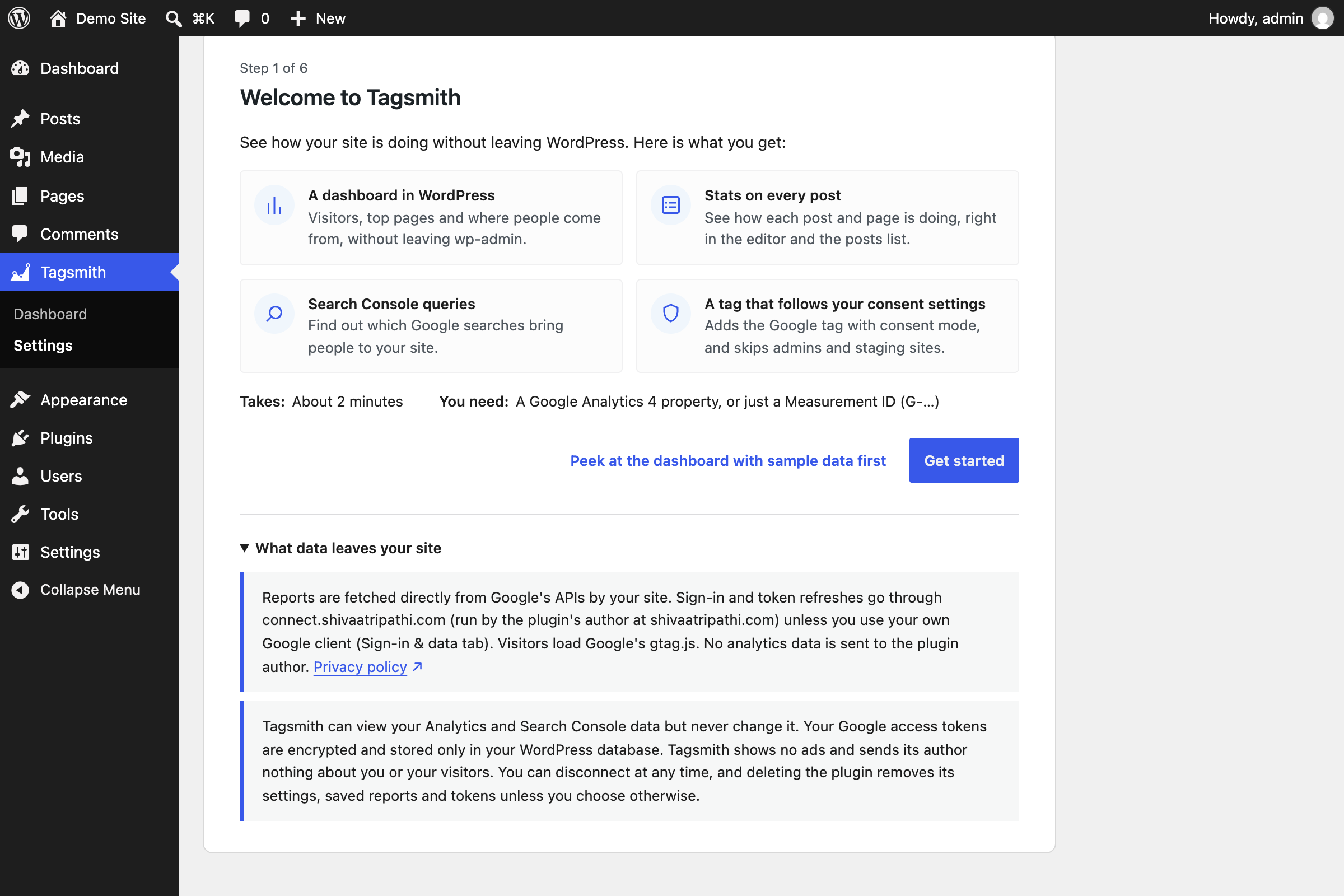
- Go to Tagsmith, Settings. The setup wizard starts.
- Read what Tagsmith does with your data, then choose:
- Connect with Google to see reports in WordPress (recommended), or
- Add the tracking code only to paste a
G-Measurement ID, for tracking only.
- If you connected, choose your GA4 property and web stream, and optionally Search Console.
- Review tracking and privacy (excluded roles, Consent Mode).
- Open Tagsmith.
Perguntas frequentes
-
How does consent work?
-
Tagsmith uses Google Consent Mode v2 and follows your consent banner’s choices (it shows none). Clarity follows the same setting, with three values:
- Advanced (default): the tag loads for everyone, but by default in the EEA, UK and Switzerland it starts with consent denied until the visitor agrees.
- Basic: the tag loads only after the visitor agrees (an opt-out banner counts as agreed). This needs a banner that supports the WP Consent API, or one that calls
window.tagsmithGrant(). - Off: no consent signals are sent.
-
How do the ad pixels work with consent?
-
In Advanced mode they wait for marketing consent from visitors whose default is “not agreed”, in Basic mode from everyone; in Off mode they load for everyone. Without a WP Consent API banner or Google Consent Mode (
ad_storage), a visitor who has to agree never triggers a pixel. Where visitors must agree, a banner that decides only in the browser (CookieYes) loses leads from forms that send visitors to another page. Google Ads waits the same way and, in Basic mode with the Google tag set up, also for its grant. -
Yes. Every feature is free, with no usage limits or upgrade screens, and nothing will be locked later. It shows no notices outside its own screens and never installs other plugins.
-
Do I need a Google Analytics account?
-
Yes, for the reports: Tagsmith reads them from your own GA4 property, with read-only access. If you have none yet, create a free property at analytics.google.com, then connect.
-
Can I use it without connecting Google?
-
Yes. Choose “Add the tracking code only” and paste your
G-Measurement ID. You get the Google tag with Consent Mode, plus Clarity and the ad pixels if you turn them on, without reports in WordPress. -
Why don’t my numbers match Google Analytics?
-
Usually caching (up to an hour for past dates), time zones, or a second tag from another plugin or your theme (Settings, Health looks for one). Tagsmith uses your WordPress time zone and GA4 your property’s, so set both the same.
-
Can it email me a summary?
-
Yes. Under Settings, Reports, choose weekly or monthly and add up to 10 addresses. It goes through your site’s own mail setup.
-
No. The plugin sends its author no usage data. The sign-in relay sees your site address, your IP address and the email of the Google account you sign in with, only while you connect or refresh tokens, and keeps none of it on disk. With your own Google client, the relay is never contacted.
-
Deleting the plugin removes its settings, saved reports, Clarity snapshots and tokens from the database and asks Google to revoke its access. If your site cannot reach Google then, or is a copy whose address changed (Tagsmith does not ask Google to revoke), remove the access at myaccount.google.com/permissions. On a site with an external object cache, cached report copies expire by themselves within a week.
-
Can I use my own Google client?
-
Yes. On the Sign-in & data tab, under “Use my own Google client”, add your client ID and secret. Your site then talks only to Google; the sign-in relay is never contacted.
-
Where is the source code for the JavaScript?
-
build is compiled from
assets/src. To rebuild, use Node 22 and runnpm ci && npm run buildin the plugin folder. -
What is the demo folder?
-
The
demofolder holds the Live Preview’s sample data.
Avaliações
Não há avaliações para este plugin.
Colaboradores e desenvolvedores
“Tagsmith – Google Analytics Dashboard (GA4), Consent Mode v2 & Ad Pixels” é um programa de código aberto. As seguintes pessoas contribuíram para este plugin.
Colaboradores
Interessado no desenvolvimento?
Navegue pelo código, consulte o repositório SVN ou assine o registro de desenvolvimento por RSS.
Registro de alterações
2.2.1
- Changed: the setup wizard’s first step states how Tagsmith handles your data in one short paragraph.
2.2.0
- New: a weekly or monthly summary email (Settings, Reports) and a print-ready summary page.
- New: an Engagement tab with key events, events, campaigns and site searches.
- Changed: “what changed” is worked out on your server, so every screen and the email agree. The old Reports settings tab is now “Access”.
2.1.1
- Fixed: the Google sign-in return works on sites whose membership or LMS plugin intercepts logged-out wp-admin requests.
2.1.0
- New: ad pixels for eight platforms, form leads, and an Overview “What changed” strip.
2.0.0
- First release.