

Descrição
SEO Plugin by Squirrly SEO Newton: the #1 Holistic SEO Software + WordPress SEO Plugin, powered by 3 different types of AI built by AISQ.
Proprietary technology that does the hard work for you, so you can focus on your best wins yet.
Watch the video below. We could do the talking ourselves, but it’s best to hear directly from our users why they love the Full Force of SEO, that only Squirrly SEO can offer you:
Força total do SEO: todos (todos os tipos com o a melhor suporte) resultados ricos Schema, automação e linkagem interna manual, redirecionamentos, ferramentas de pesquisa de palavra-chave, gerenciamento e rastreamento de portfólio de palavra-chave, ferramentas de otimização de conteúdo em tempo real, avaliações de SEO, verificador de SERP, avaliações de tráfego, avaliações de redes sociais, avaliações de backlinks, análise de autoridade na web, análise de competidor (com o lado SaaS. Incluso no gratuito), Assistência SEO local, ferramentas de rastreamento de rankings, SEO técnico.
BENEFITS / CUSTOMER SUCCESS / COMPARE / TODOS OS RECURSOS / DEMO
Leia histórias de sucesso que deixamos o link na linha acima.
Sem implementar o SEO holístico e sem ser guiado pela I.A durante o processo, esses resultados teriam sido impossíveis de atingir com plugins que não oferecem ferramentas reais de SEO, como de esperado da Ahrefs e SEMrush.
**SEO Doesn’t Have to Be Boring. Or Blind. Or Broken.
Squirrly SEO is not “just another SEO plugin.” It’s a full-blown AI SEO assistant that helps you win rankings — even in the age of AI, Google updates, and brutal competition.
Uses 3 Kinds of AI, from the proprietary technologies of Squirrly Limited (AISQ.com): Ranking Vision AI, Keyword Research AI and ASK AI.
**Who It’s For:
Entrepreneurs, bloggers, eCommerce stores, and marketers who want to rank without selling their soul to algorithms.
WordPress users tired of “improvements” and weird/niche SEO settings that do nothing for actual traffic.
Agencies managing dozens (or hundreds) of sites who need scale, automation, and real results.
**What Makes Squirrly SEO Different?
AI-Powered SEO Goals
Your SEO plan — done for you. Dynamic goals created by our Ranking Vision AI to match exactly what your site needs to rank. No guesswork.
Focus Pages – Your Ranking War Room
See exactly why a page isn’t ranking and how to fix it. Think of it as your personal SEO battleground — powered by data. From 600,000 websites that ranked higher based on different SEO tasks they were performing.
Keyword Research That Works in 2025
Find keywords you can actually rank for. We analyze competition, search intent, and opportunity — in real-time, not recycled data. And it’s AI powered, so the keywords you find here will build topical authority to get you ranked higher on Google… and it will get you ranked higher on AI Overviews, Perplexity and ChatGPT.
Live Assistant While You Write
As you write in WordPress or popular builders (Elementor, Gutenberg, Divi), Squirrly guides you with real-time suggestions to stay 100% optimized.
Automatic SEO Without the Anxiety
Technical SEO, schema, social media tags, robots.txt, canonical links — all handled for you. Set it, forget it, rank anyway.
14-Day SEO Bootcamp (Built-In)
We don’t just give you tools — we give you a step-by-step SEO mission to rank a page in 2 weeks using your own site. Motivation meets execution.
Next-Gen Compatibility
Built for 2025. Fully compatible with:
Gutenberg
Elementor
WooCommerce
Multisite
WPML
PHP 8+
AI-generated content from Next Level Marketing AI
SEO in the age of SGE (Search Generative Experience)
Why 25,000+ Paying Customers Chose Squirrly
Trusted by teams at BBC, Microsoft, Top Gear, CreativeMarket, and 150+ countries.
Endorsed by Neil Patel, Brian Dean, and BloggingWizard
Featured in Mashable, Entrepreneur, PC Magazine, Yahoo News
Consistently awarded on G2, AppSumo, Capterra
Built for the Bold. Not for the Boring.
While others teach you how to improve tiny settings, we give you the tools to win in a scientific way.
Squirrly SEO doesn’t care about boring schema over-engineering.
It cares about getting you on Page 1.
Ready to join the rebellion?
-Install now.
-Start ranking faster than ever.
One AI, is custom-built by our company, using years of study on hundreds of thousands of websites. Ranking Vision AI
The other one is an AI we developed for Keyword Research and Keyword Analysis (based on GPT4). AI Keyword Research Tools
And the third one is Ask AI, which we’ve implemented on our homepage and knowledgebase at first, but then brought inside the plugin as well. With Ask AI, users learn everything about using our plugin
With these three AIs and Squirrly SEO’s holistic approach to SEO, you will use the Full Force of SEO to outrank your competitors.
A força total do SEO. E força é medida em Newton, para os que têm curiosidade do porquê escolhemos esse novo nome.
É por isso que atingirá rankings mais altos no Google usando nosso plugin de SEO
Foco de SEO e simplicidade holística só é possível com o Squirrly SEO:
Ninguém do campo de SEO consegue oferecer ferramentas tão avançadas quanto a ferramenta Focus Pages da Squirrly SEO.
Também oferecemos treinamento da FourHourSEO.com para todos os usuários que têm o plugin SaaS +. 139.000 estudantes aprenderam com nossas aulas ao longo dos anos.
Our story started in 2012, and by 2025 we became the Two-Years-In-A-Row Most Awarded SEO Tool of the year. More info about this on our site. Squirrly Company Details
Este pacote SaaS I.A + Plugin SEO receberam muitas premiações ao longo dos anos. Premiações
Muitas inovações em tecnologias de marketing, que impressionaram a Microsoft, BBC, CyberGhost, TopGear, CreativeMarket, ThemeIsle, ElegantThemes e outros clientes grandes.Ver inovações
Powered by a strong United Kingdom-based company that created, marketed and sold over 29 SaaS and plugins over 13 years.
Nossas inovações foram notícia em todos os maiores jornais.Imprensa
Influenciadores amam nossos produtos devido a qualidade técnica que oferecemos. Veja o que pensam os influenciadores
No entanto, o mais importante para nós é:
Recomendado por milhares de usuários contentes
Squirrly SEO is the Popular WordPress SEO plugin that NON-SEO Experts use to boost their search engine traffic. Offers the same level of advice as a Human consultant would, yet with greater precision and customization.
Reach SEO success by following the Daily SEO Goals and using Squirrly’s built-in SEO tools to get higher Rankings with less effort.
Junte-se a uma enorme comunidade de usuários bem sucedidos que aparecem na primeira página de pesquisa do Google com o SEO da Squirrly.
See Success Stories from WordPress Users Who Followed Squirrly’s Advice here (click)
“I’ve used many other SEO plugins out there: Yoast, Rank Math, WP All in One SEO, but Squirrly has outclassed them all.”
I’m a Search Engine Optimization professional with 4 years of experience and from now on this product will be my go-to when implementing SEO strategies for my clients.
It’s extremely easy to use, self-explanatory, and will definitely work great for those who don’t have much SEO experience.
Zuzanna Kruger (profissional de SEO)
(fonte do testemunho: Product Hunt)
Squirrly SEO: Newton é a primeira “assistente I.A de SEO holístico” que simplifica complexidades, tornando-a a solução ideal para donos de empresas e empresários.
É possível usar Squirrly SEO no modo fácil ou difícil. Decida de acordo com suas habilidades.
Otimização de SEO nunca foi tão fácil.
Migre seus dados com segurançapara SEO Squirrly de qualquer um dos seguintes:
- Rank Math, Yoast, All in One SEO, SEO Framework, SEO Press, SEO Pressor, Add Meta Tags Plugin, Gregs High Performance SEO, Headspace 2, Platinum SEO Pack, SEO Title Tags, SEO Ultimate Plugin.
★★★★★
“When you’re new to SEO like me, some dark corners of content optimization can be hard to figure out. With Squirrly SEO’s full suite of tools, all I have to do is follow their instructions.”
It is straightforward, so anyone can use this easy-to-use tool by simply following the navigation they’re given, giving you undeniable confidence that if you put work into your site, you will get the results you want!
Masatoshi Matsumiya(fonte do testemunho: Product Hunt)
Com o Squirrly SEO: Newton, usuários podem:
Consolidação de custos: reduza o peso do financeiro ao substituir várias assinaturas com uma ferramenta abrangente.
Centralização de dados: acesse todos os dados de SEO em um único painel para insights observações mais claras e decisões melhor informadas.
Economize tempo: gaste menos tempo alternando entre ferramentas e mais tempo implementando estratégias de SEO mais eficazes.
Alinhamento de estratégias: garanta que todas as atividades de SEO estejam sintonizadas, de pesquisa palavra-chave e otimização de conteúdo até avaliações técnicas e construção de links.
Mantenha-se atualizado: aproveite uma ferramenta que evolue com as tendências do SEO, que oferece os mais recentes recursos e atualizações em tempo real.
Com Squirrly SEO: Newton, o processo de SEO inteiro fica mais fácil de gerenciar, eficiente, e alinhado com o estado da arte da indústria, permitindo aos usuários focar mais em crescer os seus negócios, e menos no manuseio de ferramentas.
O que vem por aí
Se você gosta de nosso plugin SEO do WordPress, então confire nossos outros projetos:
- Squirrly Social – One Year of Social Media Posts in a Flash.
- Starbox PRO – Your Authors Will Shine Like Stars.
- Squirrly SPY – Your Competitor’s SEO Growth. In Your Hands..
- Education Cloud PLUS – It’s like Netflix for Marketing Education.
- RankJumps – Managed SEO. Done-for-you by Experts from Squirrly.
- Learning Solutions by Squirrly – Teach Online. Starting Tomorrow.
- Hide My WP Ghost – WordPress Security Layer and Security Enhancements.
- WordPress Developers Page – Innovations and Partnerships.
- Plugins – Other Plugins created by Squirrly.
Créditos.
- Florin Muresan – CEO da Squirrly
- Calin Vingan – CTO da Squirrly
- Sorel Nagy – desenvolvedor
- Andreea Leau – VP de marketing
- Cristina Leau – designer de mascote Squirrly
- Alexandra Nicola – COO da Squirrly
- Teodora Vingan – analista de SEO
- Irina Pogor – redatora de conteúdo
- Ana Darstaru – chefe de atendimento ao cliente
- Lucian Nertan – VP de agência
- Rares Papita – CHO
Investidores
- Ibrahim Evsan, empreendedor em série, um dos blogueiros mais conhecidos da Alemanha
- Philipp Kandal, cofundador e CTO da Skobbler (recentemente adquirida por 24 milhões de dolares pela Telenav)
Muito obrigado.
Licença
O Squirrly é grátis para usar. A versão do diretório WP instalará a versão gratuita.
Você poderá usar este software de SEO depois de instalar o plugin e usar seu e-mail para se conectar a Squirrly.co
Para maiores necessidades de marketing de conteúdo e SEO, você pode conferir nosso site oficial e ver o que o plano PRO oferece.
Capturas de tela
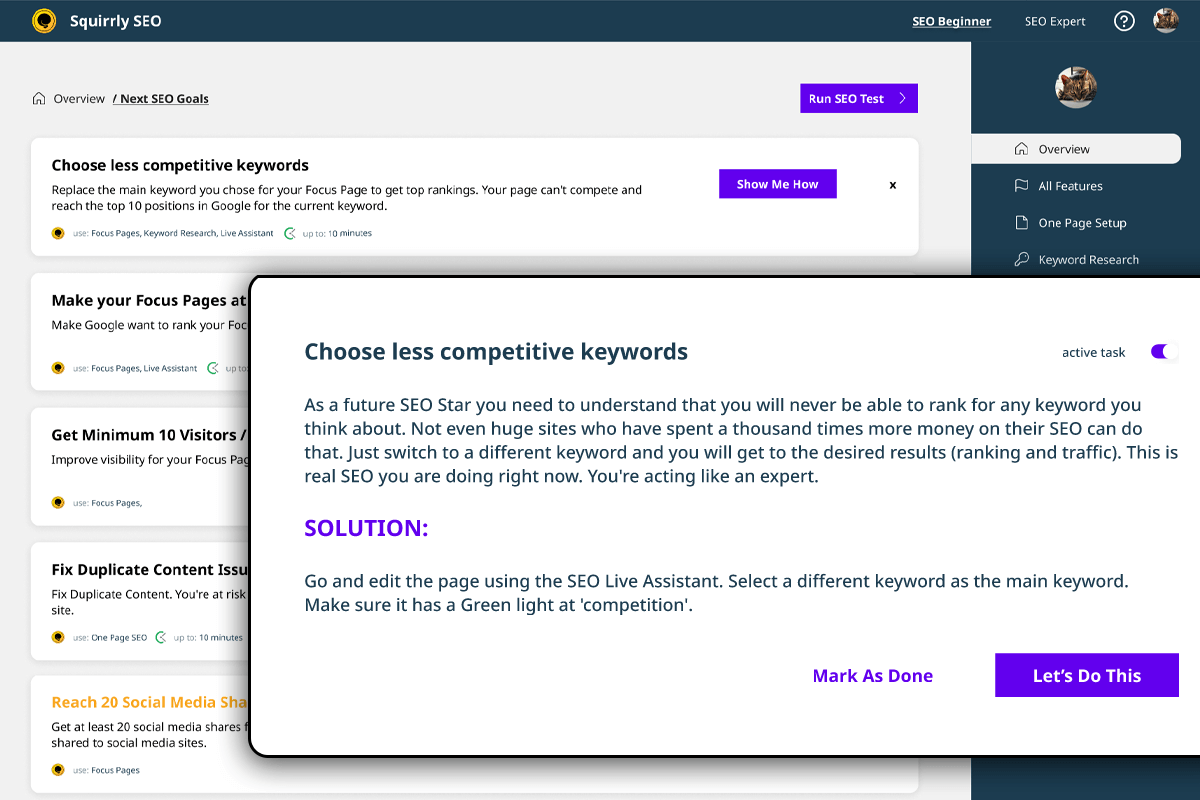
Squirrly SEO – próximas metas 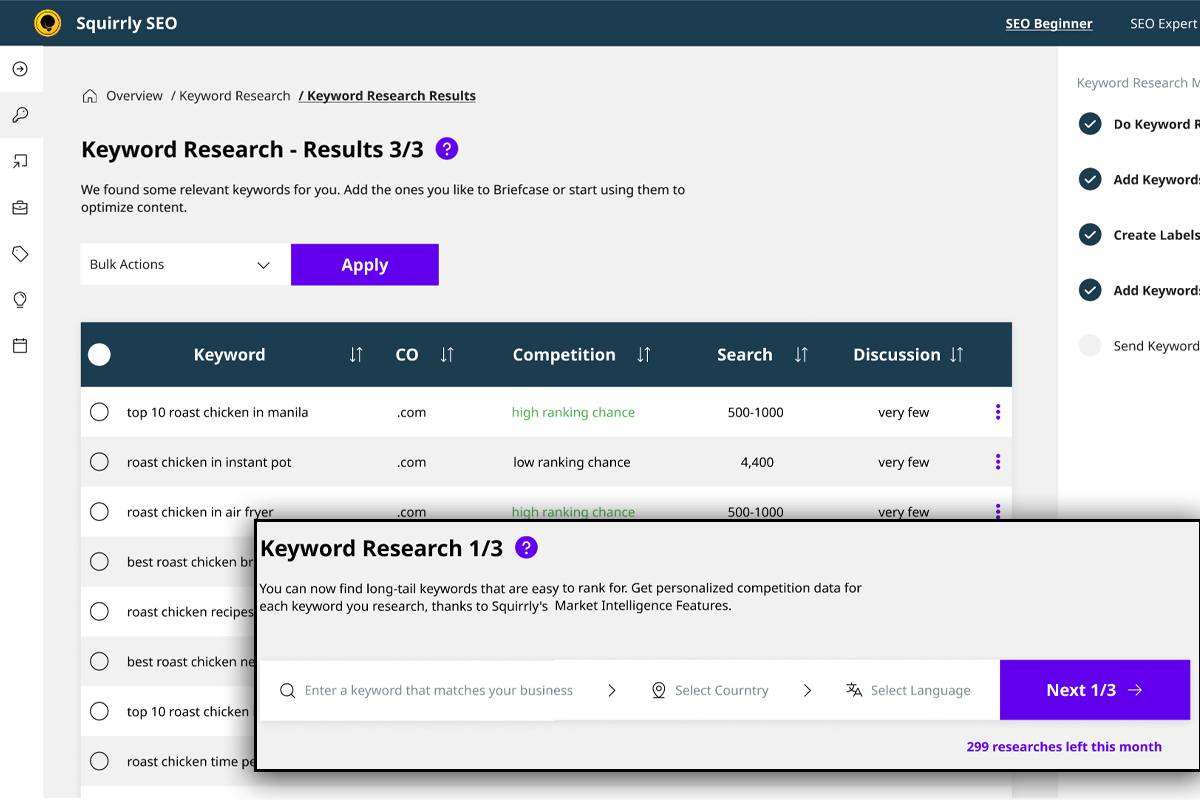
Squirrly SEO – pesquisa de palavra-chave 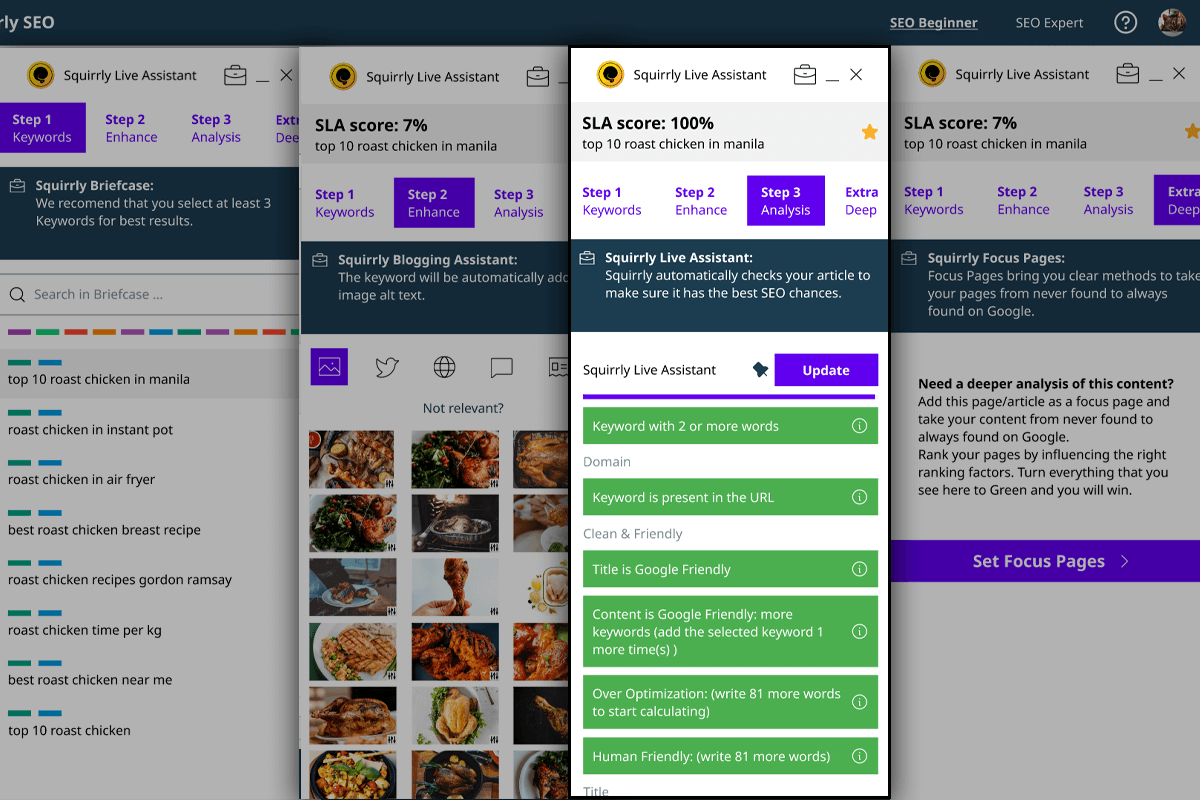
Squirrly SEO – assistente ao vivo 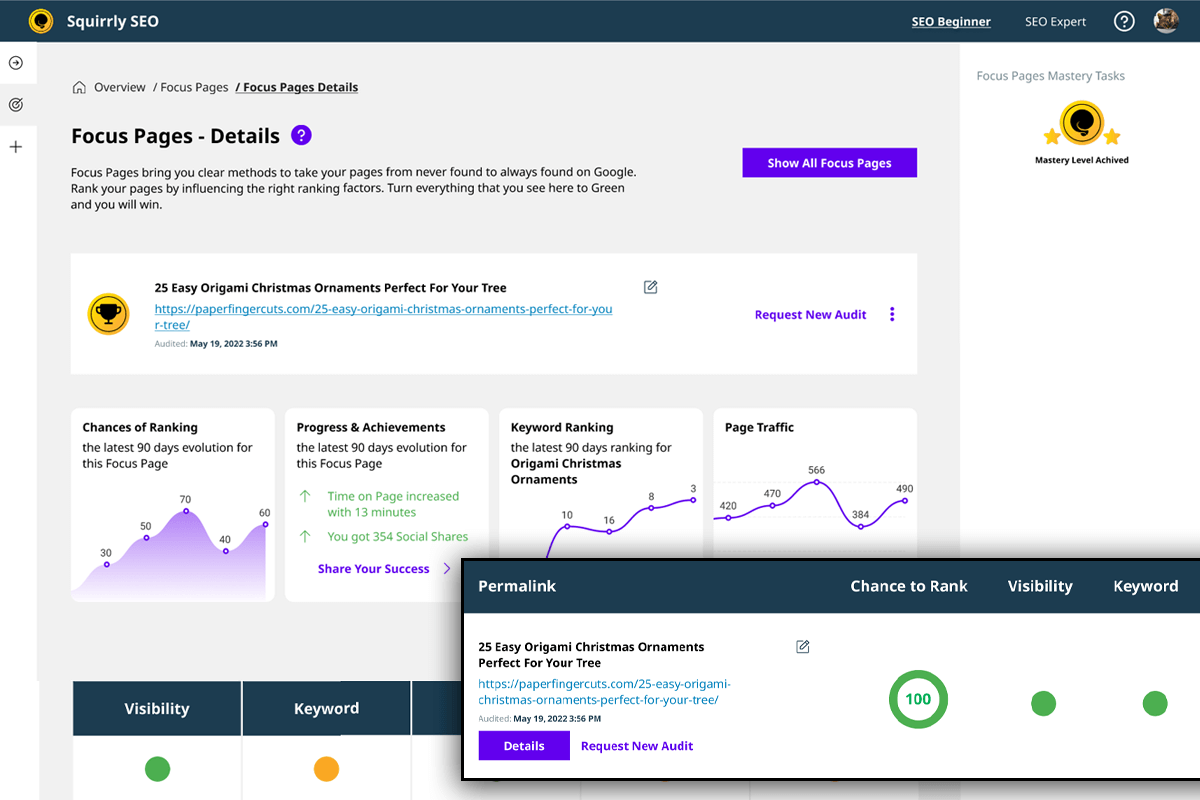
Squirrly SEO – páginas de foco 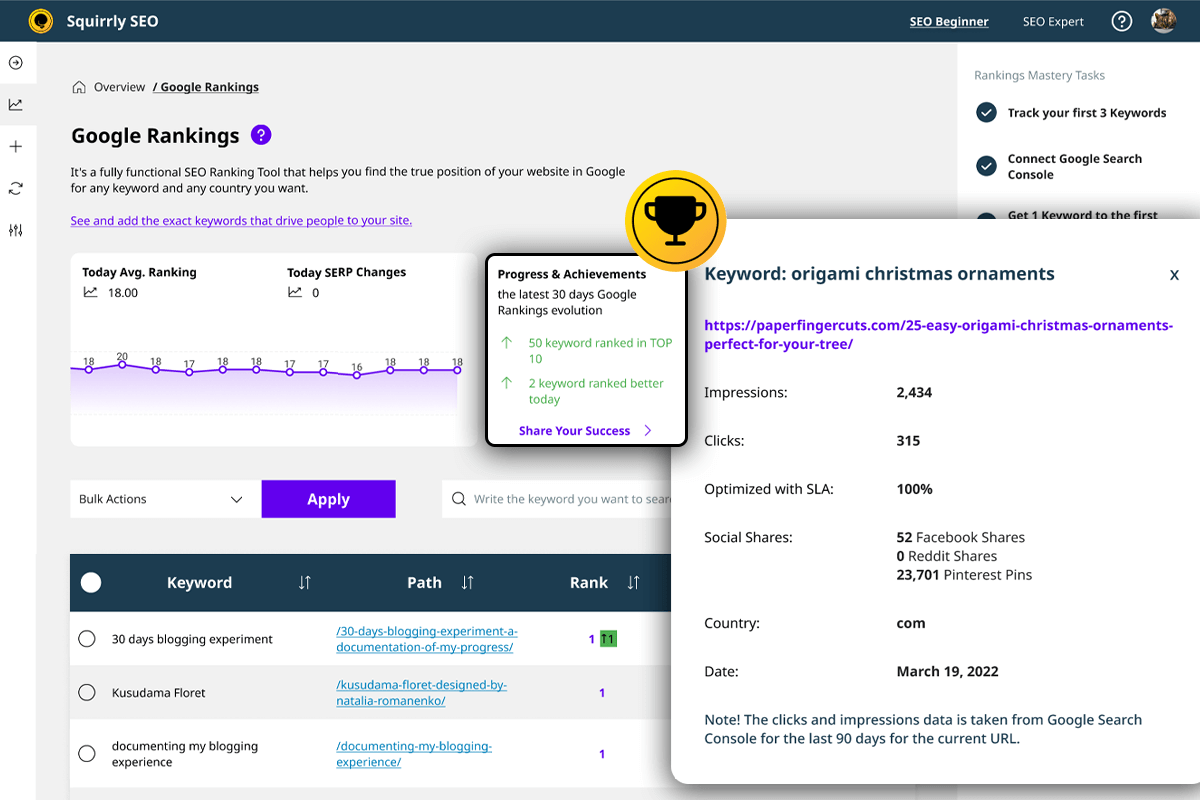
Squirrly SEO -rastreie o desempenho de SEO 
Squirrly SEO – avaliação de SEO 
Squirrly SEO – porta-arquivos SEO
Instalação
MANUALMENTE
Verifique a apresentação visual do processo de instalação de passo a passo.
- Baixe o plugin desta página (aqui no diretório WordPress)
oufrom our site. - Faça login em sua conta de administrador em seu site WordPress.
- Clique em “Plugins” no menu do lado esquerdo.
- Agora clique em “Adicionar novo”
- Nesta aba, clique no botão “Carregar plugin” na parte superior.
- Envie o arquivo “squirrly-SEO.zip” clicando no botão “Escolher Arquivo”.
- Clique no botão “Instalar Agora”.
- Após a conclusão do envio, clique em Ativar Plugin.
- Agora digite seu e-mail e clique em “Inscrever-se” 10. Concluído! Comece a obter excelente SEO no WordPress11. Você começará a receber aulas por e-mail para ajudá-lo a se tornar um grande profissional de marketing de conteúdo. Tudo de graça.
= DO SEU PAINEL DE WORDPRESS =
- Clique na guia “Plugins” no menu exibido à esquerda.
- Agora clique no botão “Adicionar Novo”.
- No canto direito, digite “Squirrly SEO” e dê enter para pesquisar.
- Clique no botão “Instalar Agora” ao lado do plugin.
- Depois de concluída a instalação, clique em “Ativar”. ↵
6.Agora digite seu e-mail e clique em “Inscrever-se”. - Feito! Comece a obter um excelente SEO no WordPress.
- Você começará a receber aulas por e-mail para ajudá-lo a se tornar um grande profissional de marketing de conteúdo. Tudo de graça.
Digite uma palavra-chave à direita da tela e comece a usar o Squirrly SEO. Aproveite!
Perguntas frequentes
-
Posso usar Squirrly junto com Rank Math? Posso substituir Rank Math totalmente com Squirrly?
-
Yes, you can use Squirrly SEO alongside Rank Math if you want to, as Squirrly enables you to deactivate certain settings or modules so that Squirrly SEO and Rank Math can work in compatibility mode.
If Squirrly stops handling source code changes, then it works with Rank Math, SEOpress, All In One SEO SEO, Yoast, and others. Regarding whether you could replace Rank Math altogether with Squirrly SEO, this graphic linked below shows you a side-by-side comparison of Squirrly SEO vs. Rank Math.
There are around 650 features in Squirrly SEO, most of which can’t be found in Rank Math, given that Rank Math does not offer a duality between plugin and cloud services.
https://howto12.squirrly.co/wordpress-seo/use-squirrly-in-compatibility-mode-with-other-seo-plugins/
https://plugin.squirrly.co/compare/#vsrankmath
-
É possível importar dados do Rank Math para o SEO da Squirrly?
-
Yes, you can easily import all settings and all page optimizations made with Rank Math, using our import features. This provides step-by-step documentation on how to migrate your data from Rank Math so that you don’t lose your previous SEO optimization.
https://howto12.squirrly.co/wordpress-seo/how-to-switch-from-rank-math-to-squirrly-seo/
-
Focus Pages são semelhantes às Pillar Content do Rank Math?
-
Você pode pesquisar por “páginas de foco” nesta página:
https://www.squirrly.co/wordpress/plugins/second-seo-features-page/
You will see there all that it offers. It is incredibly valuable for SEO and does everything required for SEO, unlike the pillar feature in Rank Math. It offers more than even Moz or Ahrefs does in terms of content analysis.
Comparação lado a lado: Squirrly SEO versus Rank Math
https://plugin.squirrly.co/compare/#vsrankmath
Powered by advanced cloud servers owned by the Squirrly Company, the MarketIntelligence big data analysis we do, and data sources like: Moz, Majestic, Alexa, Semrush, Google Analytics, ContentLook, crawlers owned by Squirrly: we are in a unique position that allows us to do in-depth content analysis and see each page the same way that Google’s algorithms see it.
-
We have been around since 2012 and we’ve validated over 17 products already with money paid by customers. There are few startups that could show the same results.
Obtenha uma resposta mais detalhada aqui.
https://howto12.squirrly.co/faq/how-does-squirrly-marketing-and-marketshare-wise-compete/
-
Sim, você pode usar o Squirrly SEO junto com outros plugins SEO como Yoast, Rank Math, SEO Press, Premium SEO Pack, All in One SEO, or SEO Framework no modo de compatibilidade.
Você pode aprender mais sobre como usar o Squirrly SEO no modo de compatibilidade aqui.
https://howto12.squirrly.co/wordpress-seo/use-squirrly-in-compatibility-mode-with-other-seo-plugins/
Se o Squirrly parar de funcionar com mudanças no código fonte, então funciona com Rank Math, SEOpress, SEO Pressor, All in One SEO, Yoast, SEO Framework, entre outros.
Basicamente, você pode usar o Squirrly SEO para aprimorar o WordPress além do que já é feito por outros plugins de SEO do WordPress que você já usa. É claro, você também pode decidir mudar para o Squirrly, já que oferece o “fúnel” completo para o SEO.
Consulte esses gráficos
https://plugin.squirrly.co/compare/
para ver como o Squirrly se compara a outros plugins de SEO como Yoast, Rank Math, SEOPress, SEO Framework e All in One SEO.
-
How does Squirrly compare with plugins like SEO Framework, SEO Press, Rank Math, All in one SEO, or Yoast in terms of site speed and pagespeed?
-
Muito do processamento, armazenamento de dados, e outras coisas que só o Squirrly SEO consegue fazer, ocorrem em nossos servidores em nuvem. A dualidade entre plugin e serviços em nuvem (API, rastreadores, big data, I.A, serviços e inteligência de marketing) nos permite carregar o código do plugin muito rapidamente.
A dualidade entre o plugin de SEO e serviços da nuvem te dá uma vantagem sobre outros plugins SEO do WordPress como o SEO Framework, SEO Press, Rank Math, All in One SEO, Rank Math e Yoast.
Saiba mais aqui.
https://howto12.squirrly.co/faq/how-does-squirrly-compare-site-speed/
-
O SEO Squirrly tem um recurso de redirecionamento?
-
Sim, Squirrly fornece a funcionalidade de redirecionamento. Squirrly SEO tem 301 opções de redirecionamentos. A opção dos 301 redirecionamentos pode ser acessada em Todos Snippets, na seção de visibilidade do Squirrly SEO.
Snippets em todos Snippet – Bulk SEO
Snippet ao editar página
Snippet na interfaceÉ uma nova maneira de fazer redirecionamentos e complementa nosso recurso de redirecionamento automático.
https://howto12.squirrly.co/kb/seo-links/
-
Existe uma maneira de remover as páginas no-index do sitemap XML?
-
Sim, você pode usar o Squirrly SEO para remover as páginas “no-index” do sitemap XML.
É possível realizá-lo por tipo de post usando a funcionalidade de automação das configurações de SEO >. Simplesmente selecione o tipo de post e desligue: “Incluir no sitemap XML”.
Mais detalhes sobre como remover páginas “no-index” do sitemap xml podem ser vistas aqui.
https://howto12.squirrly.co/kb/seo-automation/#send_to_sitemap
Ou você pode remover as páginas “no-index” do sitemap xml à nivel de URL ao editar o Snippet do SEO e então selecionando “Visibilidade”.
Mais detalhes sobre esta opção de sitemap xml podem ser vistas aqui.
https://howto12.squirrly.co/kb/bulk-seo/#bulk_seo_visibility
-
Does WordPress SEO Plugin by Squirrly Have an Option for submitting new URLs to Google Search Console to be Indexed?
-
Sim, Squirrly tem uma opção que te ajuda a enviar novos URLs para o Google Search Console, principalmente a opção: dê ping posts novos para o mecanismo de pesquisa.
Mais detalhes sobre aqui.
https://howto12.squirrly.co/kb/sitemap-xml-settings/
-
Quais recursos especiais o plugin SEO do Squirrly oferece para SEO local?
-
Squirrly fornece Schema para empresas locais. Coordenadas, horas, menus, etc. são disponibilizadas. Saiba mais aqui.
https://howto12.squirrly.co/kb/json-ld-structured-data/
Metadados para GEO e local – Especialmente útil para SEO local e grafos de conhecimentos
Adicione coordenadas para o SEO local e adicione o endereço de sua localização principal.
Isso será usado para os detalhes de sua empresa e editor dentro do seu site no WordPress.Schema for Local SEO can now be built directly from WordPress – Squirrly – SEO Settings – JSON-LD.
For multiple locations, you can build the Schema using the Editor we give access to and the Custom Code option for Schema.
We’ve even added KML files recently so you can easily add your local business to Google Earth and our integration actually works.
-
Quais recursos destinados o Squirrly oferece para sites de notícias?
-
- Build XML Sitemap for Google News (you can learn more about this here)
- XML Sitemap Settings: Blogging Frequency. You have the option to select Every Day as your blogging frequency or even Every Hour.
- Ping New Posts to Search Engines. Pinging is a process by which Squirrly SEO can notify search engines that your xml sitemap has been updated.
- Open Graph Type for Google News – NewsArticle
- Schema para o Google Notícias
https://howto12.squirrly.co/kb/sitemap-xml-settings/#news_sitemap
-
Yes, you can customize the Open Graph and Twitter Card image for every page and post using Bulk SEO or the Squirrly SEO Snippet.
Você pode aprender mais sobre esses recursos aqui.
https://howto12.squirrly.co/kb/bulk-seo/
-
How is Squirrly Addressing the Core Web Vitals SEO Scoring Method?
-
Squirrly as corrige com Focus Pages.
Page experience has been one of the main reasons we’ve created Focus Pages and it goes a little beyond just pagespeed and coding propriety.
Time on page, bounce rates, number of pages visited are also very important and we’re getting clear signals that their importance is shifting.
We already address pagespeed and https and give resources to our users, so they are prepared for the update.
https://howto12.squirrly.co/kb/focus-pages-page-audits/
-
Qual a vantagem em usar a ferramenta de pesquisa de palavra-chave do Squirrly ao invés de alguma outra ferramenta externa?
-
Squirrly’s built-in keyword research tool allows you to perform keyword research without leaving WordPress.
Furthermore, Squirrly also provides access to features like Briefcase, which means you can not only find keywords but also organize them into tighter groups for a better strategy. Furthermore, our keyword research data is fresh, since we don’t use caching (cached databases).
Maximum caching time is about 48 hours, not a whole year or two years like you find in other tools.
As we use Google API for search volume, Social Media for discussions, the data should be fresh every time and this is why it is different from others – and also why the data we show is different from what you may find in other keyword research tools who use caching for their data. (caching time can be extremely high for some of those tools).
https://howto12.squirrly.co/kb/keyword-research-and-seo-strategy/
-
Consegue garantir resultados de SEO?
-
Sim, se você seguir o que delineamos aqui, então, iremos garantir. ( leia o recurso seguinte ).
https://plugin.squirrly.co/squirrly-seo-pro-results-guarantee/
-
Por que a pesquisa de palavra-chave do Squirrly é melhor do que o Google Keyword Planner para estratégias de SEO?
-
Porque nossa ferramenta se concentra nas informações de que você precisa para se classificar melhor no Google e não exibir seus anúncios para mais pessoas. O Google Keyword Planner é uma ótima ferramenta de pesquisa se você estiver criando campanhas do Adwords. Para SEO, nossa ferramenta de geração de palavras-chave é melhor.
-
Não consigo entrar no WordPress com meu usuário. Recebo a mensagem ‘ocorreu um erro.’ O que posso fazer?
-
Vejo que seu servidor host não está permitindo que você acesse nossa API remota.↵ Diga ao seu webmaster para adicionar os IPs 176.9.121.162 e 176.9.112.210 na lista branca para acesso remoto e ai, deve funcionar.
-
100% verde no assistente ao vivo do Squirrly, mas ainda não estou recebendo tráfego
-
Às vezes recebemos e-mails com esta pergunta e quero ajudar todos a ter a imagem correta do assistente ao vivo do Squirrly. O artigo abaixo responde em detalhes a esta questão.↵https://howto12.squirrly.co/wordpress-seo/100-green-in-squirrly-live-assistant-but-im-not-getting-traffic/
Avaliações


Colaboradores e desenvolvedores
“Plugin de SEO por Squirrly SEO” é um programa de código aberto. As seguintes pessoas contribuíram para este plugin.
Colaboradores


Plugin de SEO por Squirrly SEO” foi traduzido para 5 localidades. Agradecemos aos tradutores por suas contribuições.
Traduzir o “Plugin de SEO por Squirrly SEO” para seu idioma.
Interessado no desenvolvimento?
Navegue pelo código, consulte o repositório SVN ou assine o registro de desenvolvimento por RSS.
Registro de alterações
12.4.16
- Update – default LLMS to reflect the AI crawlers requirements
- Fix – Correct the automation patterns for publish time
- Fix – Focus Pages to identify the keyword in image files for the German language
- Fix – Add Nofollow on external links including subdomains if not added on exceptions list
- Fix – Prevent clearing the third party cache by default when the plugin settings are updated
- Fix – Showing the correct subscription plan when the server connection is lost
12.4.15
- Update – Google Ranking filters and stats
- Update – LLMS & Robots to avoid translation PHP warning
- Update – Add the option to manually clear the sitemap cache
- Update – Compatibility with WPML
- Fix – Javascript error on automation patterns
- Fix – Tag, category and author pages details to show the correct language
12.4.14
- Update – Add the Llms.txt feature to configure rules for AI crawlers
- Fix – Sitemap cache directory creation issue on multilingual sites
- Fix – Daily progress and optimization in Rankings
- Fix – Compatibility with Divi pagination to show the correct canonical meta
12.4.12
- Update – Added the option to recheck a ranking keyword in Rankings
- Update – Compatibility issue when $post->id is false
- Update – Compatibility with TranslatePress URLs on Sitemap URLs
- Update – Canonical link identification in Focus Pages
- Update – Add language path support for sitemap cache directory
- Fix – Issue when adding suggested inner links
- Fix -Remove suggested inner links after added
- Fix – Warning in API calls on line 278 for grabbing post content
- Fix – WooCommerce error on Snippet product URL
- Fix – Popup layout and style in Squirrly > Overview
12.4.11
- Update – The option to recheck the ranking keyword
- Update – Compatibility issue with other SEO plugins when $post->id is false
- Update – TranslatePress on Sitemap URLs
- Fix – WooCommerce error when calling get_sample_permalink in Squirrly Snippet
- Fix – Function _load_textdomain_just_in_time was called incorrectly error.
12.4.10
- Update – Compatibility with WP 6.8
- Fixed – Main Keyword change in SLA
- Fixed – Briefcase rows and pagination when searching for a keyword
- Fix – Google Analytics 4 connection
12.4.09
- Update – Correct the issue when multiple pages are selected in Innerlinks
- Update – The nonce referrer on search forms
- Fix – The strict parameter on rankings
- Fix – Add the Squirrly FontAwesome class in Audit and Focus Pages
- Fix – Pagination in Briefcase and Rankings
12.4.08
- Update – Plugin security on api and searches
12.4.07
- Update – Update the Bulk SEO Page to load only from Optimize > Bulk SEO
- Update – Add the Item ID in Review Schema to identify the reviewed item
- Fix – Keyword Research competition info on Briefcase
- Fix – Small layout bugs
12.4.06
- Update – Squirrly Live Assistant to prevent too many ajax triggers on Gutenberg saving process
- Update – Compatibility with Polylang plugin
- Update – Security updates on search parameter in Focus Pages, Audits, Bulk SEO
12.4.04
- Fix – Sitemap path validation when multilingual plugins are activated
- Fix – Robots TXT files customization issue
- Fix – Sanitization warning on different type of search input
- Fix – Rest Api calls warnings when no keywords found in a post
- Fix – Javascript error on SEO Links when open in external tab
12.4.03
- Update – Add the option to add noindex with dofollow in metas for search engines to follow all the links on the page
- Update – Display publish date and modify date on translation language
- Fix – Focus Pages notification on limit reached per website and per entire account.
- Fix – Invalidate Sitemap cache on Automation settings update
- Fix – Hide post type sitemap when the post type is set as noindex in Automation
- Fix – Robots.txt customization issue
- Fix – Sitemap load issue on websites with paths
- Fix – Bulk SEO title and description fields sanitization error
12.4.02
- Update – Add sanitization on Focus Page search params to increase security
- Update – Show the date and month in local language
- Fix – Correct Next Goals notification counter
- Fix – Fontawesome on Post Editor and Squirrly Live Assistant
- Fix – On keywords import from postmeta, avoid error when stored as array and not string
12.4.01
- Update – Ensured compatibility with WordPress 6.7.
- Update – Improved plugin layout and improves plugin security.
- Update – Reorganized the menu for a more streamlined and user-friendly navigation experience.
- Update – Grouped related sections like Automation and Bulk SEO under a new Optimize section for better organization.
- Update – Renamed IndexNow to Auto-Indexing to clarify its functionality.
- Update – Added a Visibility column to the Posts and Categories tables, highlighting all noindex and nofollow URLs.
- Fix – Addressed minor bugs for smoother performance.
12.3.24
- Update – Add Squirrly permalink hook sq_permalink for dev use
- Update – Add the options to select the IndexNow Endpoints
12.3.23
- Update – Compatible with WP 6.6.2
- Update – Add the option to remove Posts from Sitemap News in Google News
- Update – Add the option to set SEO Automation for each language with WPML plugin
- Fix – Clear the optimized keyword when deleted from SLA
12.3.22
- Update – Sitemap Compatibility with WPML
- Update – Update plugin security on SEO Snippet
- Update – Add the option to remove Posts from Sitemap News in Google News
- Update – Add the option to set SEO Automation for each language with WPML plugin
12.3.21
- Update – Compatibility with EWWW Image Optimizer
- Update – Compatible with WP 6.6.1
- Fix – Prevent loading the same optimized keyword on cloned posts/pages
12.3.20
- Update – Compatible with WP 6.6
- Fix – API security on innerlinks check and keywords check
- Fix – Sitemap compatibility with WordPress sitemap wp-sitemap.xml path
- Fix – Live Assistant to reload resources when network connection is low
- Fix – Sitemap to add only videos with thumbnails for google validation
12.3.19
- Update – Compatible with WP 6.5.3
- Update – SLA compatibility for Chinese chars
- Update – SLA compatibility with last version of Elementor
- Update – Compatibility with WPML when post type is not translatable.
- Fix – Focus Page > Platform Health tasks to not create confusion about the current URL
- Fix – Location coordinates kml in sitemap
- Fix – Prevent loading the sitemap.xml on subcategories
- Fix – Adjust settings layout on scale resolution
- Fix – Sitemap to use the /wp-content/cache as the default directory
- Fix – Favicon size in config to load on all mobile devices
12.3.18
- Update – Compatible with PHP 8.3 & WP 6.5
- Update – Search by URL in Focus Pages and Audit
- Update – Search term by URL in Focus Pages and Audit
- Update – Added more compatibility with WooCommerce variation products
- Update – Add specific notification in Ranking Sync page when GSC token expires
- Update – Language in Dublin Core for more compatibility with WeGlot plugin
- Update – Compatibility with SEO Generator plugin from AppSumo
- Update – Keyword load in SLA when added in wp_postmeta with meta_key sq_keywords
- Update – Advanced SEO Pack to work better with Polylang for WooCommerce when No Category path is activated
12.3.17
- Compatible with WP 6.4.3
- Update – Sitemap compatibility for JetEngine
- Update – SLA compatibility with Avada, add support for Fusion Builder
- Update – Notification message in Focus Pages and Audits when a crawling error is received
- Update – Added the option to select multiple pages as inner link source
- Update – Inner linking order to show the recent added links
- Update – Show all WP hidden patterns in the list when “sq_show_hidden_patterns” is active
- Update – Innerlinks API query in posts to find relevant links
- Fix – Sitemap Custom Posts loading issue
- Fix – IndexNow submit from Bulk SEO
- Fix – Inner link add button in popup when accessing multiple pages
- Fix – Keywords import in Briefcase
12.3.16
- Compatible with WP 6.4.2
- Update – Add the option to select the label for the Keyword Research
- Update – Add the option to select the label for the Research > History
- Update – Add the option to select the label for the Research > Suggestion
- Update – GA properties to show only the domain mathing domains
- Update – SLA for Divi not to take the header and footer in LP optimization
- Fix – SLA loading issue for Oxygen Builder
- Fix – Stop loading any resource from Squirrly when Page builder in preview
- Fix – Keyword Sync on Rankings
- Fix – Bulk keyword deletion in Briefcase
- Fix – Bulk label deletion in Briefcase
12.3.15
- Compatible with WP 6.4.1
- Update – Integrated the SEO Automation with Polylang and WPML for each Post Type
- Fix – Canonical link on Polylang and WPML for the Home Page
- Fix – Post Title in Focus Pages and Audits when the Feature Image is set
12.3.14
- Compatible with WP 6.4 & PHP 8.3
- Update – Language support on WPML when website language different from user language
- Fix – Local posts/custom posts search on Inner Links
- Fix – Compatibility with Frontend Builders when used in Third Party plugins/themes
- Fix – Bulk action on Briefcase when adding labels to keywords
- Fix – Bulk action on Briefcase when sending keywords to rankings
- Fix – Patterns warning when postmeta value is not string
- Fix – Compatibility with WPML when adding Rich Snippets for {search_term_string} param on WebPage Schema
12.3.13
- Fix – Local posts/custom posts search and pagination in Squirrly Live Assistant
- Fix – Silent installation of Advanced SEO Pack on websites with WPML
- Fix – Show original posts title when searching in Focus Pages and Audits Pages
- Fix – Language option in keyword research to find keywords in a specific language for a specific country
12.3.12
- Update – Added the language option in keyword research to find keywords in a specific language for a specific country
- Update – Added the option to add custom post meta title, description and keywords _sq_title, _sq_description, _sq_keywords
- Update – Search on SLA for extra posts
- Update – Jsonld compatibility with woocommerce products with variables
- Update – Added the custom fields pattern in Squirrly for sanitized fields in postmeta like {{customfield(field_name)}} & {{customfields(array_key|array_value)}}
- Update – Added the caching option in Sitemap XML for faster loading and saving server resources
- Update – Show keywords from other SEO plugins in SLA and Post List if there are none set in Squirrly SEO
- Fix – Set NoWrap on table columns with numbers
12.3.11
- Fix – Show the custom JsonLd code if already set in Squirrly SEO Snippet
- Update – Add Patterns support for customfield data like {{customfield(field_name)}}
- Update – Automation to load the reusable schema from Advanced SEO Pack
- Update – Show connect tool on Connect Tools as it needs Google Auth
- Update – Add Company URL in Rich Snippets
- Update – Better URL detection on Archives, Custom Post Type taxonomy
- Fix – Hide the Squirrly SEO Snippet close button on categories and tags to avoid folding the snippet
- Fix – Plugin typos
- Fix – Customer support phone details in Rich Snippets
- Fix – Loading dependency with jQuery on resources
- Fix – Change the twitter icon with X twitter
- Fix – Pagination links on table pages for the first page and previous page
12.3.10
- Fix – Security and Vulnerability issue on pagination in Focus Pages > Inner Links.
- Fix – Squirrly SEO Snippet visibility error when post type was not added in Automation
- Fix – Remove db table alter on plugin load
- Fix – View layout and typos
- Fix – Don’t show image width and height on Advanced Rich Snippets when can’t load them
- Fix – Multiple URLs submit issue on IndexNow feature
- Update – The option to load add image width and height in Advanced Rich Snippets
12.3.05
- Update – Metas, Open Graph, Twitter Card, Rich Snippets, layout in SEO Snippet section
- Update – Inner Links suggestions to load when suggestions are found on server
- Update – Added support for sq_question and sq_answer classes to automatically add them in FAQ Rich Snippet
- Fix – Increased the loading speed on Briefcase, Suggestions, History, Labels, Rankings
- Fix – Switch on/off SEO on Automation to work better
- Fix – Compatibility with Schema & Structured Data for WP & AMP showing query error
12.3.04
- Update – Add related questions to Research > Suggestions with the option to write focus page related articles
- Update – Add the option to add Inner Link directly from Research > Suggestions for the optimized articles
- Update – Add the suggested keywords found by the Cloud in Inner Links section
- Update – Security on Inner Links section
- Fix – Bugs and Types
12.3.03
- Update – More bugs fixed and competibility with Squirrly SEO – Advanced Pack
12.3.02
- New – Inner Links feature available in Squirrly SEO > Focus Pages
- New – Redirects feature available in Squirrly SEO – Advanced Pack
- New – 404 Monitoring feature available in Squirrly SEO – Advanced Pack
- New – Custom Schemas feature available in Squirrly SEO – Advanced Pack
- New – Advanced Rich Snippets feature available in Squirrly SEO – Advanced Pack
- Update – Added the option to insert custom inner links based on keywords
- Update – Added the option Inner Links for custom nofollow & open in new tab
- Update – Added the option to create DevKit packages in Squirrly Cloud for DevKit accounts
- Update – Compatibility with Divi theme when header templates are created
- Update – Added the option to install Squirrly SEO – Advanced Pack plugin for Redirects, 404 Monitoring, Custom JsonLD Schemas, Rich Snippets
- Fix – Small Bugs
12.3.01 – 08/14/2023
- Update – Compatibility with WP 6.3
- Update – Added API calls for Innerlinks and Contextual Keywords with links
- Fix – Reset the SLA box position when is outside the window. Firefox compatibility.
12.2.04 – 08/07/2023
- Update – Remove twitter support from SLA for the moment
- Update – Automation types based on Ecommerce website
- Update – Frontend snippet for tags, categories and taxes
- Update – The onboarding video
- Update – Compatibility with Polylang and the tags
- Fix – Set the home URL when the URL is missing from post
- Fix – Loading of Squirrly SEO Live Assistant based of dependencies
- Fix – Api call on inner links to avoid long DB queries
- Fix – Handle the styles and scripts differently for more compatibility with other plugins
- Fix – Sitemap URL validation to not allow cloud URLs
- Fix – Woocommerce offer expire date in Schema
12.2.03 – 05/22/2023
- Update – Compatibility with WP 6.2.2
- Fix – Frontend SLA for Divi & Zion Builder
12.2.02 – 05/17/2023
- Update – Compatibility with WP 6.2.1
- Update – New Snippet layout using hooks for each section
- Update – Loading CSS and JS function to load js dependencies in frontend
- Update – Compatibility with Beaver Builder
- Update – JsonLD schema autodetects video schema on post/page
- Update – Added more countries and languages on Google Ranking section
- Fix – z-index style of Media Library for Frontend editor
- Fix – Show notifications in Squirrly SEO when limits are reached
- Fix – Country ranking check issue for countries with Google prefix “com.” & “co.”
12.2.01 – 04/24/2023
- Update – Compatibility with Polylang & TranslatePress plugins
- Update – Frontend SLA to work better with Media Library and detect the Title in Elementor when a text is changed in H1
- Update – Search post query in Squirrly SEO Focus Pages, Bulk SEO and SEO Audits to work with the Theme Incubator
- Fix – Sitemap to load the archive on post type when the category archive is not added in the sitemap
- Fix – Sitemap to not include data:image from post contents
- Fix – Feedback & Cloud Disconnect option on uninstall
- Fix – Frontend SLA for Thrive plugin javascript warning
- Fix – Add language slug on home url for TranslatePress plugin
- Fix – Prevent showing the white space at the beginning of the sitemap
- Fix – Show Rich Snippets Profile info on Dublin Core and OG when it’s selected as global showing in settings
- Fix – Crawler server to load the website faster
- Fix – UI small bugs
divi seo
thrive seo
oxygen seo
elementor seo
zion seo
bricks seo
yoast alternative
yoast seo alternative
all in one seo alternative
seo pressor alternative
wordpress seo alternative
wordpress seo
seo optimization
seo content
nofollow external links
nofollow links plugin
structured data plugin
google structured data
yandex seo optimization
yandex seo metas
google seo metas
- Arquivo Changelog: https://plugin.squirrly.co/squirrly-seo-changelog/