
Descrição
Customize the WooCommerce My Account page. Add tabs, reorder menus, and personalize content for your customers
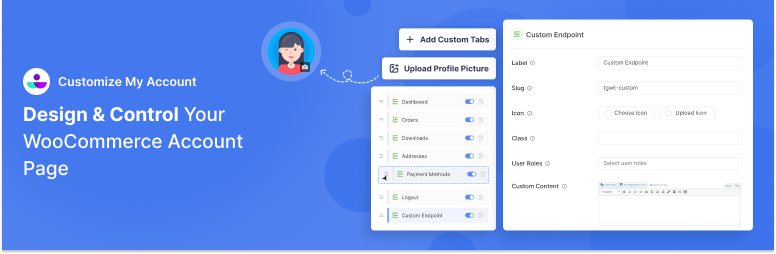
Edit the default My Account Page by adding unlimited tabs, reordering menus items with drag and drop method, customizing default WooCommerce endpoints, and personalizing customer dashboard content.
Key Features of Customize My Account Page
-
Modify Default WooCommerce Endpoints: Easily modify or disable default WooCommerce endpoints: Dashboard, Orders, Downloads, Addresses, Payment Methods, Account Details, and Logout.
-
Create Custom Endpoint: Add a custom endpoint for your own using Customize My Account Page. You can specify its own label, slug, icon and personalize the page content.
-
Create Unlimited Links: Add unlimited menu items linking to another page within your WooCommerce store or external website. You can have the link open in the same tab or new tab in your browser.
-
Hide/Show WooCommerce Tabs: Control which default WooCommerce endpoints are visible on your customer’s My Account Page. Toggle between hide and show in a single click.
-
Visual Styling Options for Endpoints: Change label and icon of individual endpoints to your liking. Choose from the available icon or upload your own.You can use style the endpoint further using custom classes.
-
Display Custom Profile/Avatar for WooCommerce Users: Allow customers to upload custom profile images for their account page. It supports png and jpg file types and default placeholders.
-
User Role-Specific Endpoints: By default, endpoints are visible to all users. However, you can create limit endpoints to specific user roles only.
-
Customize Each Endpoint with custom label and icon: Change the label and icon of each endpoint to your liking. You can choose from the available icons or upload your own.
-
Change Layout of Account Page with Drag and Drop Menu Method: Re-order endpoints and links within the My Account Page easily through drag and drop interface. You can re-arrange both default and custom tabs using this method.
-
Custom Account Page Content: Customize content on the WooCommerce My Account page using our WYSIWYG editor. Add rich content with formatted texts, medias, custom HTML codes. You can also integrate content from your theme and plugins through shortcodes.
-
Personalize Content for Your Customers: Personalize content for your customers through use of available smart tags: User ID, User Name, User Email, First Name, Last Name, User Display Name, User IP Address, Site Name, Site URL, Page URL, Current Date, Current Time, Billing Address, Billing Company, Shipping Address, and Shipping Company.
How to Use Customize My Account Page for WooCommerce?
After Installation
- Go to WooCommerce > Customize My Account Page
- Start customizing your My Account page using the drag-and-drop interface
- Save your changes and preview the results
Instalação
- Login to your WordPress admin panel
- Navigate to Plugins > Add New
- Search for “Customize My Account Page”
- Click “Install Now” and then “Activate”
Perguntas frequentes
-
Is this plugin compatible with my WooCommerce theme?
-
Yes! The plugin is designed to work with any properly coded WooCommerce theme. It follows WordPress and WooCommerce coding standards to ensure maximum compatibility.
-
Can I add custom content to the My Account page?
-
Absolutely! You can add custom tabs with rich text, HTML, shortcodes, and even embed widgets or third-party content.
-
Will this plugin slow down my website?
-
No, the plugin is optimized for performance. It only loads resources on the My Account page and uses efficient coding practices to minimize impact.
-
Can I customize the styling and appearance?
-
Yes! The plugin supports custom labels and icons for endpoints. You can also add custom CSS for advanced styling.
-
Can I revert to the default My Account page?
-
Yes, you can easily disable customizations or deactivate the plugin to return to the default WooCommerce My Account page.
-
Does it work with WooCommerce Subscriptions and other extensions?
-
Yes, the plugin is designed to be compatible with popular WooCommerce extensions including Subscriptions, Memberships, and Bookings.
Avaliações
Não há avaliações para este plugin.
Colaboradores e desenvolvedores
“Customize My Account Page For WooCommerce” é um programa de código aberto. As seguintes pessoas contribuíram para este plugin.
Colaboradores
Traduzir o “Customize My Account Page For WooCommerce” para seu idioma.
Interessado no desenvolvimento?
Navegue pelo código, consulte o repositório SVN ou assine o registro de desenvolvimento por RSS.
Registro de alterações
1.0.0 – 09-12-2025
- Initial release