

Descrição
Stop losing visitors and search rankings to broken links. 404 Solution automatically redirects 404s to the right page — not just your homepage — using a 7-engine matching pipeline that includes a spell-checking algorithm to find what visitors actually typed.
Example: A visitor hits /prodcut/awesome-item (typo). Most 404 redirect plugins send them to your homepage. 404 Solution’s spell-checker finds /product/awesome-item and redirects them there automatically.
Why 404 Solution Is Different
Most redirect plugins fall into two categories: tools that require you to manually write every rule, or tools that blindly send every 404 to your homepage. 404 Solution does neither.
- A spell-checking algorithm that actually matches typos. Using Levenshtein distance and N-gram scoring, 404 Solution catches
/prodcut/,/categroy/, and/wooocmmerce/and finds the real destination — something no other free plugin does. - 7 matching engines, in sequence. Slug match URL fix Title keywords Category/tag paths Content search Spelling similarity Archive fallback. The first engine with a confident match wins.
- Automatic, from day one. Install and activate. 404 Solution starts capturing and redirecting immediately. You can tune it; you don’t have to.
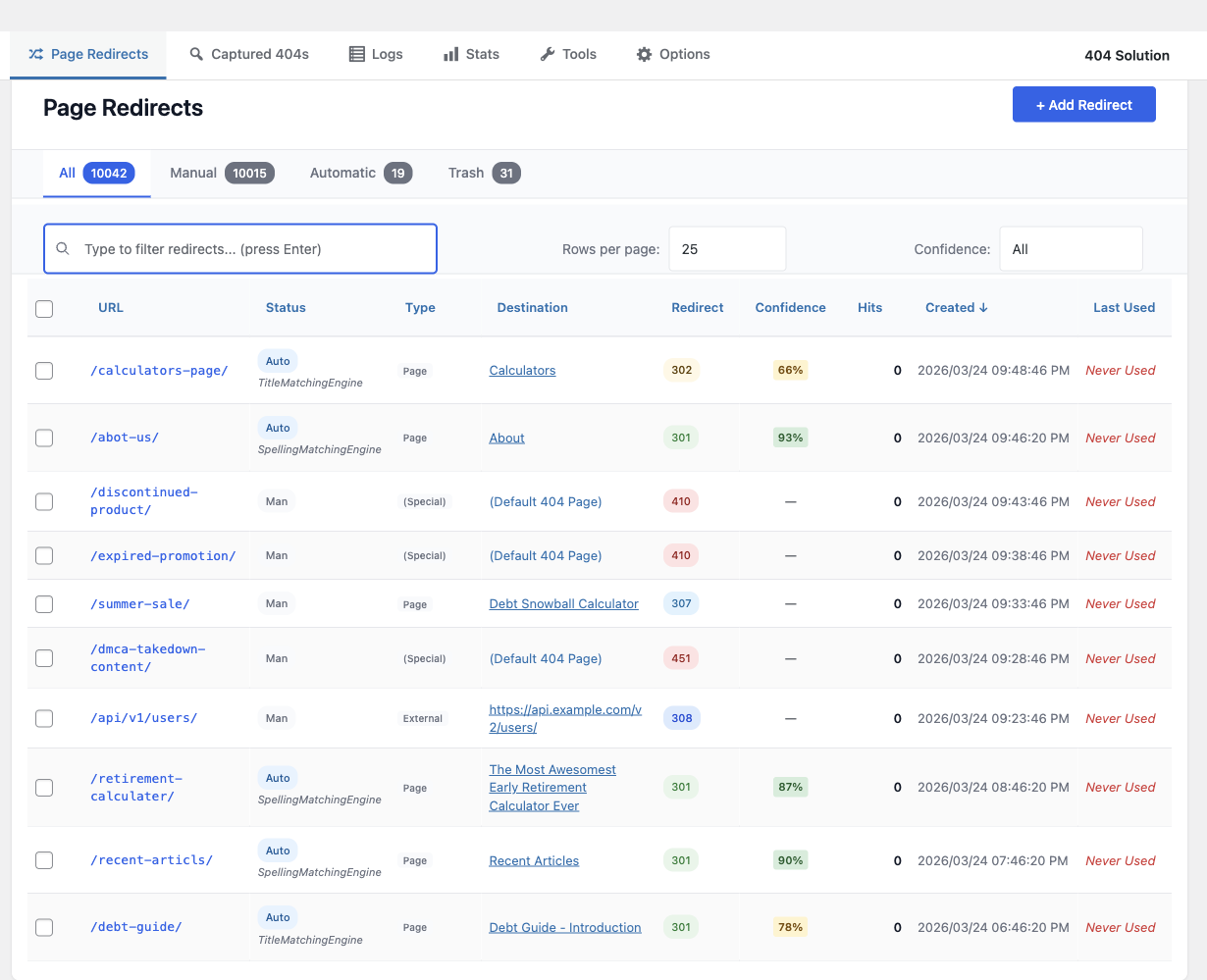
- Redirect management when you need it. Full manual redirect editor, regex support, bulk actions, and CSV/JSON import compatible with Redirection’s export format.
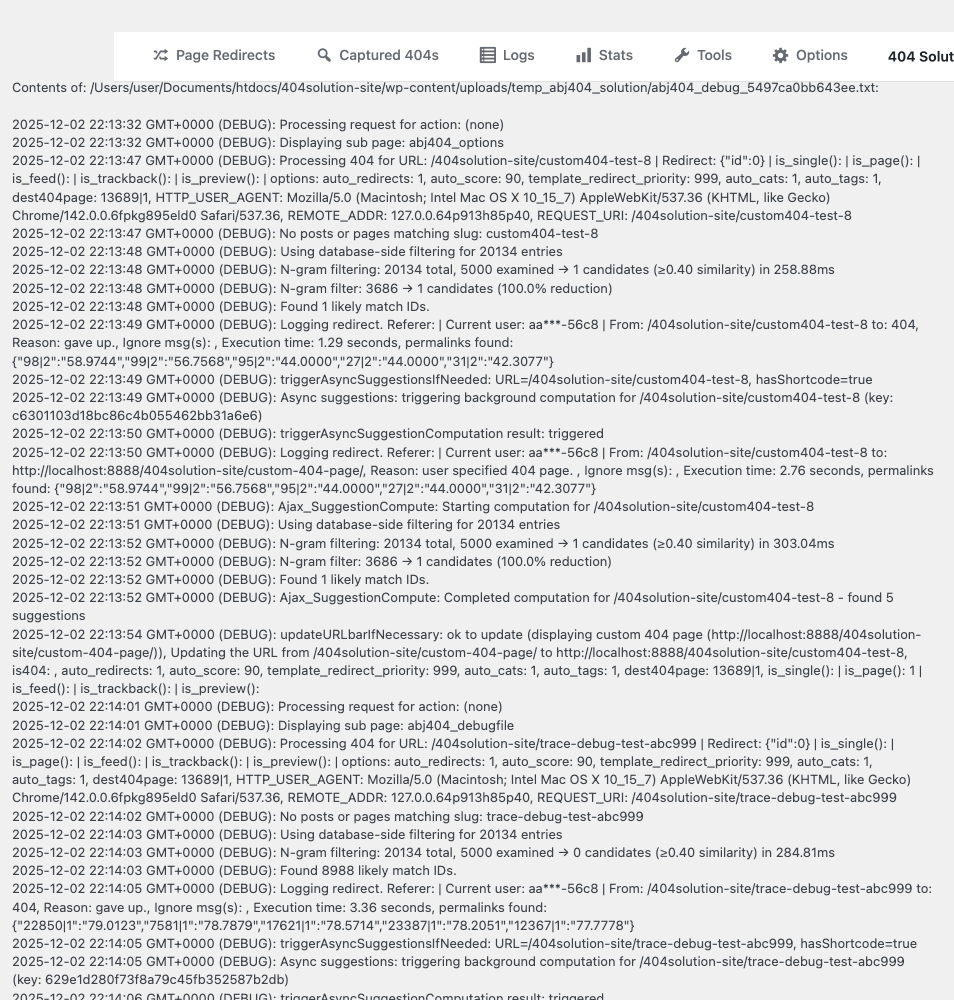
- Debug mode that shows its work. Enable debug logging and see exactly which engine chose a redirect and why — a level of transparency no competing plugin offers.
- Built for real-world hosting. Self-healing database tables, auto-recovery from corruption, automatic log trimming, and zero wp-admin-wide banners.
- Ships with extras most plugins sell separately. HTTP 410 Gone, 307/308/451 status codes, Google Search Console integration, REST API, WP-CLI support, email digest reports, and security probe detection — all free.
Unlike plugins that blindly redirect to your homepage
A 404-to-homepage redirect tells Google your broken URL is the same page as your homepage. That creates a soft 404 — a page Google may index as duplicate content, eroding crawl budget and ranking over time.
404 Solution redirects to the correct destination, or returns a proper 410 Gone when content is permanently removed. Both outcomes are better for search engines and for visitors.
When you trash or delete a published post, 404 Solution redirects its URL to the closest parent that still exists (its category, its parent page, or its post type archive) and falls back to the homepage only when there is none.
How It Works
- A visitor reaches a URL that returns a 404.
- 404 Solution runs the URL through its 7-engine pipeline.
- Each engine tries to find a confident match above its score threshold.
- The first engine to find a match wins. The visitor is redirected to the correct page.
- The redirect is logged. You can review, edit, or delete it from the dashboard.
The whole process adds no perceptible latency for visitors on non-404 pages. The matching pipeline only runs when a genuine 404 occurs.
Key Features
Intelligent Automatic Matching
- 7-engine matching pipeline (slug, URL fix, title, category/tag, content, spelling, archive)
- Levenshtein distance + N-gram scoring catches genuine typos
- Per-engine confidence thresholds — tune aggressiveness per engine
- Conditional engine groups — override the matching strategy for specific URL patterns
- Slug-change auto-detection — redirects created automatically when you rename a post
- Trash/deletion monitoring: a trashed or deleted post’s URL redirects to its closest parent (category, parent page or post type archive)
Redirect Management
- Manual redirect editor with bulk actions
- Full regular expression support
- CSV and JSON import/export (compatible with Redirection plugin format)
- .htaccess and Nginx server-level export
- Per-post and per-term exclusion via meta box
- HTTP status codes: 301, 302, 307 (method-preserving temporary), 308 (method-preserving permanent), 410 Gone, 451 Unavailable For Legal Reasons, and Meta Refresh
- GDPR-compliant: IP addresses are hashed before storage — never written to disk in plain text
404 Monitoring and Logging
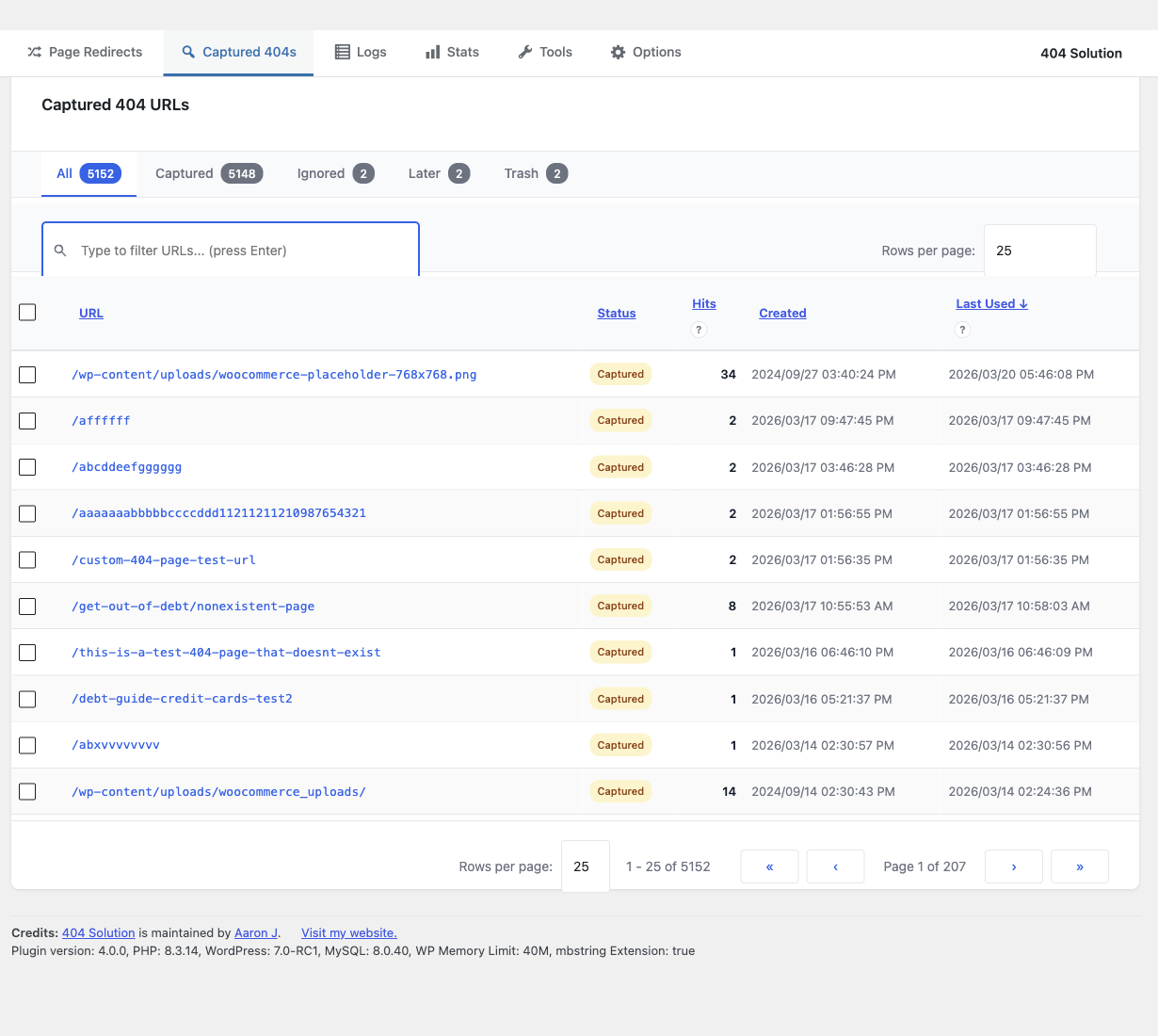
- Captures every 404 hit with referrer, user agent, and timestamp
- Automatic log trimming with configurable disk usage limits
- Security monitoring — flags vulnerability scanner probes (.env, /wp-config.php, phpMyAdmin, etc.)
Reporting and Diagnostics
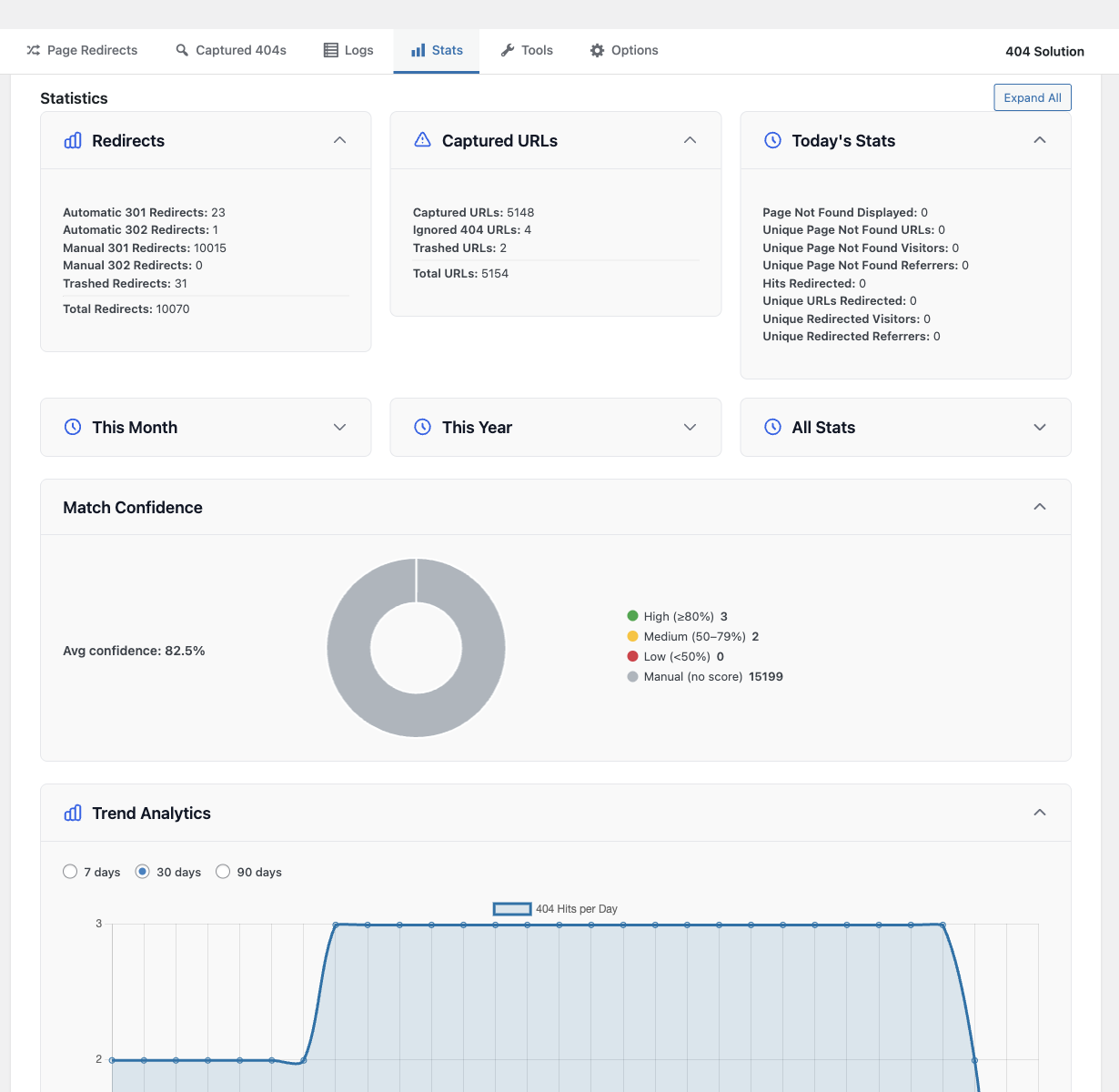
- Stats dashboard with traffic trend charts (404s, redirects, captures over time)
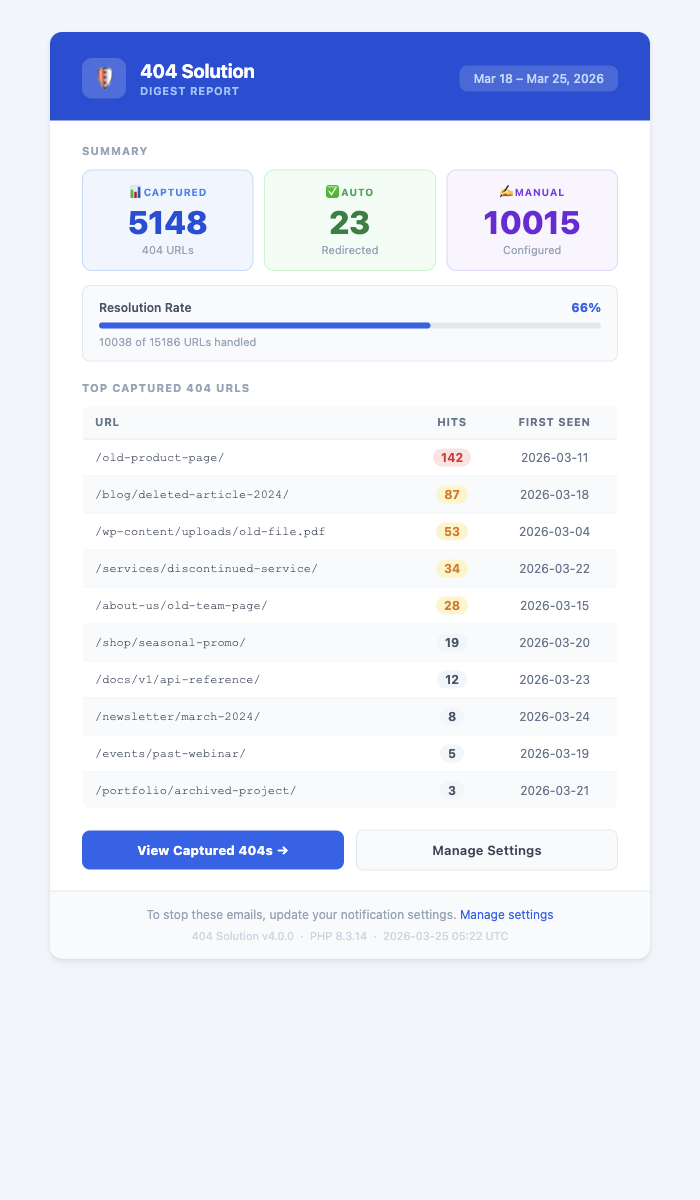
- Email digest reports
- Debug logging — see which engine fired and why
- Google Search Console integration — import crawl errors and push fixes
- Internal link scanner to find broken links before visitors do
Developer and Integrator Tools
- REST API for redirect management
- WP-CLI subcommands (list, create, delete, import, export)
- Scheduled maintenance cron
- Full WordPress Multisite support
Compatibility
- WooCommerce (products, variations, categories, custom URLs)
- Yoast SEO, Rank Math
- WPML, Polylang, TranslatePress
- Easy Digital Downloads
- All custom post types and custom taxonomies
Perfect For
- eCommerce sites (WooCommerce, EDD) with changing product URLs
- Content sites with evolving permalink structures
- Migrated sites where old URLs need to map to new content
- Large sites with thousands of pages where manual redirects are impractical
Capturas de tela
Instalação
- Unzip the files and upload the contents to
/wp-content/plugins/. - Activate the plugin.
- Use the
Settings -> 404 Solutionoptions page to set the options.
Perguntas frequentes
-
How is this different from the Redirection plugin?
-
Redirection is a manual redirect manager — you write the rules, it applies them. That is useful when you know in advance which URLs will break. 404 Solution handles the URLs you don’t know about: it automatically finds the right destination using a 7-engine matching pipeline and a spell-checking algorithm.
Example: If a visitor types
/prodcut/awesome-item, Redirection does nothing unless you manually created that specific rule. 404 Solution finds/product/awesome-itemautomatically.The two plugins are complementary. Many sites run both: Redirection for planned migrations and 404 Solution for everything else.
-
How is this different from 404 to 301?
-
404 to 301 redirects ALL 404 errors to one fixed destination (usually the homepage). 404 Solution finds the actual page the visitor was looking for. Sending visitors to your homepage is poor UX and can create soft 404 problems in Google Search Console.
-
How is this different from WP 404 Auto Redirect to Similar Post?
-
WP 404 Auto Redirect uses keyword matching, which works when the URL contains recognizable words from a post title. It fails on character-level typos — a URL like
/prodcut/has no keyword that matches “product.”404 Solution adds Levenshtein spell-checking, which catches transpositions and typos regardless of whether the keywords match. It also includes: full 404 logging, manual redirect management, CSV import/export, 410/451 status codes, GDPR IP hashing, debug logging, REST API, and WP-CLI support.
-
What HTTP status codes are supported?
-
301 (permanent redirect), 302 (temporary redirect), 307 (temporary, method-preserving), 308 (permanent, method-preserving), 410 Gone (correct response for permanently deleted content — better for SEO than a 301 to homepage), 451 Unavailable For Legal Reasons, and Meta Refresh (client-side HTML redirect).
Using 410 instead of redirecting deleted content to your homepage produces better results in Google Search Console and prevents soft-404 indexing.
-
Will this slow down my site?
-
No. The matching pipeline only runs when a genuine 404 occurs — normal page loads are unaffected. For large sites, 404 Solution uses N-gram indexing and caching tables to keep matching fast. Once a redirect is established, subsequent hits are served from the redirect table directly, bypassing the pipeline.
-
Does it work with WooCommerce?
-
Yes. 404 Solution indexes WooCommerce products, product variations, product categories, and tags. When a product URL changes or a product is deleted, the appropriate redirect is created automatically.
-
What happens when a redirect destination is deleted?
-
404 Solution detects when a destination post is trashed or deleted and flags the redirect. Redirects pointing to deleted content are highlighted in the redirect table so nothing slips through unnoticed. The daily maintenance cron automatically removes orphaned auto-redirects.
-
Can I import redirects from another plugin?
-
Yes. 404 Solution imports CSV and JSON in the Redirection plugin’s export format. It can also directly import from Rank Math, Yoast SEO, AIOSEO, and Safe Redirect Manager’s database tables from the Tools tab.
-
Is it GDPR compliant?
-
Yes. IP addresses are hashed using a one-way algorithm before storage; the original IP is never written to disk. Log retention limits are configurable. By default no data is transmitted to external servers. The “Help the developer by sending error logs” admin checkbox (default off) and the uninstall feedback modal are the only opt-in paths that send data to the plugin author’s reports server. See the plugin’s privacy policy stub at
docs/privacy.mdfor the retention period for rows keyed by site_url, the data-subject erasure path, and the processing region for the reports endpoint. -
Does it support regex?
-
Yes. Manual redirect rules support full regular expression syntax for source URLs.
Capture-group replacements can use either full HTTP(S) destination URLs or site-relative paths such as/archive/$1. -
Does it work with WPML, Polylang, or TranslatePress?
-
Yes. 404 Solution detects the active language from the multilingual plugin’s API and resolves redirect destinations to the correct translated version automatically.
-
Can I use WP-CLI to manage redirects?
-
Yes. 404 Solution includes WP-CLI subcommands for listing, creating, deleting, importing, and exporting redirects — useful for scripted migrations and DevOps workflows.
-
Does it work after a site migration?
-
Yes. 404 Solution is ideal for site migrations: slug-change auto-detection, URL typo correction (strips
.html,.php,.asp), hierarchical category path resolution, and regex redirects for bulk pattern changes. -
Can I redirect all 404s to a specific page?
-
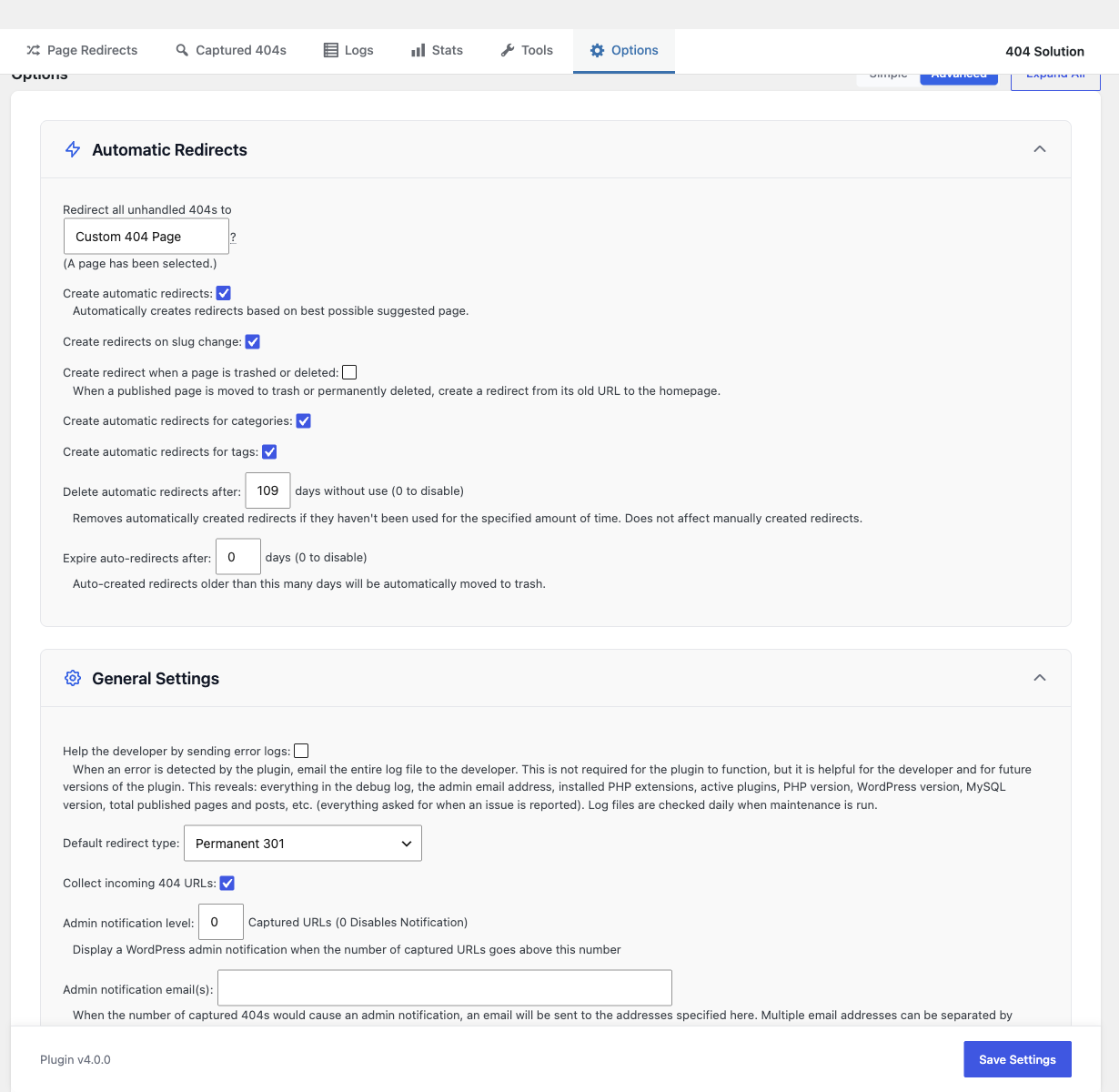
Yes. Go to Settings 404 Solution Redirect all unhandled 404s to and select your preferred fallback page.
-
How do I manage log files and disk usage?
-
Log cleanup is automatic. Configure maximum log size under Options General Settings Maximum log disk usage. You can also manually clear logs from the Logs page.
-
Can I exclude certain URLs from being processed?
-
Yes. Use Options Advanced Settings Files and Folders Ignore Strings to add paths to ignore. Per-post and per-term exclusion is also available via the edit screen checkbox.
-
How do I exclude a specific post or page?
-
Edit the post/page and check the “Exclude from 404 Solution redirects” checkbox in the sidebar. Category and tag terms can also be excluded via term meta on the edit screen.
-
Have you written any other programs?
-
Check out AJ Experience for other useful tools and resources.
Avaliações


Colaboradores e desenvolvedores
“404 Solution” é um programa de código aberto. As seguintes pessoas contribuíram para este plugin.
Colaboradores
404 Solution” foi traduzido para 4 localidades. Agradecemos aos tradutores por suas contribuições.
Traduzir o “404 Solution” para seu idioma.
Interessado no desenvolvimento?
Navegue pelo código, consulte o repositório SVN ou assine o registro de desenvolvimento por RSS.
Registro de alterações
Version 4.3.6 (September 29, 2026)
Bug Fixes
- Fixed fatal “Maximum execution time exceeded” errors on sites with many pages, where suggestion matching kept working after the host’s PHP time limit was nearly used up. Matching now runs against a time budget for the request and, when it runs out, serves the plain 404 the visitor was already getting instead of finishing the search.
- Fixed automatic redirects to a WooCommerce product category, or to a term of another category-like taxonomy, never being saved. The matching engine found these terms, but the check that an automatic redirect’s destination exists looked for them only among post categories, so it rejected them and every later visit to the same broken URL ran the whole matching pipeline again.
- Fixed a fatal out-of-memory error when the debug log folder could not be created (an unwritable uploads folder, or a file sitting where the folder should be). Writing the warning about the missing folder tried to create the folder again, and so on without end.
- Fixed the Add Redirect form and CSV import reporting success when nothing was saved. A redirect that failed to save now says so, with the cause, and CSV rows that failed are counted as invalid instead of imported. A failed save of a regex redirect is reported as a save failure rather than as an invalid pattern.
- Fixed pages that show suggestions running the suggestion search for every 404, including scanner and bot visits that never read the result. The search now runs only when a real visitor’s page asks for it, which cuts the extra WordPress requests and CPU a scanner probing many paths used to cause.
- Fixed the suggestions link on a custom 404 page showing a permanent loading state for visitors without JavaScript. It now offers a working link. The
abj404_suggestopt-in is also no longer carried onto suggestion links or redirect destinations. - Fixed the “hits” totals on the Page Redirects screen never finishing on sites where WP-Cron does not run (a blocked
wp-cron.phporDISABLE_WP_CRON). The totals now complete without cron. - Fixed an internal lock that the database refused to release (for example after a deadlock) staying behind for days and then being logged as a “Forcibly removed synchronization” error. The release is now retried, and a lock that is reclaimed is reported once and as a recovery rather than as an error.
- Fixed a harmless failure to store a temporary suggestions value being logged as a storage error.
- Fixed the time-limit report bars using fixed grey colors that ignored the admin color scheme.
- Fixed three hits-rollup notices that were not translatable.
- Fixed the Statistics trend chart showing an empty chart, as if there were no data, when its database query failed. It now reports the failure.
- Fixed users listed in the “Plugin Admin Users” setting being refused access to the plugin’s admin pages (“Sorry, you are not allowed to access this page”) unless they were already site administrators. The permission that lets them in was only switched on along a startup path normal page loads no longer take.
Improvements
- When a published post is trashed or deleted with “Create redirect when a page is trashed or deleted” enabled, its old URL now redirects to the closest parent that still exists instead of to the homepage: the post’s primary category (as set in Yoast SEO or Rank Math, otherwise the category WordPress uses in its permalink), the nearest published parent page, or the post type archive, in that order. The homepage is used only when none of these exists. A mass redirect to the homepage is what Google reports as a soft 404. The category default (“Uncategorized”) and archives that would be left empty are skipped, and the redirect’s reason records which parent was chosen, for example “post trashed: parent category”. Custom taxonomies such as WooCommerce product categories work the same way.
- Faster admin page loads: settings are read without building the plugin’s full service graph, and one unused lookup was removed from the admin theme stylesheet hook.
- Better support reports when something goes wrong. Reports now include where a request’s time went (a per-request phase timeline, including when PHP’s time limit fires inside 404 Solution), CPU time and the running hook stack for fatal errors, and a short, redacted excerpt of a response that was not valid JSON, so an unexpected answer from a host or firewall can be identified. Failures in the plugin’s admin screens now keep the HTTP status and the start of the response in the browser console instead of a generic message, and failures the plugin catches are recorded in its log even when debug logging is off. Nothing is sent anywhere unless you choose to send a report.
Version 4.3.5 (August 30, 2026)
Bug Fixes
- Fixed hosts with disabled PHP functions receiving repeated error-log entries during admin requests and a fatal error when opening Statistics. The plugin now checks whether each required PHP function is callable before using it and safely degrades when the host removes it.
Improvements
- Runtime diagnostics now report the plugin functions that are actually unavailable, including functions missing with an extension or host policy, instead of relying only on the
disable_functionssetting.
Version 4.3.4 (August 20, 2026)
Bug Fixes
- Fixed concurrent diagnostic writers being able to discard the newest retained journal generation. A writer whose file had already been rotated could retain its old near-limit size and mistakenly rotate a much smaller live file; destructive rotation now revalidates that the writer still owns the live path before renaming or deleting any journal.
- Fixed sites with more than 51 active regex redirects evaluating only the 51 oldest rules. The cache safety check used a 51-row query to decide whether the result was small enough to cache, but when it found more rules it kept using that same limited query instead of continuing through the table. Newer regex redirects therefore stayed at “Never Used” and matching requests fell through to the 404 page. Regex rules are now read completely in bounded batches, preserving their existing oldest-first precedence without imposing a matching limit.
- Fixed a fatal error on the plugin’s own Page Redirects and Captured 404s screens for sites running WordPress 5.0, 5.1 or 5.2. The plugin supports WordPress 5.0 and above, but eight places that render a date called a WordPress function that only arrived in 5.3, so those screens died with “Call to undefined function wp_date()” instead of rendering.
- Fixed a redirect loop in which a request was answered with a redirect back to that same request. When a 404’s destination was the home page and the request carried a query string such as
?page=1, the destination was rebuilt into the original URL, so a browser or crawler looped until it gave up. Every hop was counted as another 404 hit, and one site recorded 3,892 hits on a single row this way. The home destination now resolves to the home page’s own path, and no redirect is sent when the destination is the request being answered. - Fixed a fatal error during a plugin update, when a request that started under the old version was still running as WordPress replaced the plugin files. The plugin now notices its own files changed mid-request and re-reads its class list, instead of looking up the new files through the previous version’s list and failing with “Class ABJ_404_Solution_… not found”.
- Fixed the Confidence column on the Captured 404s tab reading as a dash for every row on every install. The match score was worked out when the 404 was captured and then thrown away, so the column, its tooltip and the two indexes that exist to sort by it had no value to work with. Captured 404s now record the score of their closest match.
- Fixed apostrophes and quotes being stored with a backslash in front of them, so text typed as “didn’t” was saved as “didn\’t”. This affected support and uninstall feedback and other text saved from the admin screens. The redirect destination and 404 log search boxes had the same problem, so searching for a term containing an apostrophe matched nothing.
- Fixed the plugin emailing “Failed to schedule cron hook” reports for scheduling requests that had not failed. WordPress refuses a request when an equivalent scheduled task already exists, and reports that the task list “could not be saved” when the list is written with no change; both are normal outcomes that mean the task is scheduled. One site received 18 copies of the same message, 14 of them inside one second.
- Fixed the reverse scheduled-task check: a failed recurring schedule could be reported as successful when a different occurrence of the same task already existed. Exact schedule and removal checks now require the requested timestamp, and malformed WordPress cron responses are logged with their original context instead of being treated as success.
- Fixed two simultaneous requests being able to schedule separate links in the permalink-cache background chain. The existing hook-wide check stopped a later request from restarting an already-visible chain, but the check and cron write were separate, so racing requests could both observe an empty store and queue events with different arguments. Scheduling that chain is now serialized by an expiring database claim, and the claim holder refreshes WordPress’s process-local cron cache before deciding, preserving the chain’s execution limit without leaving a permanent lock if a request dies.
- Fixed canonical pagination handling terminating the request and recording a successful hit after WordPress rejected the redirect. A rejected redirect now keeps normal 404 handling active and records the destination, status and source in the debug log. Its captured evidence row is now inserted only when the source is absent, inside a serializable database transaction that prevents two simultaneous requests from both inserting it, and duplicate cleanup preserves a user-authored redirect over newer captured evidence.
- Fixed schema checks, database upgrades and internal database lock rows being able to wait effectively forever behind another connection’s schema change. Metadata-lock waits for those operations are now bounded, the site’s previous database-session setting is restored afterward, and the original database error remains available in the debug log.
- Fixed database index repair retrying an
ALTER TABLEafter failures that removing the optional online-DDL clauses could not cure, such as permission or storage errors. The bare fallback now runs only when the database specifically rejectsALGORITHM=INPLACEorLOCK=NONE. - Fixed the plugin retrying forever when WordPress refused to remove one of its scheduled tasks. Nothing in the retry could make progress, so a deactivation or cleanup request kept asking until the server’s time limit killed it. Security and scheduled-task manager plugins can refuse the removal, which is what made this reachable.
- Fixed a code path that could wait for one of the plugin’s internal locks with no time limit at all. On a read-only database replica, a full disk, or an unwritable uploads directory the wait could never succeed, so the request slept and retried until the server’s time limit killed it.
- Fixed the same internal lock being granted to two requests at once on sites with no persistent object cache. Ownership was decided by writing a value and reading it back, but WordPress answered the read from its own in-memory copy, so each competing request read back its own write and concluded it had won. Two database upgrades were seen starting in the same second on one site.
- Fixed two simultaneous requests entering the same database upgrade and the losing one reporting the winner’s success as a string of errors, including a second change that could not succeed because the change it asked for had already been made.
- Fixed “COLLATION ‘latin1_swedish_ci’ is not valid for CHARACTER SET ‘utf8mb4′” database errors repeating every few seconds on sites whose database settings still name a latin1 collation. The permalink cache never refreshed on those sites and the published-content lookup returned nothing.
- Fixed “Illegal mix of collations” errors when the plugin compared its own log rows against WordPress’s posts table on sites where the two tables were created with different collations. The comparison returned no rows rather than failing visibly, so the check that depends on it silently found nothing.
- Fixed the plugin repeatedly trying to add a column named “using” of type “btree” to its redirects table, and logging the resulting database error, on sites where an index definition ended in USING BTREE. The error was logged three times per upgrade and three more times per scheduled run, indefinitely.
- Fixed the plugin rewriting a database table that was already correct. A table’s character set was read from the first column that named one rather than from the table’s own settings, so a correctly configured table could be read as out of date and converted when nothing had drifted.
- Fixed one of the plugin’s index repairs naming a column without first checking that the column exists. That repair removes and re-adds an index in a single statement, so a database server that applied only half of it could leave the log table with neither index.
Improvements
- The Simple Mode setting for automatic redirects now says what the match score has to reach and where to change it, instead of only saying that a good match is required. It names the score actually in force on the site rather than the shipped default.
- The page that offers suggestions for a 404 now explains, to administrators only, what the number beside each suggestion means, what the current bar for an automatic redirect is, and the two ways to act on it: redirect that URL, or change the bar.
Internationalization
- Completed the translations for every language the plugin ships. 80 entries in Swedish and 846 across the other catalogs were still being shown in English; each is now translated, or marked to record that the English word is the right one in that language.
- The support request dialog, the confidence chart on the stats screen and the plugin migration tool now have translations. Their text previously rendered in English in every language, no matter how complete that language’s translation was.
- Restored accented characters in seven Latin-script translations where entries had been typed without them.
Version 4.3.3 (August 12, 2026)
New Features
- Regex redirect destinations can now be site-relative paths such as
/archive/$1, not only full http(s):// URLs.
Bug Fixes
- Fixed the Page Redirects and Captured 404s tabs being able to hang after their data was already built. When something else on the site holds an output buffer open that cannot be closed, whether that is PHP output compression or another plugin, the response could keep trying to flush buffers until the host’s execution limit killed the request. Flushing is now bounded, so the table finishes rendering instead of spinning.
- Fixed a fatal error that could happen while updating from 4.2.x, when the server’s PHP bytecode cache was still handing out the previous version’s files as the new ones loaded. This guard protects future updates; it cannot protect the update that installs it.
- Fixed a crashed or killed request being able to leave an internal lock behind, which left redirect lookups on a slower fallback path until the lock expired (more than 24 hours was observed on one site). Locks are now released even when the request dies, and an abandoned lock is reclaimed after at most 5 minutes instead of after the server’s maximum execution time.
- Fixed “Illegal mix of collations” database errors on sites whose plugin tables do not all share the same collation. This affected 404 log cleanup, the admin list counts, the email digest, and the dead-destination check.
- Fixed the plugin running a schema-wide collation repair in the middle of an admin page load, which could make that page slow or time out. The repair now happens outside the page request.
- Fixed slow sorting on the Captured 404s tab. The timestamp sort had no supporting database index, so a large site re-sorted the whole table on every page load.
- Fixed the plugin trusting one of its own sort indexes by name alone. A database server silently narrows an index when a column it referenced is dropped, and an index narrowed that way was treated as correct forever, so the sorts it was built for scanned the entire table instead of reading a single page of rows. Indexes are now compared against the definition the plugin ships and rebuilt when they differ.
- Fixed the plugin rebuilding a database index on the strength of index information it could not read. When a database server left out or garbled the field that says whether an index is unique, the plugin decided the index differed from the one it ships and repaired it, which on the page-suggestion cache meant emptying that table and rewriting the index. Index information that cannot be read is now treated as unknown, and an index the plugin cannot describe is left alone.
- Fixed the Page Redirects and Captured 404s tabs waiting on their own row counts on large sites. Pagination and the per-status counts now load in separate stages, and a count that is still being computed is shown as incomplete instead of holding up the table.
- Fixed a regex redirect whose source pattern starts with an anchor (for example
^/products/(.*)) being rewritten on save into a pattern that could never match. - Fixed the Add Redirect dialog rejecting valid regex destinations, and checking them against a stale copy of the validation rules after an update.
- Fixed the “Hits” counts on the admin tabs falling behind. The roll-up that keeps them current was no longer running from a page view, and the counts could also sit empty on sites whose WordPress cron is backed up. Both paths are restored.
- Fixed 404 URLs containing
@(retina images such aslogo@2x.png) and PHP static-call frames in stack traces being mangled by the redaction that runs before a debug log or automatic report is written. - Fixed page suggestions staying poor for months after an interrupted rebuild. A partially built suggestion cache recovered at about 50 entries a day rather than rebuilding; it is now completed at full rebuild speed.
- Fixed a multisite network where deleting a site part way through the page-suggestion rebuild could leave a later site with an empty suggestion cache that was marked fully built and never rebuilt. The rebuild now tracks the last site it finished instead of counting positions in a list that shifts whenever a site is removed.
- Fixed transient database failover and connection-state errors, including Galera nodes that are temporarily unavailable and “Commands out of sync,” being treated as permanent failures. Affected queries now recover and retry through the shared database path.
- Fixed an admin table database failure being mistaken for a successful empty result, which could make the table appear empty instead of showing the real error.
- Fixed the 404 and redirect trend charts reading all zeros on sites whose database server is not set to UTC, which is common on shared hosting. Each database row was matched to a calendar day by comparing two dates produced in different time zones, so on those sites no row ever matched a day and the chart drew a flat line with no error shown. The Search Console date range was built the same way and is fixed too.
- Fixed the “Post types” and “Categories” settings fields being able to alter the database queries built from them. Values from those two fields were placed into queries without being escaped, so a value containing a quote could change what the query did. Both fields are now escaped, and text carrying invalid characters is repaired before it reaches the database.
- Fixed automatic redirects being able to save a destination that cannot be reached. The destination was checked as a positive number but stored exactly as entered, so a value such as
-3was checked against page 3 and then stored as-3. Automatic redirects are created with nobody watching, so nothing later would have questioned it. - Fixed 404 URLs losing their hit counts and their “View Logs” row action when their log rows had no canonical URL recorded. Those rows were dropped from the hit-count roll-up entirely, with nothing to say so.
- Fixed the “Hits” columns going stale, or being rebuilt on every check along with a repeating admin notice, on sites whose database server is not set to UTC. The age of the hit-count roll-up was measured by comparing a time the database rendered in its own time zone against a time measured in UTC, so it was wrong by that server’s offset, in one direction or the other depending on which side of UTC the server sits.
Improvements
- The hit-count roll-up no longer runs at the very end of an admin request, where it added as much as 21 seconds to the page on a 900,000-row test site.
- On LiteSpeed servers the admin table response is handed back as soon as it is ready, instead of waiting for the rest of the request to finish.
- Creating, editing or deleting a redirect no longer scans the whole WordPress options table. The plugin was still clearing a results cache it stopped using in 4.3.1, and the pattern it searched for could not use an index, so on a site with a large options table every redirect change read the entire table to delete nothing.
- When an admin action fails because the server or its gateway rejected the request, the message now names the underlying failure (for example “502 Bad Gateway”) instead of a generic “An error occurred”, and the full detail is written to the browser console. Saving settings, restoring defaults, switching settings mode and trashing a redirect each had their own copy of this handling, and two of them discarded the failure entirely.
- Automatic error reports and support previews now include log evidence for the error they describe, even when the error falls outside the most recent log tail. Admin table retries also preserve a diagnostic trail under the plugin’s shipped default settings.
Version 4.3.2 (July 11, 2026)
- FIX: Fixed the email digest sending every day even when the notification frequency was set to Weekly (thanks to gardendarts for reporting this). The weekly/daily cadence is now enforced against the time the last digest was actually sent, and changing the frequency in Settings now takes effect on the very next save instead of the next unrelated one.
- FIX: Fixed automatic error and heartbeat reports silently failing to send on some sites when an internal reporting component was unavailable.
- FIX: Fixed debug logs and automatic reports sometimes over-redacting the plugin’s own file names, option names, and URLs, including incorrectly truncating URLs that contained a query string.
- FIX: Fixed a rare issue where saving, publishing, or deleting content, or changing a category, during a plugin update could interrupt a scheduled background maintenance task.
- Improvement: Hardened several internal WordPress integration points (404 handling, REST API setup, log maintenance, and permission checks) so an unexpected internal error in one can no longer interrupt that request or affect other plugins.
- Improvement: Out-of-memory diagnostic reports now preserve the exact memory sizes involved, making them easier to diagnose.
- Improvement: Removed an internal AJAX diagnostics footer that no longer reflected real admin activity.
- Improvement: If you’ve opted in to “Help the developer with error logs and usage stats,” the optional weekly status ping now sends on a predictable weekly cadence (once the plugin’s been active 5+ days) instead of a rare random daily chance that averaged about once every 6 months. Same opt-in checkbox and same aggregate-only data (site version, URL, 404/redirect counts); just a steadier heartbeat.
- New: Added a “Never” option to the Email notification frequency dropdown, so you can fully turn off 404 email notifications without switching to Instant mode and separately zeroing the threshold.
- New: Added a “Your Diagnostic Data” card to the Options tab so you can download or delete the diagnostic data this plugin has reported for your site, in line with GDPR data access and erasure rights.
Version 4.3.1 (June 26, 2026)
- FIX: Fixed an out-of-memory error (thanks to johnegg and kalshyre for reporting this).
- FIX: Fixed other things that looked like possible out-of-memory errors during maintenance.
- Improvement: Made automatic error reporting more robust to cover OOM as best as possible as well as other failure types.
Version 4.3.0 (June 12, 2026)
Bug Fixes
- Fixed locale-stale labels in the Page Redirects view cache by storing status and type as integer codes only, translating labels at render time, and dropping the legacy translated-label columns during upgrade.
- Fixed the Page Redirects and Captured 404s admin tabs still occasionally failing to load on high-traffic sites running 4.2.0. The 4.2.0 release notes claimed this was fixed, but only the cache-warmup race was addressed. A separate internal “mutation watermark” gate could still abort the cache rebuild mid-stage when 404 traffic arrived during the rebuild, and surface the same “Could not finish refreshing data” message at the 45-second budget. That gate and its supporting machinery (watermark counter table, admin-mutation gate, view-build watermark stamping) have now been removed in full. On Bruno-class data (about 30,000 active redirects, about 384,000 hit rows, sustained 1 request per second or higher 404 traffic), the admin tabs hydrate within budget across consecutive refreshes.
- Fixed a stale “No ID(s) found” notice appearing after a redirect was edited and saved successfully. The notice from the prior screen is now cleared so the success message stands alone.
- Fixed a stuck “Refreshing data… (stage 4)” badge that could remain on the Page Redirects pagination strip after a background refresh failed. The strip now collapses placeholder-only rows on a failed table load, and the error notice no longer competes with the 5-star review prompt for attention.
- Fixed generic “Something went wrong” messages on admin AJAX errors. The underlying cause is now appended in parentheses so the error is self-diagnosable, and the multi-stage diagnostic detail is tucked behind a collapsed Details panel.
- Fixed
wp abj404 listnot returning redirects that were just created viawp abj404 createin the same session, and corrected the--status=manualfilter so manually-created redirects are returned. - Fixed CSV-imported redirects not appearing in the Page Redirects table immediately after import. The cached view is now rebuilt synchronously when the import completes, so the table reflects the new rows on the next page load.
- Fixed a “table doesn’t exist” error path that could fire during a partial install or upgrade. The data layer now tolerates an unprepared
$wpdband surfaces a clean degraded state instead of a fatal. - Fixed the plugin’s settings defaults not being available on the uninstall path, which could leave a stray option behind on some sites.
- Fixed a duplicate-accessible-name accessibility warning on the redirects list. The “Add Redirect” submit button inside the modal is now labeled “Add”, which removes the collision with the page-level “Add Redirect” action button.
- Fixed a fatal that could occur on the Plugins admin screen when
wp-admin/includes/plugin-install.phpwas unavailable on hardened hosts (the include is now guarded withis_readable). - Fixed a fail-open default in the REST captured-404s status filter that could return rows from an unintended status when an unknown filter value was supplied.
- Fixed the URL and Destination column-sort “being prepared” progress indicator that could stay stuck at 0% on large sites where a security plugin blocks the WordPress cron loopback. The one-time sort-key preparation is now driven by the admin’s own page view in the background, with a longer and gentler retry window, so column sorting becomes available without depending on WP-cron, and a transient timeout no longer halts the progress.
Improvements
- Several admin surfaces were restyled to match native WordPress chrome and feel quieter on the eye: the top sub-navigation now uses standard
.nav-tabstyling; the Edit Redirect form follows the nativeform-tableshape; list-table filter rows use subsubsub pipe-separated links; status badges and pills use the bordered-label shape; checkbox columns and column-header padding match core WP list tables; AJAX error notices use the native.notice-errorshape; and the self-healing dashboard notice routes through the standard notice template. - Several internal queries that scanned the full
information_schema, post-type table, or content-keywords index on large sites are now bounded, removing a needless cost during background cache rebuilds. No behavior change for typical sites; smoother performance on sites with thousands of post types or very large content tables. - Changed the internal admin-notice payload schema to store translated message and guidance text directly, removing the message catalog indirection. No user-facing behavior change is expected.
- When a background refresh fails, a Support button is now mounted directly on the failure notice so the report path is one click instead of a hunt through Settings.
Version 4.2.0 (May 23, 2026)
Bug Fixes
- Fixed the “Page Redirects” and “Captured 404s” admin tabs occasionally failing to load on busy sites. The cache-warmup pipeline could race against ongoing 404 traffic and report that the data snapshot was missing even when the underlying query had succeeded. Admin tables on high-volume sites now load reliably.
Improvements
- Substantial internal refactor of the data-access, view-build, and admin-mutation layers for long-term maintainability. No visible behavior change is expected; the version bump from 4.1.x to 4.2.0 reflects the size of the change.