
Descrição
Find SEO problems before they cost you visitors.
Jagelon Guard looks at your site the way a search engine does and tells you in
plain language what is fine, what needs attention and what to do next. The check
is free, takes one click and needs no account, no key and no sign-up.
Free, with no account
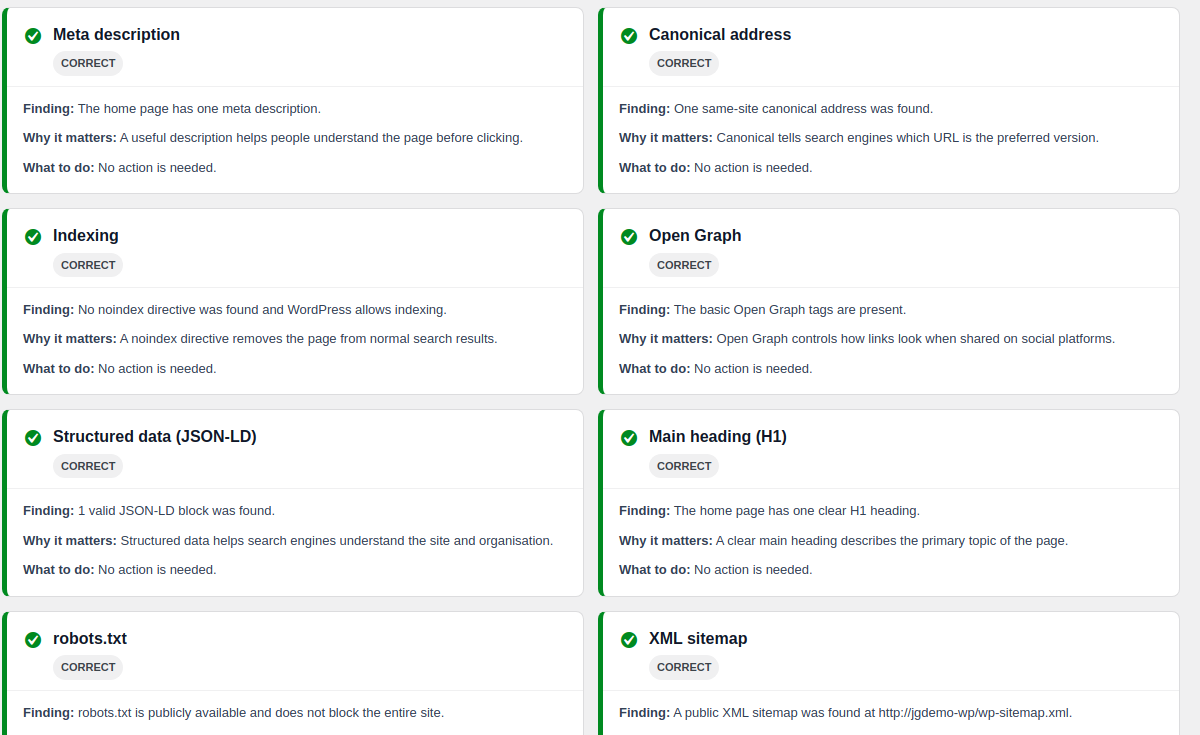
- One-click SEO check. Reads your public home page, robots.txt and sitemap
and explains each result: correct, needs attention or could not be checked.
It only reads, it never changes your site. - See your page in Google before you publish. Every page and post gets a
title and description field with a live Google preview and a character count,
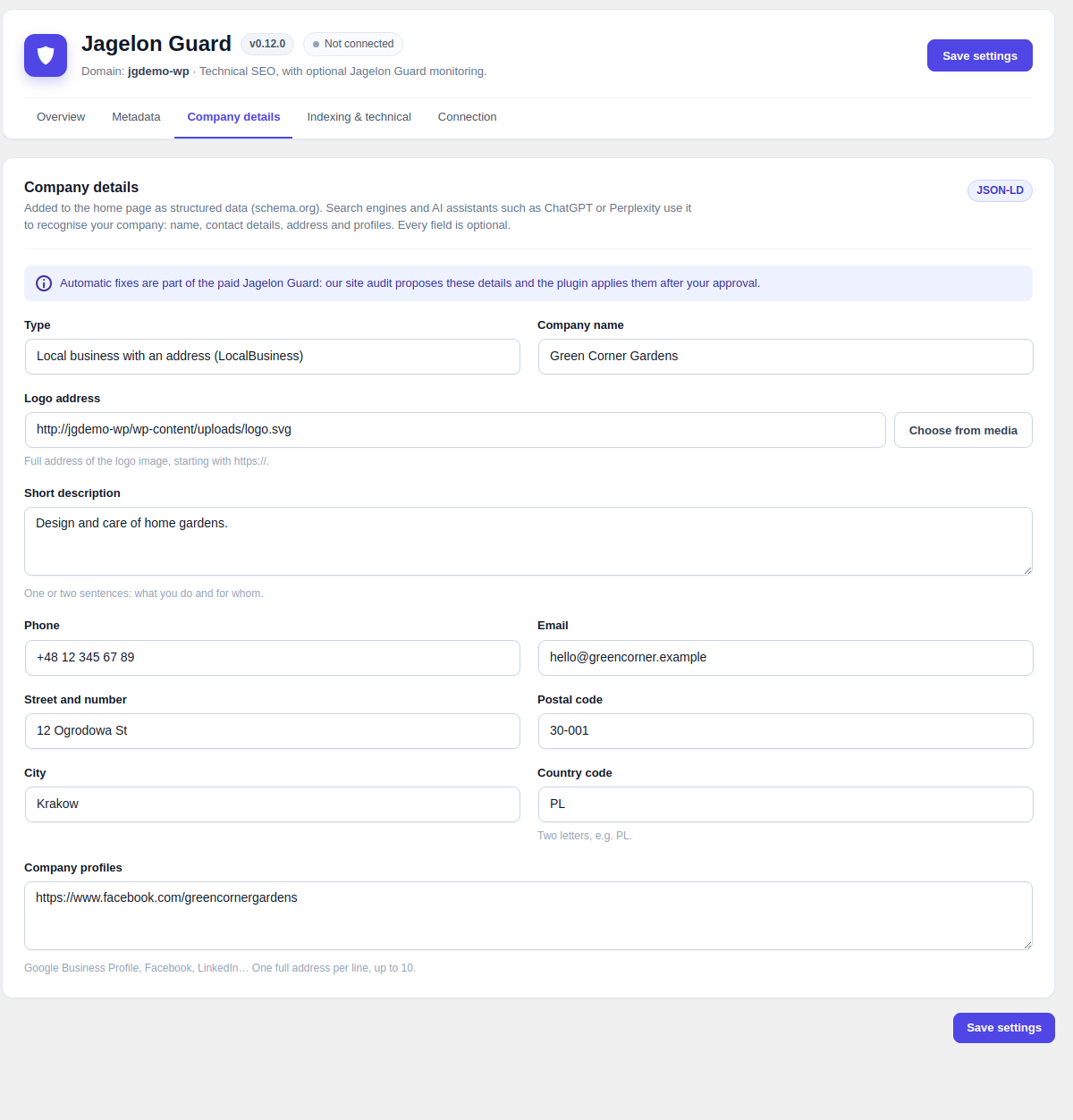
plus a switch to hide a single page from Google. - Help Google and AI assistants recognise your business. Business type,
phone, email, address, logo and profiles become Organization or LocalBusiness
structured data on your home page. - The technical basics, set up for you. Canonical addresses, the WordPress
sitemap without author pages, robots.txt rules, Open Graph previews for social
media and WebSite schema. - Works next to Yoast SEO, Rank Math and other SEO plugins without
duplicating their tags.
Free features run on your own site, do not expire and send nothing to Jagelon.
Paid plan: monitoring and fixes (optional)
Sites rarely break loudly. An update quietly sets noindex, a page title that
used to rank is edited, a redirect starts returning 404. The site still looks
fine in a browser, so nobody notices for weeks.
The yearly Jagelon Guard plan adds a service that watches your public site:
- a check every 15 minutes and an event log in your dashboard: what changed,
where, since when and what to check - a weekly email report, including the quiet weeks
- recommendations ranked by importance, with the affected addresses
- fixes proposed by the site audit, applied only after you approve them and
reversible with one click - a timeline of when search engines fetch your sitemap and changed pages
Nothing in the paid plan changes your site without your approval. Reports and
recommendations are currently written in Polish; the free features are fully
available in English.
How to get it: order the yearly plan at https://securplan.pl/en/jagelon-guard/.
An account is created with your order and keeps your connection key until you
collect it. You see the key once, paste it into the plugin and the account no
longer stores it.
Privacy
Without a connection key the plugin sends nothing anywhere. After you paste a key
it sends only your site address, WordPress, PHP and plugin versions, the results
of the service’s own checks of your public pages and a timestamp for each
connection. It never sends post content, user data, database contents or
anything from inside wp-admin. If the service is unavailable, every free feature
keeps working; only monitoring and reports pause.
Service terms: https://securplan.pl/en/terms/
Privacy policy: https://securplan.pl/en/privacy-policy/
Capturas de tela




Instalação
- Install and activate the plugin.
- Open Jagelon Guard in the admin menu and click Check SEO.
- Fill in your home page title, description and company details. That is all the free plugin needs.
- Optional: after ordering the paid plan, collect your connection key in your account and paste it under Connection.
Perguntas frequentes
-
Do I need an account or a key?
-
No. The SEO check, titles and descriptions, company details, canonicals, the
sitemap, robots.txt, Open Graph and schema all work without registration and do
not expire. A key is only needed for the optional paid monitoring. -
What does the free SEO check look at?
-
Whether the home page loads, its title, meta description, canonical address,
indexing directives, Open Graph tags, structured data and main heading, plus
robots.txt, the XML sitemap, HTTPS and redirects. It is read-only. -
Why does a check sometimes say “Could not check”?
-
Some hosting providers block a site from loading its own pages. Jagelon Guard
then says the test was not possible instead of reporting a false SEO error. -
Does Jagelon Guard change my site?
-
The free plugin applies only the settings you choose on its screens. In the paid
plan the site audit can propose fixes, for example missing company details; each
one is applied only after you approve it, checked on the live page and can be
rolled back with one click. -
Will it conflict with my SEO plugin?
-
No. When Yoast SEO, Rank Math, All in One SEO, SEOPress, The SEO Framework, Slim
SEO or Squirrly SEO is active, Jagelon Guard does not add duplicate SEO tags. The
SEO check and the optional monitoring keep working alongside it. -
What does the paid monitoring check?
-
Every 15 minutes it looks for changes that can cost visibility: noindex,
robots.txt changes, missing or foreign canonicals, changed titles, sitemap
failures and HTTP errors on important pages. -
The free features keep working. Monitoring and reports pause until the service
is back.
Avaliações
Não há avaliações para este plugin.
Colaboradores e desenvolvedores
“Jagelon Guard – Free SEO Check & Site Monitoring” é um programa de código aberto. As seguintes pessoas contribuíram para este plugin.
Colaboradores
Traduzir o “Jagelon Guard – Free SEO Check & Site Monitoring” para seu idioma.
Interessado no desenvolvimento?
Navegue pelo código, consulte o repositório SVN ou assine o registro de desenvolvimento por RSS.
Registro de alterações
0.13.8
Paid Jagelon Guard plan only: after the plugin is connected, the event log
shows the progress of the first full check of the site until monitoring starts.
0.13.7
Paid Jagelon Guard plan only: when the number of crawlable pages changes, the
event log lists the most recent added and removed addresses with the date of
the scan that noticed them.
0.13.6
- Fix: sites updated from Securplan SEO Core keep the title, description,
canonical address and indexing setting saved on individual pages. Since
0.9.30 these were not carried over and pages fell back to defaults.
0.13.5
Paid Jagelon Guard plan only: the Discovery tab also shows when verified
Googlebot and Bingbot last fetched the sitemap and the RSS feed. No change in
the free plugin.
0.13.4
Everything new in the free plugin since 0.10.0:
* New look for the settings screen: tabs, a status overview at the top and
clearer forms. Works the same without JavaScript.
* New “Company details” tab: business type (Organization or LocalBusiness),
description, phone, email, address and company profiles, added to the home
page structured data that search engines and AI assistants use to recognise
the company. Includes a logo picker from the media library.
* “Check status” button refreshes the connection to the monitoring service on
demand, and a “Settings saved” message after saving.
* SEO Health Check: translator notes for every message with a number or
address, so translations read correctly.
Paid Jagelon Guard plan only (not part of this plugin package): fixes proposed
by the site audit and applied after your approval, notifications about new
fixes, and the Discovery timeline of how changed pages reach search engines.
0.10.1
- The weekly report no longer calls a one-off change an ongoing problem. A
changed title, heading, canonical, robots.txt or sitemap now says when it was
noticed; genuine faults still say how long they have been going on and are
listed first. - The report explains that confirming a change in the panel stops the reminder,
so the same line no longer returns week after week. - Settings and the site pairing survive the rename from Securplan SEO Core.
0.10.0
- Adds the free, manual SEO Health Check. It works without an account, changes
no site settings and clearly separates correct, warning, error and unavailable
results. - The check remains available alongside Yoast SEO, Rank Math and All in One SEO,
without producing duplicate metadata. - Adds same-site request restrictions, nonce and capability checks, a short
per-user rate limit, responsive results and deterministic regression tests.
0.9.30
- The plugin is now Jagelon Guard. The previous name could be confused with
an unrelated trademark, so the plugin, its text domain and its admin screen
were renamed. - The character counter label is JSON-encoded with escaped angle brackets, so
a translation cannot break out of the inline script.
Older versions are listed in changelog.txt.