
Descrição
ICP Registration Home 404 is a lightweight WordPress plugin designed specifically for websites during the ICP filing/registration period.
After enabling:
- Visitors who are not logged in receive a 404 (or 403 / 503) response on the pages you choose
- Logged-in users, allow-listed IP addresses and holders of the preview link can still browse the site normally
- Effectively meets access restriction requirements during the ICP review process
The plugin provides:
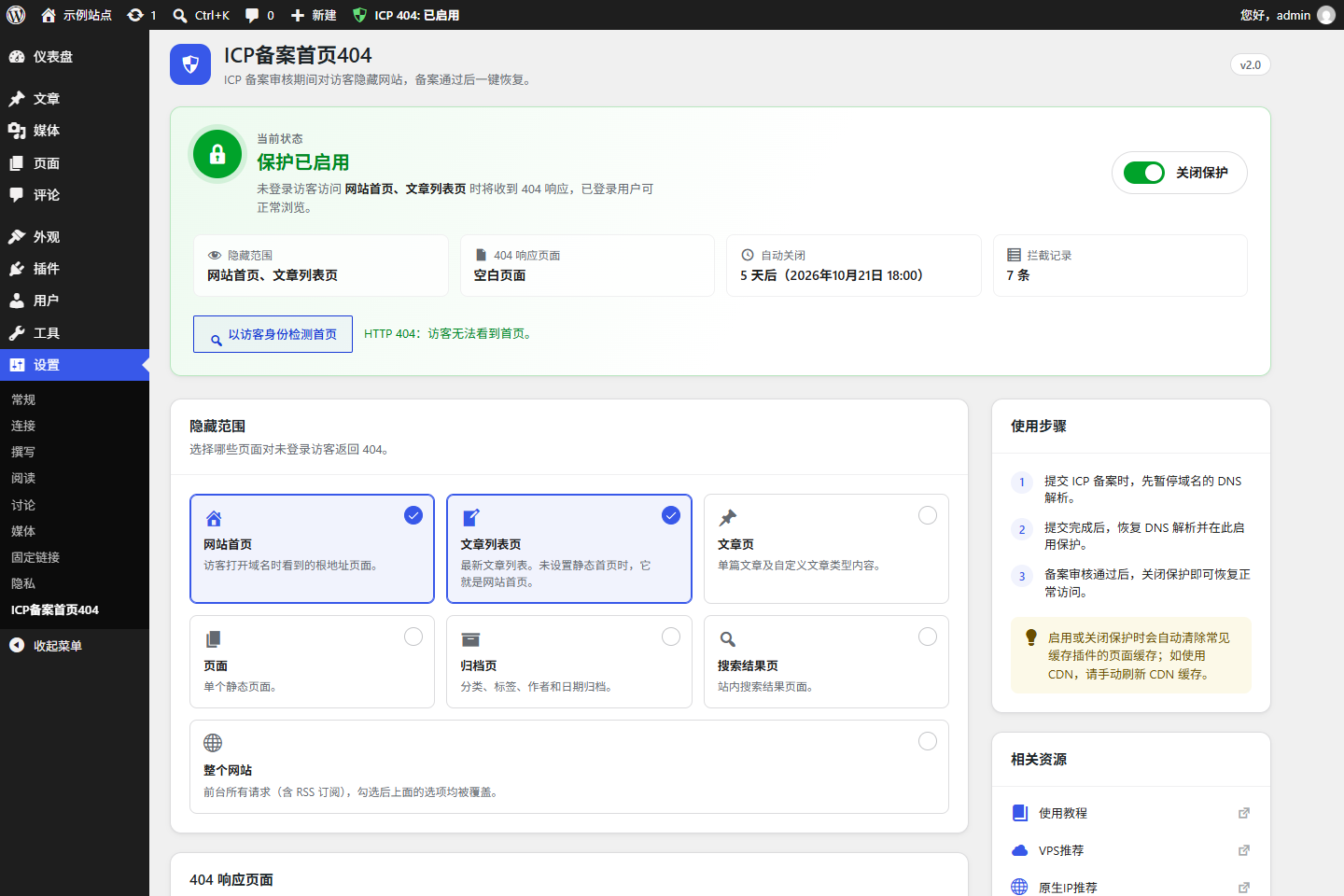
- A modern settings panel with a live status overview and a one-click on/off switch
- A “Check as a visitor” button that shows what anonymous visitors (and your CDN) actually get
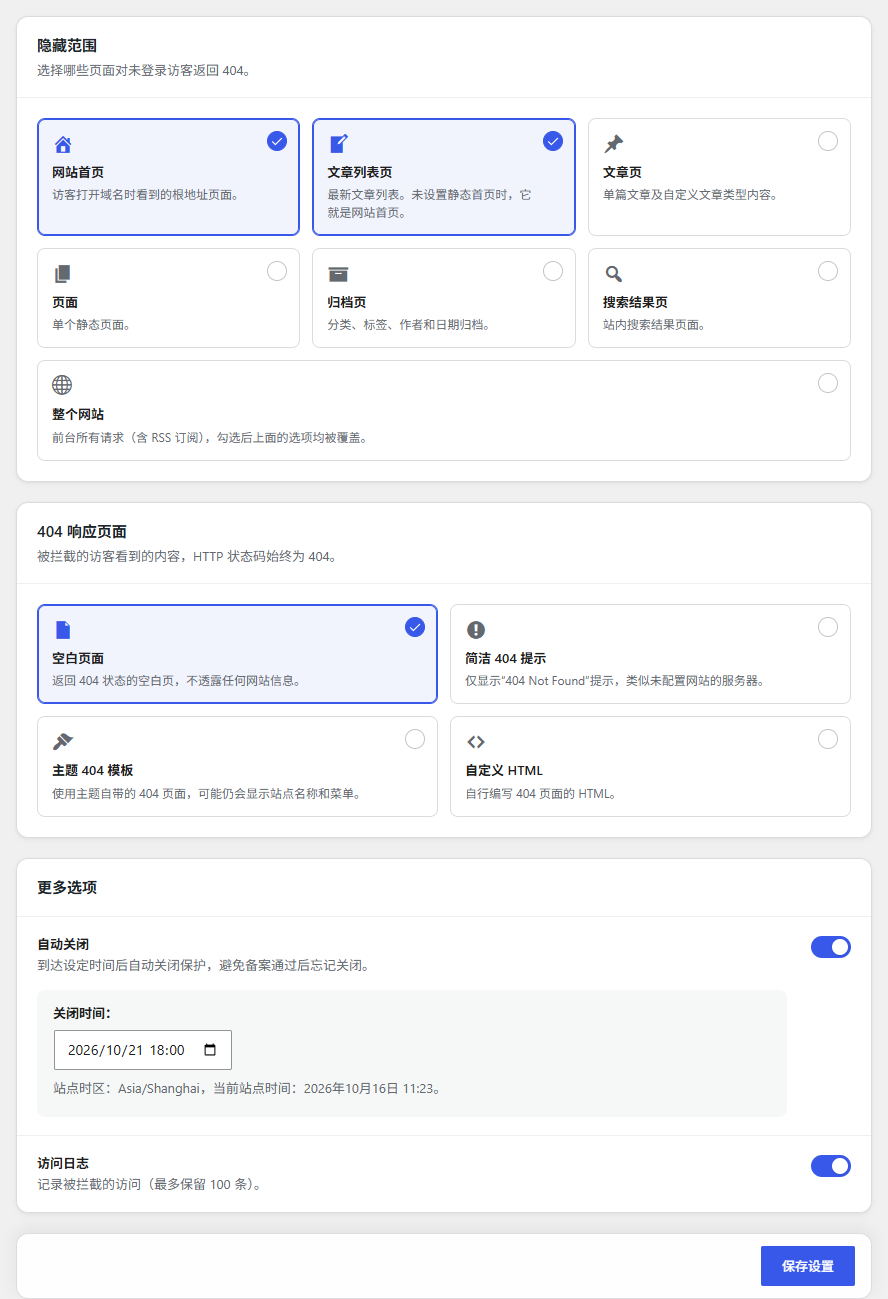
- A choice of HTTP status (404 Not Found, 403 Forbidden or 503 Service Unavailable) and page: blank page, simple error notice, your theme’s 404 template or custom HTML with a ready-made “site under construction” template
- An allow list: IP addresses and ranges, search engine crawlers (optional) and a secret preview link
- Page hiding by type: front page, blog posts page, single posts, pages, archives, search results or the entire site
- Scheduled auto-close, so protection turns itself off at a time you choose
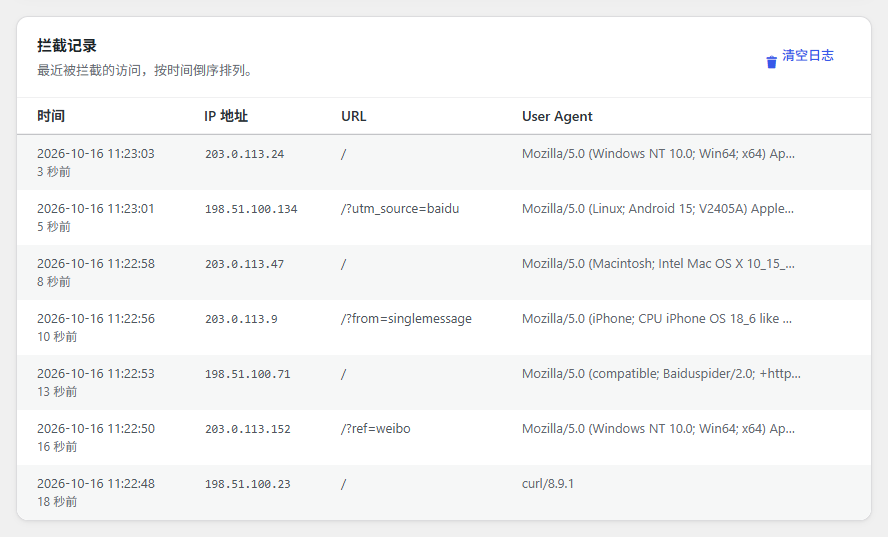
- Access logging of blocked visits
- Quick toggle in the admin toolbar and the plugins list
Compatible with classic and block themes.
Features
- 🔒 Hide pages during ICP registration (visitors who are not logged in only)
- 🔄 Returns a standard 404, 403 or 503 HTTP status code
- ✅ IP allow list with CIDR ranges and CDN / reverse proxy support
- 🕷️ Optionally let search engine crawlers through (Baidu, Google, Bing, Sogou, 360 and more)
- 🔗 Secret preview link to browse the site without logging in
- 🌏 Optionally block mainland China visitors only, so overseas customers and search engines are unaffected
- 🖥️ Nginx and Apache default error page look-alikes, plus “under construction”, “maintenance” and “coming soon” templates
- 📋 Dashboard widget with status, protection time, auto-close countdown and blocks in the last 24 hours
- 📥 Access log with visit counts, CSV export and optional IP locations
- ⚙️ Modern settings panel that follows your admin colour scheme and works on mobile
- 🔍 Built-in visitor check to confirm the homepage is really hidden
- 🧹 Purges the page cache of popular caching plugins when protection is switched (WP Super Cache, W3 Total Cache, WP Rocket, LiteSpeed Cache, WP Fastest Cache and more)
- 🧭 Always shows the WordPress toolbar on the front end while enabled, so you can see the status
- 📝 Custom page with an HTML code editor and a default “site under construction” template
- 📊 Access logging (max 100 entries)
- ⏰ Auto-close at a scheduled time (uses your site timezone)
- 🎯 Page hiding for front page, blog posts page, single posts, pages, archives, search results or the entire site
- 🚀 Quick toggle in the plugins list and admin toolbar
- 🔒 Nonce and capability checks on every action
- 🌍 Full translation support, Simplified Chinese included
- 🧩 Lightweight, no dependencies, no front-end assets
Usage
- When submitting your ICP filing, pause DNS resolution for the domain
- After submission, restore DNS and open
Settings → ICP Registration Home 404 - Choose the pages to hide and the 404 response, then save
- Click Enable protection
- Click Check as a visitor to confirm the homepage returns 404
- Once the filing is approved, click Disable protection (or let auto-close do it)
Logged-in users can still access the pages for content management.
External services
This plugin can use the ip.sb IP geolocation service to show where blocked visitors come from. The feature is off by default and only runs when an administrator turns on Show IP Locations in the plugin settings.
- What is sent: the IP addresses listed in the plugin’s access log (never private or local addresses). Lookups are made from the administrator’s browser while viewing the settings page.
- Service: ip.sb – Terms of Use, Privacy Policy
Author
yongnetwork
https://yongnetwork.com
Capturas de tela
Instalação
- Download and extract the plugin
- Upload the
icp-registration-home-404directory to/wp-content/plugins/ - Go to WordPress Admin Plugins Activate ICP Registration Home 404
- Navigate to
Settings → ICP Registration Home 404to configure
Perguntas frequentes
-
Will this affect search engines?
-
The plugin is intended for temporary use during ICP registration. Simply disable it after approval.
-
Will it affect the admin area or other pages?
-
No. It only affects the selected page types for visitors who are not logged in. The admin area and the login page are never blocked, whether protection is on or off. Front-end login pages from themes or plugins (such as Zibll’s
/user-sign) are detected and kept open as well, and you can list other always-open pages under Admin and Login Pages. -
Is cache/CDN supported?
-
Blocked responses are sent with no-cache headers and the
DONOTCACHEPAGEflag. When you switch protection on or off, the page cache of popular caching plugins is purged automatically. A CDN cache has to be refreshed manually. Use Check as a visitor to confirm the result. -
Which response should I choose?
-
404 Not Found is the most common choice during ICP filing. 503 Service Unavailable tells search engines the site is temporarily closed, so they retry later instead of dropping indexed pages. For the page, Blank Page reveals nothing and is the safest choice during the review. Theme 404 Template looks nicer but may still show your site name and menus.
-
What is custom page content?
-
You can provide your own HTML for the blocked page: either a complete HTML document, or just the body content. It starts from a “site under construction / undergoing ICP filing” template, and an empty field uses that template too.
-
How do I let my own computer or office through?
-
Add your IP address or range (such as
198.51.100.0/24) to the IP Allow List. The settings page shows your current IP with a one-click Add to allow list button. If your site sits behind a CDN or reverse proxy, also turn on Site Uses a CDN or Reverse Proxy so the real visitor IP is used. -
Yes. The admin area and login page are never blocked. Turn on the Preview Link and open it on any device: it lets you browse the site normally for 7 days. Create a new link at any time to make the old one stop working.
-
Should I let search engine crawlers through?
-
Only if you need to keep the site indexed. Crawlers are recognized by their User-Agent, which can be faked, and showing crawlers different content than visitors may be treated as cloaking by search engines. If you mainly want to keep your rankings, 503 Service Unavailable is usually the safer choice.
-
What is access logging?
-
When enabled, the plugin logs blocked access attempts including time, IP address, URL and user agent. Maximum 100 entries are stored.
-
How does auto-close work?
-
Set a time and the plugin turns protection off automatically, using the timezone in
Settings → General. This is useful to avoid forgetting to disable it after ICP approval. -
Can I hide other pages besides the homepage?
-
Yes. You can hide the front page, blog posts page, single posts, pages, archives and search results independently, or the entire site.
-
Can overseas visitors keep seeing the site?
-
Yes. Turn on Let Visitors Outside Mainland China Through: only visitors from mainland China are blocked. The country comes from a header your CDN adds (Cloudflare’s
CF-IPCountryby default; other CDNs can be configured). Requests without the header are blocked, so only use this when all traffic passes through that CDN. -
Which page looks the least suspicious to a reviewer?
-
Many site owners prefer Nginx Error Page or Apache Error Page: they reproduce the web server’s own default error page, as if no site had been deployed yet.
Avaliações
Não há avaliações para este plugin.
Colaboradores e desenvolvedores
“ICP Registration Home 404” é um programa de código aberto. As seguintes pessoas contribuíram para este plugin.
Colaboradores
ICP Registration Home 404” foi traduzido para 1 localidade. Agradecemos aos tradutores por suas contribuições.
Traduzir o “ICP Registration Home 404” para seu idioma.
Interessado no desenvolvimento?
Navegue pelo código, consulte o repositório SVN ou assine o registro de desenvolvimento por RSS.
Registro de alterações
2.4
- New: optionally block mainland China visitors only, using the country header from your CDN (Cloudflare’s CF-IPCountry by default), so overseas customers and search engines are unaffected
- New: Nginx and Apache default error page look-alikes
- New: “maintenance” and “coming soon” templates for the custom page
- New: dashboard widget with status, protection time, auto-close countdown, blocks in the last 24 hours and a one-click switch
- New: the status overview and admin notice show how long protection has been on
- New: repeat visits are merged into one log entry with a visit count
- New: export the access log as CSV
- New: optional IP locations in the access log (uses ip.sb, see External services)
2.3
- New: with the entire site hidden, the REST API is blocked for visitors too, so posts can’t be read through /wp-json
- The toolbar is only forced on for administrators, not for site members
- Bundled translations fill in strings that the translate.wordpress.org language pack doesn’t have yet
- Repeated visits from the same IP to the same URL are logged once a minute, sparing the database during scans
- Fix: switching auto-close off no longer clears the saved time
- Fix: the visitor check no longer says the homepage is visible when a CDN answers with a different error code
- Fix: the theme 404 template mode now sends the noindex header
2.2
- New: front-end login pages stay open while the site is hidden. Login pages moved by themes or plugins (such as Zibll’s /user-sign) are detected automatically, and you can list other always-open pages
- Responsive settings panel: uses the full width on large screens, two balanced columns on tablets, and compact layouts on phones, including the access log
- Simplified the status overview
- Fix: the “Leave site?” prompt no longer appears when nothing was changed
- Code cleanup for Plugin Check
2.1
- New: IP allow list with single addresses, CIDR ranges and notes; one click to add your current IP
- New: CDN / reverse proxy option to read the real visitor IP from proxy headers
- New: optionally let search engine crawlers through
- New: secret preview link to browse the site without logging in for 7 days
- New: choose the HTTP status: 404 Not Found (default), 403 Forbidden or 503 Service Unavailable
- New: custom HTML starts from a “site under construction” template, with a restore button
- Pages shown to allowed visitors are never cached, so the protection can’t leak through a page cache or CDN
- Added a WeChat tip code to the settings page
2.0.1
- Redesigned the author card on the settings page
- Links now point to yongnetwork.com
- New plugin icon and banner
- Removed an unused image, making the download about 390 KB smaller
2.0
- Redesigned settings panel: status overview, one-click switch, card layout, sticky save bar, admin colour scheme support and mobile layout
- New: “Check as a visitor” button to verify what anonymous visitors and your CDN get
- New: choose the 404 response: blank page, simple 404 notice, theme 404 template or custom HTML (with code editor)
- New: hide search results or the entire site
- New: purge popular page caches automatically when protection is switched; blocked responses are never cached
- New: enable/disable from the admin toolbar
- New: data is removed when the plugin is deleted
- New: updated Simplified Chinese translation, plus a
.l10n.phptranslation file for faster loading on WordPress 6.5+ - Fix: the Enable/Disable link in the plugins list did nothing
- Fix: auto-close used UTC instead of the site timezone, and only ran when a non-hidden page was visited
- Fix: new installs now hide the front page as well as the blog posts page, so sites with a static front page are covered
- Fix: the access log is no longer loaded on every page request
- Fix: proxy IP headers are validated before they are logged
- Fix: the reminder notice is only shown to administrators
- Tested up to WordPress 7.1
1.4
- Added translation support (enabled load_textdomain)
- Added CSRF protection for all forms and AJAX requests
- Added auto-close functionality with scheduled time
- Added status display in plugin list and admin bar
- Added custom 404 page content support
- Added access logging functionality (max 100 entries)
- Added quick toggle in plugin list
- Added extended page hiding options (homepage, front page, single posts, pages, archives)
- Added admin notices for active status and auto-close reminders
- Improved security with nonce verification
- Enhanced user experience with better status indicators
1.3
- Added plugin repair
1.2
- Added plugin description image
- Added Usage Tutorial / VPS Recommendation / Native IP Recommendation buttons
- Added “Settings” link on the plugins list page
1.1
- Added admin settings page
- Added enable/disable control
1.0
- Initial release
- Implemented homepage 404 during ICP registration