Descrição
Related Products for WooCommerce plugin shows custom-related products in WooCommerce. You can show related products by category, tags, or choose products to show as related products on the product details page of a specific product.
Showing related products recommendation brings customers’ attention to other products in your store that they might be interested in. This persuades them to try those products, thus resulting in an increase in the average order value.
You can also make use of the related product’s functionality in your WooCommerce store to suggest products to your customers and boost your sales.
Using this WooCommerce related products plugin you can:
- Disable default WooCommerce related products functionality
- Choose custom related products
- Option to set up related products for the entire store (by category, tags)
- Set up related products for individual products (by category, attributes, tags, or products)
- Exclude selected categories from showing as related products
- Exclude out of stock products from showing as related products
- Displays related products in the slider
- Customize the related products section on the front-end (heading, order of items, number of products, and more)
- Relate products by subcategory using a filter.
- Use WooCommerce related products shortcode ([wt-related-products product_id=”xx”]) to display related products for any posts/pages on your site
- Show the same set of related products for their translated versions as well when using WPML
- Override your theme’s default related products template
- Import related products using the default WooCommerce importer Learn more
✅ Tested OK with WooCommerce 8.7.0
Related Products for WooCommerce – Installation and Setup
You can learn about the installation and setup of the WooCommerce related products plugin with the help of this setup guide.
You can also check out this video to get a quick understanding of the plugin.
Compatible plugins
Related Products as a Powerful Marketing Tool
Displaying related products has become the best strategy for selling products. This feature has a great influence on making customers purchase from your store. Showing related products at each stage of a product purchase increases the stores’ profit multiple times. eCommerce giant Amazon’s success is the best example of the related products technique. It acts literally like a virtual salesperson who accompanies us with better recommendations of choices throughout our purchase in the store.
It is also seen that when customers keep getting recommendations while purchasing a product it increases their confidence in the product thereby simplifying the decision making process without spending a lot of time on it. Thus online purchasing would be a great option for people who hate shopping or who do not have the time or patience for it.
Different ways to Show Related products on your WooCommerce store
WooCommerce Related Products feature is one of the important sales tools available for store owners. “Related products” can be employed on your website in different forms. When built-in features in WooCommerce enable you to manually list related products like upsells and cross-sells, with the help of third-party plugins you can equip your store to automatically list related products depending upon the activities of customers on your WooCommerce store.
Up-sells – These products are shown on the product page as an alternative to the product customers have chosen to purchase. There will be an upgrade of the chosen product either in quality or price thereby persuading the customer to choose the better one. It comes under the default text “you may also like”.
Cross-sells – On contrary to up-sells cross-sells are displayed on the cart page under the title “you may be interested in”. These products would complement the products currently in the cart. On seeing this customers would feel an urge to buy the complementary products along with the products in their cart thereby selling more products for the store. Notifying customers about phone cases while purchasing a phone would be a perfect example of cross-selling.
About webtoffee.com
WebToffee creates quality WordPress/WooCommerce plugins that are easy to use and customise. We are proud to have thousands of customers actively using our plugins across the globe.
Imagens de tela
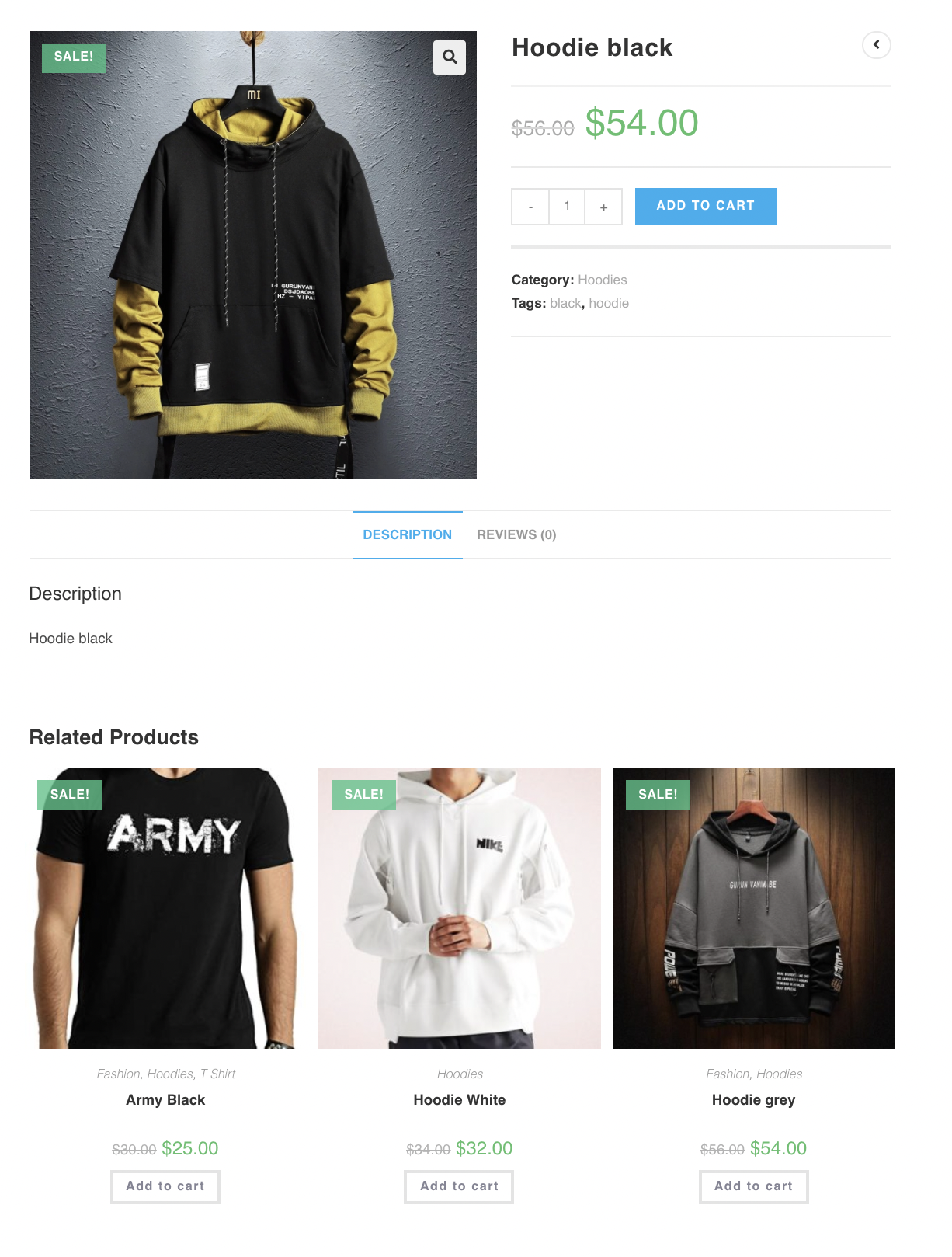
Product page - Related Products enabled.
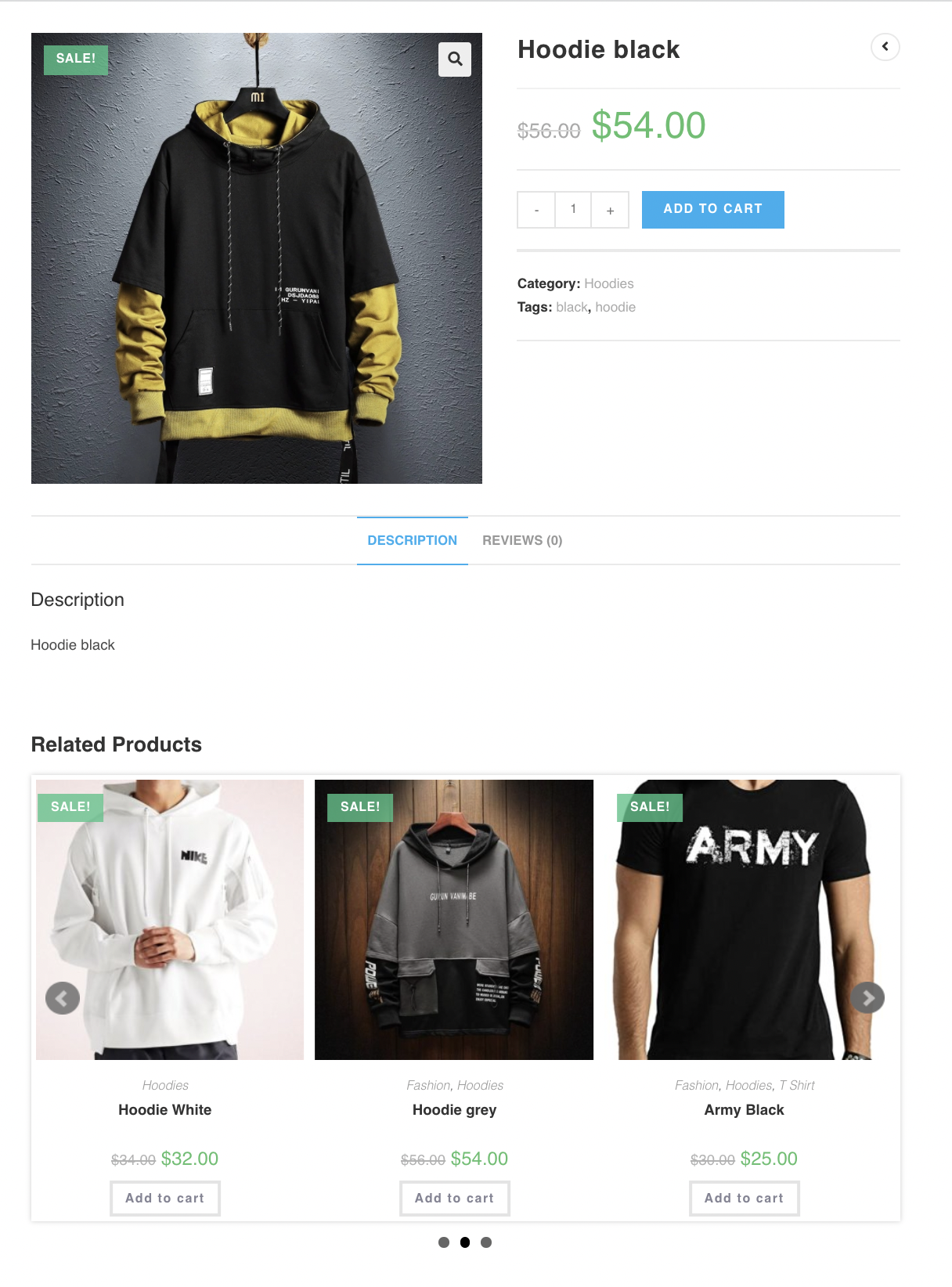
Related Products Slider.
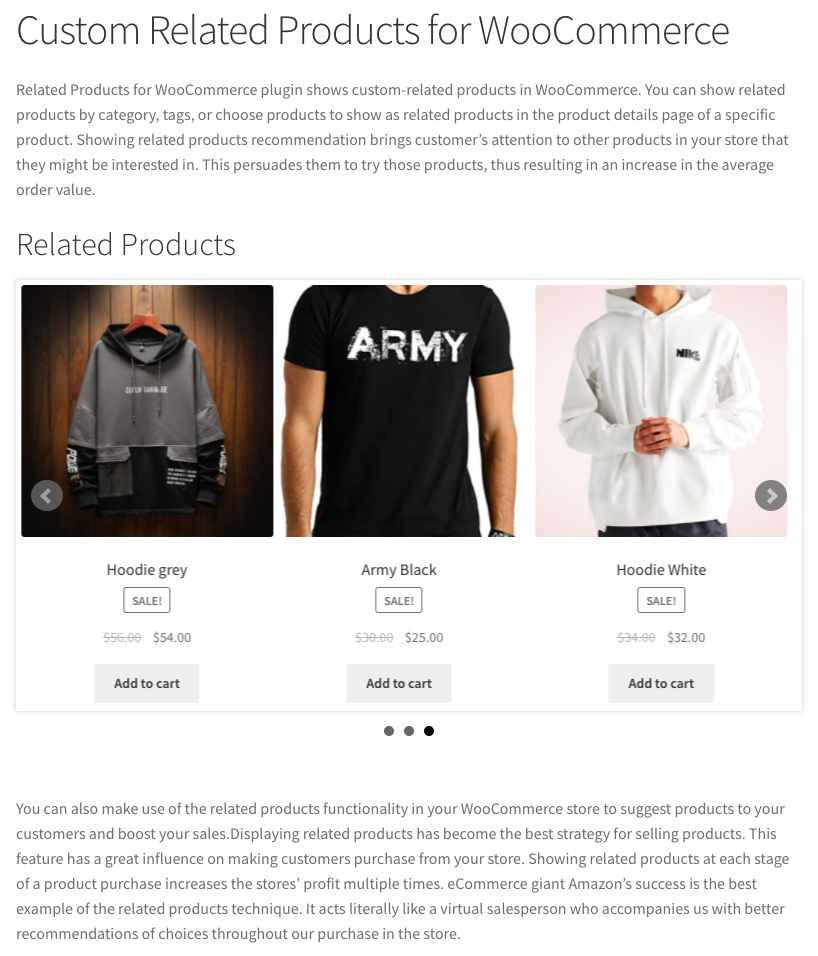
Related Products using shortcode in a blog post.
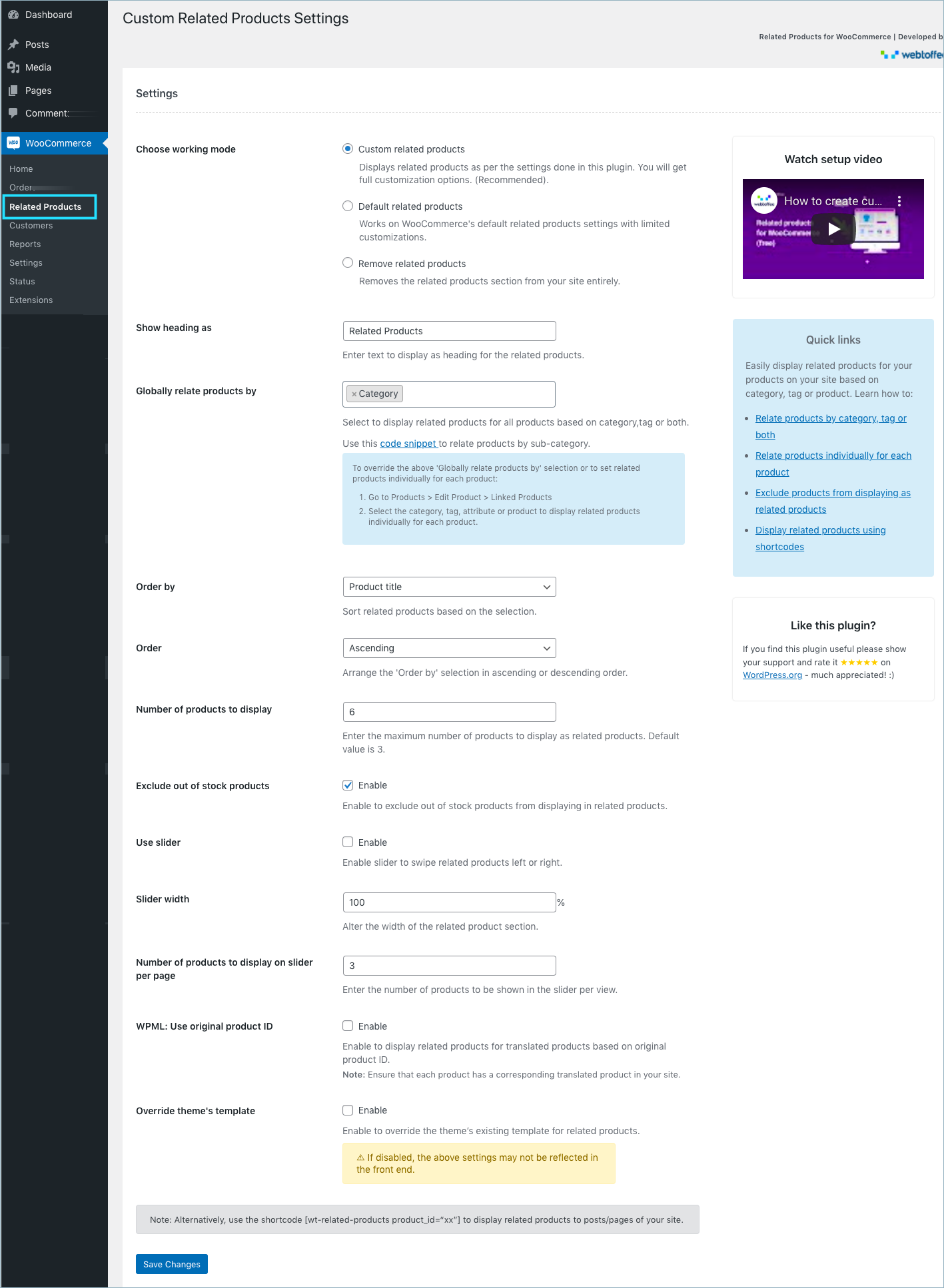
Custom Related Product - Settings.
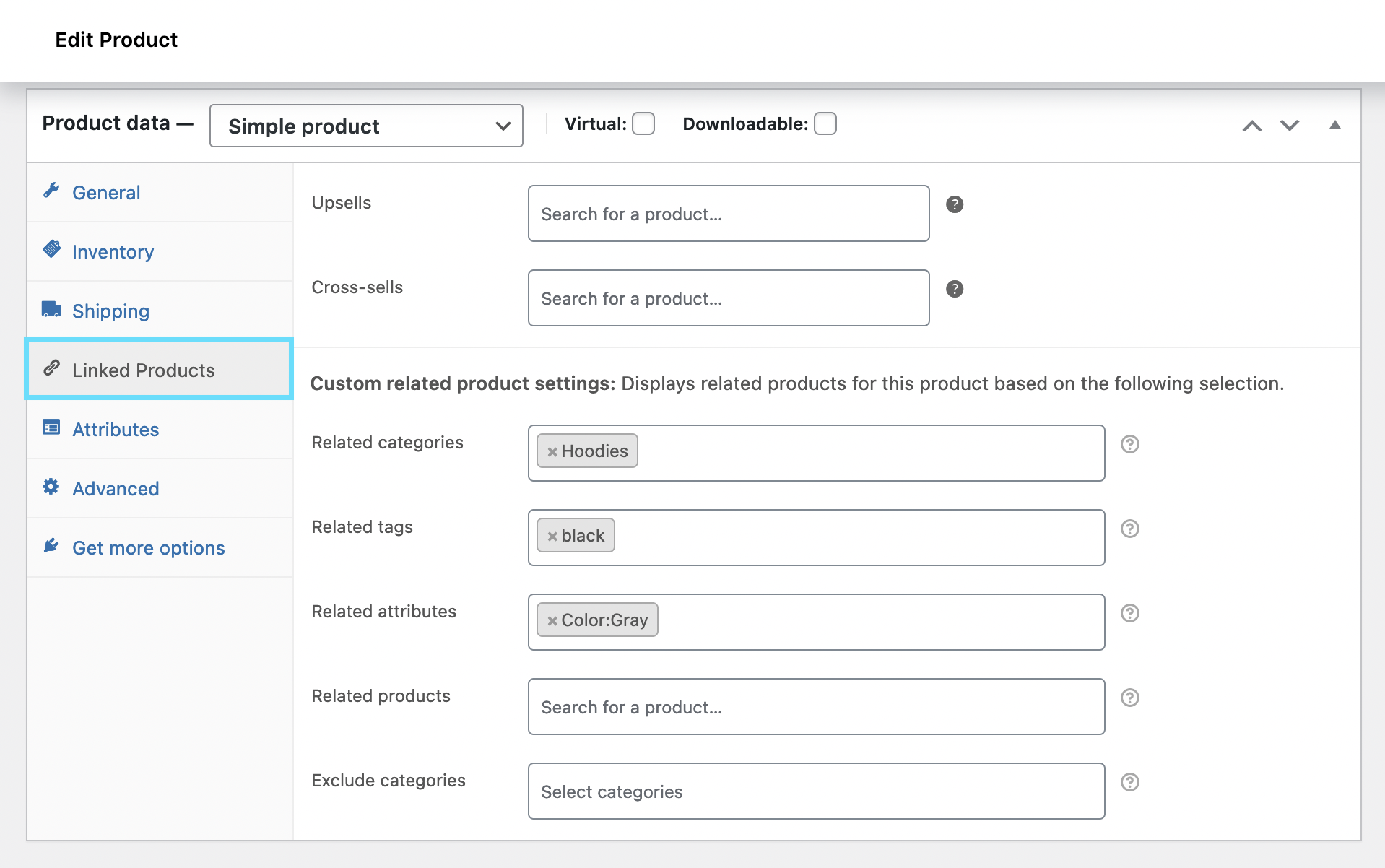
Related Products - Setup Page.
Instalação
The easiest way to install the plugin is to search and add it to your site directly. Below are the steps:
Log in to your WordPress dashboard, navigate to the Plugins menu, and click Add New.
In the search field, type Related products, then click Search Plugins. Once you’ve found us, click Install Now
Then, Activate the plugin.
Alternatively, you can download the related product plugin and upload it to your web server via the FTP application. Below are the steps:
Upload the plugin folder into the ‘wp-content/plugins/’ directory of your WordPress site.
Activate the plugin through the ‘Plugins’ menu in WordPress.
FAQ
-
Yes. You can export the related products, categories, and tags using the default WooCommerce exporter. Simply enable the option ‘Export custom meta’ while exporting. Learn more
-
Yes. It’s possible to import related products using product IDs. Learn more.
-
Yes. It’s possible to import related products using product SKUs. Learn more.
-
The plugin is seamlessly compatible with WP all import export. Learn more on how to export related products using WP all import export.
-
The plugin is seamlessly compatible with WP all import. Learn more on how to import related products using WP all import export.
Avaliações


Colaboradores e desenvolvedores
“Related Products for WooCommerce” é um software com código aberto. As seguintes pessoas contribuíram para este plugin.
Colaboradores
“Related Products for WooCommerce” foi traduzido para 2 localizações. Agradecemos aos tradutores por suas contribuições.
Traduzir “Related Products for WooCommerce” para o seu idioma.
Interessado no desenvolvimento?
Navegue pelo código, dê uma olhada no repositório SVN ou assine o registro de desenvolvimento via RSS.
Registro de alterações
1.5.4 09-04-2024
- [Fix] – PHP Warning on undefined variable
1.5.3 05-04-2024
- [Improvement] – Updated tooltips
- [Compatibility] – Tested OK with WordPress 6.5
- [Compatibility] – Tested OK with WooCommerce 8.7.0
1.5.2
- [Fix] – Added specification to related product’s carousal customization
- [Add] – Option to hide related products widget for products and categories
- [Compatibility] – Tested OK with WordPress 6.4.2
- [Compatibility] – Tested OK with WooCommerce 8.4.0
1.5.1
- [Fix] – Added changes to related products display on the cart page
- [Add] – Option to choose alternate custom slider arrow on related product widget
- [Enhancement] – Added Block theme Compatibility
- [Compatibility] – Tested OK with WordPress 6.4.1
- [Compatibility] – Tested OK with WooCommerce 8.2.2
1.5.0
- [Compatibility] – Tested OK with WordPress 6.3.1
- [Compatibility] – Tested OK with WooCommerce 8.1.1
1.4.9
- [Fix] – Displaying random products when no products to show.
- [Add] – Compatibility with HPOS.
- [Add] – Option to Exclude Backorder Products from Related Products.
- [Enhancement] – Implemented Ajax search instead of Select Categories
and Exclude Categories for related products. - [Compatibility] – Tested OK with WooCommerce 7.8.2
- [Compatibility] – Blocksy theme.
1.4.8
- [Compatibility] – Tested OK with WordPress 6.2
- [Compatibility] – Tested OK with WooCommerce 7.8
- [Enhancement] – Implemented Ajax search instead of Select Tag for related products.
- [Fix] – Undefined index error
- [Fix] – Out-of-stock products included in related products
1.4.7
- [Compatibility] – Tested OK with WP 6.1.1
- [Compatibility] – Tested OK with WC 7.3.0
- [Enhancement] – Related product slider style.
1.4.6
- [Fix] – Conflicts with default related product layout
1.4.5
- [Compatibility] – Tested OK with WP 6.0.2
- [Compatibility] – Tested OK with WC 6.9.3
- [Enhancement] – Related product slider style.
- [Enhancement] – Displays related products in cart page.
1.4.4
- [Compatibility] – Tested OK with WP 6.0
- [Compatibility] – Tested OK with WC 6.6.1
- [Enhancement] – Option to customize related product slider.
1.4.3
- [Compatibility] – Tested OK with WP 5.9.3
- [Compatibility] – Tested OK with WC 6.4.1.
- [Add] – Option to customize related product slider.
1.4.2
- [Compatibility] – Tested OK with WP 5.9.2
- [Compatibility] – Tested OK with WC 6.3.1.
- [Compatibility] – Import/Export plugins.
1.4.1
- [Add] – Orderby Price, Popularity, Rating.
- [Fix] – Fixed fatal error.
- [Fix] – Empty products when sub-category is not last in category tree (using filter ‘wt_crp_subcategory_only’ ).
- [Compatibility] – Tested OK with WC 6.1.1.
- [Compatibility] – Tested OK with WP 5.9.
1.4.0
- [Add] – Relate products by ‘attribute’ in product edit page.
- [Add] – Filter ‘wt_crp_subcategory_only’ to relate products by sub category (if ‘category’ is selected in “Globally relate products by” option).
- [Enhancement] – Heading translation using WPML.
- [Compatibility] – Tested OK with WC 5.8.
1.3.9
- [Add] – Multiselect option for ‘Related by’.
- [Add] – Order option (ASC/DESC).
- [Add] – WPML: Use original product ID for showing related products.
- [Add] – Option to override theme’s template.
- [Enhancement] – Working mode option.
- [Enhancement] – UI style and Help texts.
1.3.8
- [Add] – “Order by” feature.
- [Add] – New filters “wt_crp_min_slides”, “wt_crp_max_slides” & “wt_crp_slider_center_align” added for slider customisations.
- [Compatibility] – Tested OK with WC 5.6.
- [Fix] – Custom related products are not shown if the theme has its own template for related products.
1.3.7
- [Add] – Option to display related products by category/tags for all products (global option “Related by”).
- [Compatibility] – Tested OK with WC 5.5.
- [Compatibility] – Tested OK with WP 5.8.
- [Fix] – Invalid response while adding shortcode from editor.
- [Tweak] – Display problems with slider.
- [Enhancement] – Help text modifications.
1.3.6
- Tested OK with WC 5.4.1
- Added option to exclude categories from related products.
- Readme updates.
1.3.5
- Tested OK with WC 5.3.0
- Added option to exclude out of stock products from related products.
- Bug fix with the notification to disable “WooCommerce default related products”.
- Typo correction in filters: wt_related_products_odrerby to wt_related_products_orderby & wt_related_products_odrer to wt_related_products_order
- Improved help texts.
1.3.4
- Tested OK with WC 5.2.0
1.3.3
- WC and WP latest tested OK
1.3.2
- Warning fix
1.3.1
- Filter for auto slide
add_filter( 'wt_custom_related_products_slider_autostart', '__return_true' );.
1.3.0
- WC 5.0 Tested OK.
1.2.9
- Readme updates.
1.2.8
- Added new option for slider.
1.2.7
- Tested OK with WooCommerce 4.9.2
1.2.6
- Tested OK with WC 4.9.0
- Bug fix with related products shortcode
[wt-related-products product_id="xxx"] - Fix HTML validation issues.
1.2.5
- FAQ updated
1.2.4
- Added shortcode for related products
[wt-related-products product_id="19"]
1.2.3
- Added Italian translation and updated German translation
- Plugin screenshots updated
1.2.2
- Added option to select number of related products
- Improved page loading speed
1.2.1
- Added option to select related tags with custom related products
1.2.0
- Added option to select related tags with default related products
- Tested OK with WC 4.8.0 and WP 5.6
1.1.9
- [bugfix] – related product disappears if only product category added
- Tested OK with WC 4.6.1
1.1.8
- Added option to select related categories
- Tested OK with WC 4.5.2
1.1.7
- Tested OK with WC 4.3.3 and WP 5.5
1.1.6
- Tested OK with WC 4.2.2
- Filter for heading
wt_related_products_heading
1.1.5
- Tested OK with WC 4.0.1
- Tested OK with WP 5.4
1.1.4
- Tested OK with WC 4.0.0
1.1.3
- Tested OK with WC 3.9.2
1.1.2
- Custom Sorting for related products
1.1.1
- Tested OK with WC 3.7.1
1.1.0
- Tested OK with WC 3.6.5
- Applied filter wt_related_products_number for number of products to display.
1.0.9
- Tested OK with WC 3.6.4
- Updated translations
1.0.8
- Tested OK with WC 3.6.2 and WP 5.2.
1.0.7
- Tested OK with WooCommerce 3.5.5
1.0.6
- content updates.
1.0.5
- content updates.
1.0.4
- Tested OK with WooCommerce 3.5.1 .
1.0.3
- WC Tested up to 3.4.5 updates.
1.0.2
- Content updates
1.0.1
- Uninstall feedback and translation added.
1.0.0
- Initial commit