

Descrição
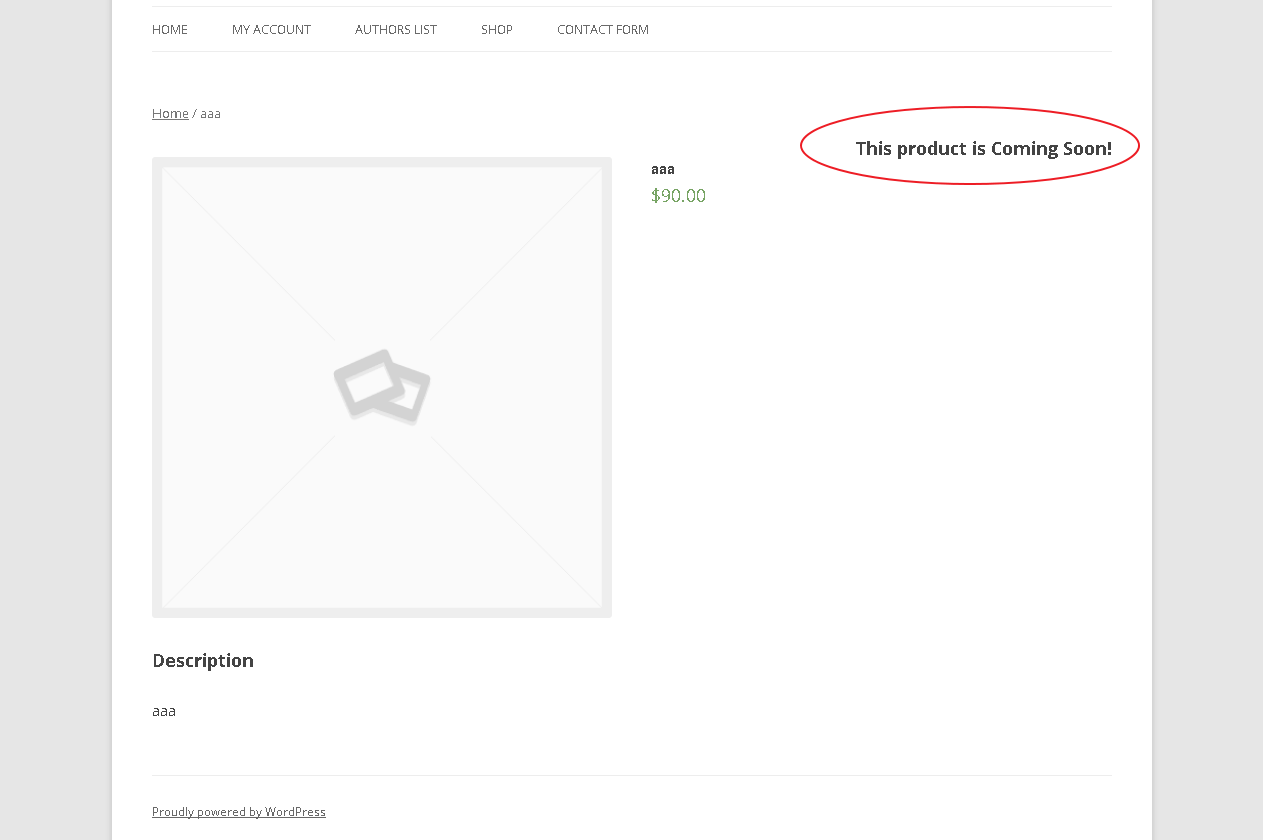
Products Coming Soon for WooCommerce lets customers see products before they can buy them. Tick one box on a product, and the Add to Cart button is replaced by a “Coming Soon” message, in the shop, on the product page, and in block themes too.
Free features
- One-click Coming Soon in the Publish box of every product.
- Automatic release on an arrival date and time (uses WP-Cron, released to the minute, no page-load queries).
- Stock based availability: show Coming Soon while stock is at or below a number you choose.
- Purchase protection: coming soon products cannot be bought, even through direct add-to-cart links.
- Works with classic and block themes, WooCommerce Cart/Checkout blocks and High-Performance Order Storage (HPOS).
- Custom message with an
{date}placeholder, custom button label, message position and CSS. - Optional badge on product images and hide price for coming soon products.
- Product list column and filter to see what is coming soon at a glance.
- Site-wide Coming Soon mode: a clean placeholder page for visitors (503 + noindex for SEO) while logged-in team members see the real site. No core files are modified.
- Lightweight: no Bootstrap, no icon fonts, no external requests.
Pro features
The Pro build adds a pro folder to the plugin. It is plug and play: when the folder exists Pro features switch on, and without it the free features run as usual.
- “Notify me when available” email capture with automatic release emails and one-click unsubscribe.
- Live countdown timer on product pages and the site-wide page.
- Quick Edit and Bulk Edit for coming soon status and arrival date.
- Variation level coming soon status and arrival date.
- Per-product custom messages.
- Subscriber manager with CSV export, plus WordPress privacy export/erase integration.
- Site mode extras: secret preview link, IP allow-list, launch countdown, email capture.
- Shortcodes:
[woo_coming_soon product_id="123"]and[woo_cs_countdown product_id="123"].
Developers
Useful hooks: woo_cs_is_coming_soon (filter), woo_cs_notice_html (filter), woo_cs_notice_message_raw (filter), woo_cs_product_released (action), woo_cs_product_saved (action), woo_cs_site_bypass (filter).
Capturas de tela



Instalação
- Upload the plugin to
/wp-content/plugins/woo-coming-soonor install it from the Plugins screen. - Activate it.
- Edit any product and tick Coming Soon in the Publish box.
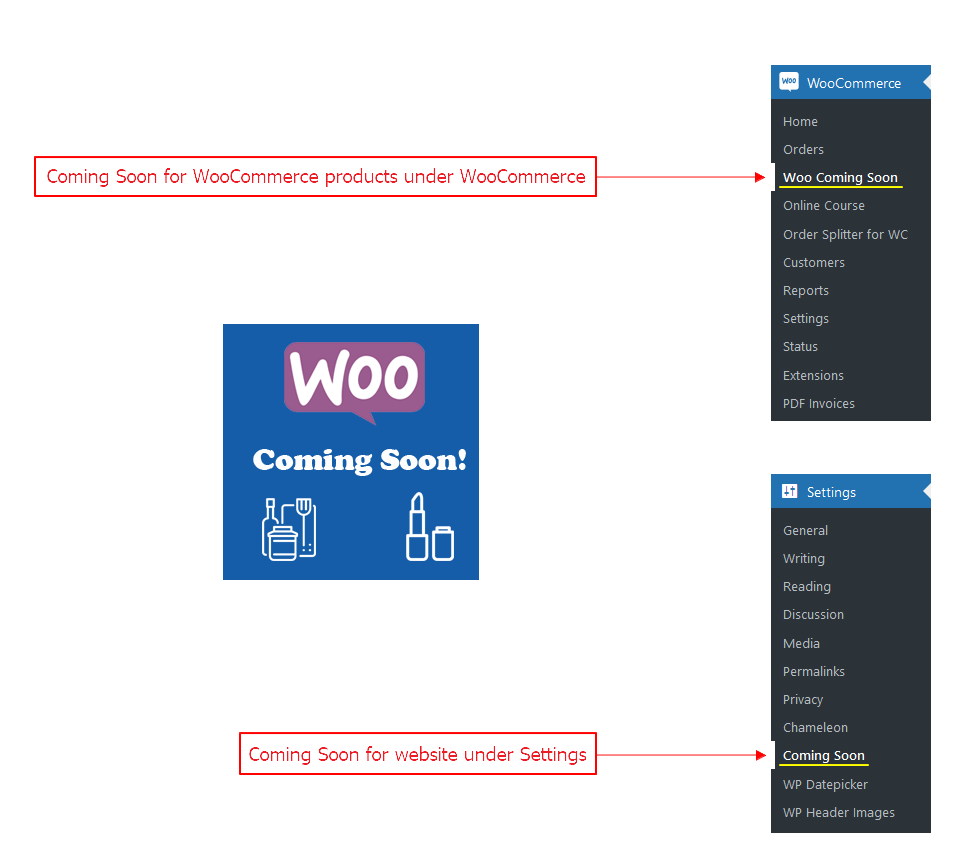
- Optional: go to WooCommerce > Coming Soon to customise the message, or Settings > Coming Soon for site-wide mode.
Perguntas frequentes
-
How do I mark a product as Coming Soon?
-
Open the product, tick Coming Soon in the Publish box and click Update. To release it automatically, enable “arrival date” in WooCommerce > Coming Soon > Products and choose a date and time.
-
Can customers still buy a coming soon product?
-
No. The product becomes non-purchasable, the add to cart form is removed, and direct add-to-cart URLs are rejected.
-
Does it work with block themes?
-
Yes. In block themes the message replaces the Add to Cart Form block automatically.
-
How does stock based availability work?
-
Enable it in the settings, then turn it on per product and choose a number. While the stock is at or below that number the product is shown as Coming Soon.
-
How does Coming Soon mode for the whole website work?
-
Go to Settings > Coming Soon (or the Site Coming Soon tab), turn it on and save. Visitors see a placeholder page; anyone logged in who can edit posts sees the real site. The page is sent with a 503 status and noindex so search engines do not index it.
-
Do I still need the Chameleon plugin?
-
No. Site mode is built in. If an older version left a modified index.php in your WordPress root, the plugin restores the standard file automatically on the first admin visit.
-
I used the Android app. What happened to it?
-
Version 2.0 removes the app’s REST API because its authentication could be bypassed. Product management now happens in wp-admin.
-
How do I enable Pro?
-
Install the Pro build over the free plugin. The
profolder is detected automatically. Note that updating from WordPress.org replaces the plugin folder, so update Pro from your Pro download. -
Is any data sent to third parties?
-
No. The free plugin makes no external requests. Pro stores subscriber emails in your own database only.
Avaliações


Colaboradores e desenvolvedores
“Products Coming Soon for WooCommerce” é um programa de código aberto. As seguintes pessoas contribuíram para este plugin.
Colaboradores

Traduzir o “Products Coming Soon for WooCommerce” para seu idioma.
Interessado no desenvolvimento?
Navegue pelo código, consulte o repositório SVN ou assine o registro de desenvolvimento por RSS.
Registro de alterações
2.0.0
- Rebuilt from the ground up for WordPress 7.1 and current WooCommerce.
- Security: removed the companion-app REST API (its login check could be bypassed) and deleted any keys it created.
- Security: nonces and capability checks on every save; all output escaped; all SQL removed or prepared.
- Security: the plugin no longer overwrites the site’s root index.php; the standard file is restored for sites affected by older versions.
- Fix: add to cart can no longer be re-enabled by other plugins’ purchasable filters, and direct add-to-cart URLs are blocked.
- Fix: a past arrival date is honoured instantly, and releases run via WP-Cron instead of a query on every page load.
- New: built-in site-wide Coming Soon mode (503 + noindex), no Chameleon plugin required.
- New: block theme support, WooCommerce Cart/Checkout blocks and HPOS compatibility.
- New: Overview tab, product list filter, badge, hide price,
{date}placeholder, native date and time pickers. - New: plug and play Pro directory (notify me, countdown, quick/bulk edit, variations, subscribers).
- Removed ~4.5 MB of unused assets (Bootstrap, Font Awesome, jQuery UI, QR code library).
- Requires WordPress 6.0+ and PHP 7.4+.
1.5.0
- Fix: Allow reviews for products marked as Coming Soon.
1.4.6
- Fix: hook position displayed in the left corner after updating.
Older changelog entries are available in the plugin’s previous releases.