
Descrição
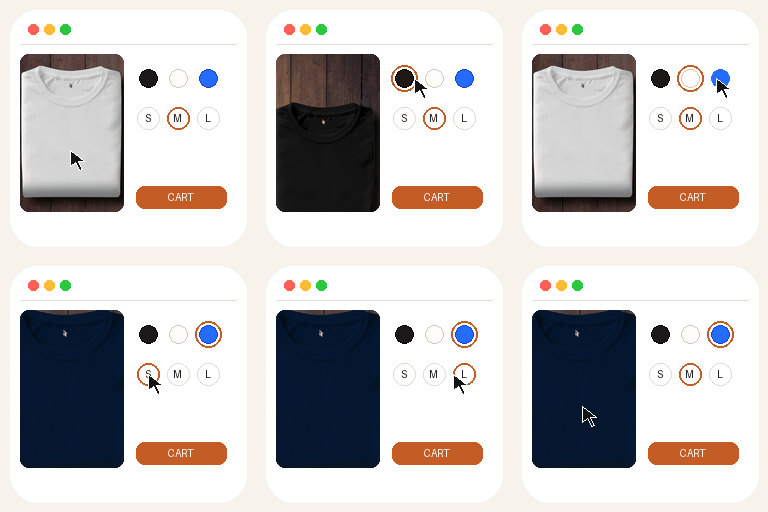
SparkSwipe Variation Swatches replaces WooCommerce variation dropdowns with color, label, and button swatches on variable products. It uses WooCommerce’s native product attributes and variations as the source of truth — it does not duplicate products, stock, or prices.
Why merchants like it
- Easy — a setup wizard configures attributes in a couple of minutes
- Beautiful — three style presets (Minimal, Classic, Modern) with shape, size, and gap controls
- Fast — frontend CSS and JS load only on product pages
- Compatible — works with WooCommerce’s variation form, prices, images, and add to cart
Free features
- Color, label, button, and dropdown swatches
- Circle, square, and rounded shapes
- Size, spacing, borders, and selected states
- Basic term-name tooltips
- Global attribute configuration
- Product-level overrides (display + shape)
- Disable or cross unavailable variations
- Reset variations
- Setup wizard / tutorial and live preview
- System status report
- Translation-ready and RTL-friendly
Pro (separate plugin)
Additional features are available in a separate Pro plugin (not included here):
- Image swatches and image + text
- Radio, dual color, and gradient types
- Term images and secondary colors
- Per-product swatch image overrides
- Shop, category, and search swatches
- Blur / hide unavailable options
- Custom CSS
This free plugin is fully functional on its own.
Capturas de tela


Instalação
- Install and activate WooCommerce.
- Upload this plugin or install it from Plugins Add New.
- Activate SparkSwipe Variation Swatches.
- Complete the tutorial (or skip it and open SparkSwipe Swatches in the admin menu).
- Assign colors to attribute terms under SparkSwipe Swatches Attributes.
Perguntas frequentes
-
Does this replace WooCommerce variations?
-
No. The original variation selects stay in the form (visually hidden). Swatches update those selects so price, stock, images, and add to cart keep working.
-
Will I lose settings if I deactivate the plugin?
-
No. Settings are kept by default. You can choose “Delete all plugin data” under Settings Uninstall before removing the plugin.
-
Can I style one product differently?
-
Yes. Edit a variable product and open the SparkSwipe Swatches tab. Turn on Override global styles to change display and shape per attribute.
-
Are image swatches included in Free?
-
Image swatches (and term images) are part of the separate Pro plugin. Free includes color, label, button, and dropdown.
Avaliações
Não há avaliações para este plugin.
Colaboradores e desenvolvedores
“SparkSwipe Variation Swatches for WooCommerce” é um programa de código aberto. As seguintes pessoas contribuíram para este plugin.
Colaboradores
Traduzir o “SparkSwipe Variation Swatches for WooCommerce” para seu idioma.
Interessado no desenvolvimento?
Navegue pelo código, consulte o repositório SVN ou assine o registro de desenvolvimento por RSS.
Registro de alterações
1.1.4
- Refresh WordPress.org banners, animated icon, and catalog-style screenshots
1.1.3
- Use one distinctive sparvasw prefix for PHP names, options, REST, and meta writes
1.1.2
- Finish the SparkSwipe rename in remaining admin, tutorial, and license strings
1.1.1
- Keep in-stock swatches clickable on first paint — they no longer grey out before WooCommerce finishes checking combinations
- Select numeric attribute values (7, 10, 00) reliably instead of treating them as numbers
- Do not prefix custom product attributes with pa_ when that taxonomy does not exist
- Re-bind swatches when a variation form is loaded over AJAX or after a fragment refresh
- Clicking the selected swatch clears it, matching WooCommerce’s reset behaviour
- Declare compatibility with WooCommerce 11.1 and keep swatch boxes sized correctly in Safari
- Restore the first-run tutorial redirect after activation
1.1.0
- Rename to SparkSwipe Variation Swatches for WooCommerce (distinctive slug)
- Remove locked Pro feature code from the free plugin (Guideline 5)
- Replace the Pro feature list with swatch previews, per-style preview dialogs, and a Free/Pro comparison table; drop all leftover “locked” styles and scripts
- Harden REST term permissions for WooCommerce attribute taxonomies only
- Prefix options, meta, REST, and handles with sparvasw_
- Show a skeleton placeholder while the Attributes and System Status panels load, instead of a blank screen
- Show a retry prompt when a panel fails to load, instead of leaving the screen empty
- Align the dashboard stat values and card buttons, and restore the marker on the Pro feature list
- Group short settings fields into rows, style the section headings consistently, and match checkboxes and radios to the plugin palette
- Give the border colour pickers visible labels
- Use Aptos / Segoe UI / Tahoma for titles and all admin and swatch text
1.0.23
- Product Smart Swatches tab: shorter copy, clearer override switch contrast
- Product Image display: per-term swatch image overrides with live preview (Pro)
- Admin URL slug fixes for the dashboard and tutorial links
1.0.0
- Initial release.