Descrição
PHOTOPRESS is an integrated suite of image management and gallery presentation features that photographers can use to build photography centric websites. The plugin allows you to create beautiful designed image galleries as well as extract, store and publish any EXIF/IPTC/XMP meta-data embedded in your images.
The broader goal of PHOTOPRESS is to make WordPress easy to use for photographers by bringing critical image management and presentation features together into a single, modern, and free plugin. Features currently include:
GALLERY LAYOUTS
PhotoPress adds Masonry, Rows and Mosaic layouts to the WordPress Gallery block.
- Masonry arranges images in columns of a width you set. Each image keeps its own height.
- Rows arranges images in rows of a height you set. Each image keeps its own width.
- Mosaic fills each row to the gallery’s width. Each image keeps its own proportions.
- Any gallery can open the full-screen slideshow when an image is clicked.
- Images load at the size the layout shows them, so pages load faster.
- An image deleted from the Media Library is removed from the galleries that show it.
Documentation: Gallery Layouts.
FULL-SCREEN SLIDESHOW
- Clicking an image in a gallery opens it in a slideshow that fills the window.
- Visitors move through the images by clicking either half of the image, swiping or using the arrow keys.
- It can show a row of thumbnails, and the image’s caption, title, description and a link to its page.
Documentation: Full-Screen Slideshow.
GALLERY SLIDESHOW BLOCK
- The Gallery Slideshow block shows a gallery on the same page as a slideshow, placed anywhere on the page.
- Clicking an image in the gallery shows it in the slideshow.
- It can show thumbnails, captions and autoplay, with a slide or fade between images.
- It can hide the gallery so only the slideshow shows.
Documentation: Gallery Slideshow Block.
CHILD PAGES GALLERY
- The Child Pages Gallery block shows the pages under a page as a gallery, each page as an image linked to it. It makes a good index of gallery pages.
- Updating PhotoPress converts the older Child Pages block to a Child Pages Gallery.
Documentation: Child Pages Gallery.
IMAGE METADATA MANAGEMENT
- Image taxonomies: PhotoPress files each uploaded photo under its camera, lens, location, keywords and other metadata, with an archive page for each.
- You choose which metadata fields become taxonomies, including keyword hierarchies from Lightroom or Capture One and any IPTC field.
- The Image Metadata block shows an image’s terms and exposure details on its page.
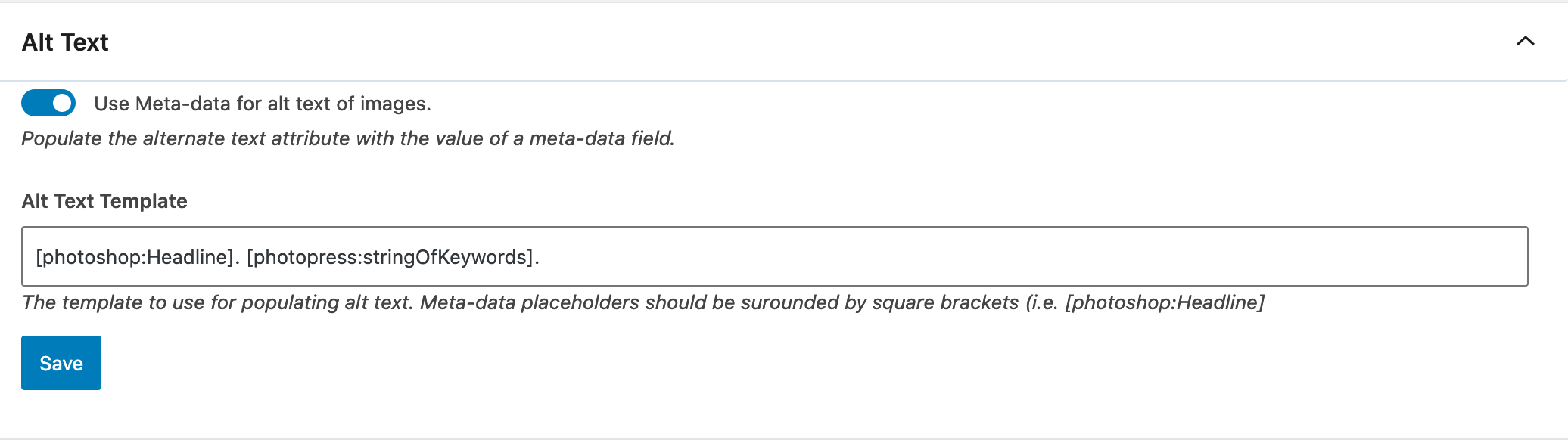
- Alt text and descriptions are written from each photo’s metadata when it is uploaded.
- Licensing metadata is embedded in your image files and published as structured data on the pages that show them.
- Changes can be applied to the images already in the Media Library, in the background.
Documentation: Image Taxonomies, Alt Text and Descriptions, Licensing.
IMAGE TEMPLATES
PhotoPress adds two templates to block themes: Image Archives and Image Pages. They need WordPress 6.7 or later. If the theme has its own template for these pages, the theme’s is used.
- Image Archives shows a keyword’s, camera’s or other term’s images in a gallery, with links to more pages.
- Image Pages shows an image with its caption, description, terms and exposure details.
- You can edit both templates in the Site Editor.
- The Taxonomy Gallery block shows the latest images, or the images of a chosen term, in any PhotoPress layout.
Documentation: Image Templates and Blocks, Taxonomy Gallery.
IMAGE AND TAXONOMY PAGES
- Attachment pages: a switch that publishes, or stops publishing, a page for each image in the Media Library.
- Image taxonomy pages: a switch that publishes, or stops publishing, an archive page of images for each keyword, camera and other term.
Documentation: Attachment and Taxonomy Pages.
SEARCH
- Images in search results: a switch that adds images to the site’s search results, found by their titles, captions, alt text and terms.
- Block themes get an Image Search template that shows the images found in a gallery and lists the matching posts and pages below it.
- With Relevanssi, PhotoPress has Relevanssi index images with their alt text and taxonomy terms.
Documentation: Image Search.
SEO
- PhotoPress adds image pages and image taxonomy archive pages to the site’s sitemap, whether it is WordPress’s own, Jetpack‘s or Yoast SEO‘s.
- With WordPress’s own sitemap, PhotoPress adds an image sitemap to it: each image with the page it is shown on.
- Unneeded archives: a switch that turns off author, date and post format archives, each on its own, redirecting them to the home page and leaving them out of the sitemap.
Documentation: Sitemaps.
PAGE CACHE
On a site with a Varnish page cache and the Proxy Cache Purge plugin, PhotoPress purges the cached pages that show an image, a gallery or an image taxonomy term when it changes.
Documentation: Page Cache.
IMAGE SIZES
- You set the quality WordPress saves JPEG and WebP images at.
- You can turn off image sizes your site does not use, so WordPress stops making them.
- Save and regenerate updates the images already uploaded, in the background.
Documentation: Image Sizes.
OFFLOAD MEDIA
These features need the WP Offload Media plugin.
- You set how long browsers and the CDN cache offloaded images.
- A replaced image is cleared from CloudFront, so visitors see the new file.
- A replaced image’s old files can be deleted from cloud storage.
Documentation: Offload Media and CDN.
Development
Our development motto is “do no harm” which means that we leverage the patterns outlined in WordPress Core and the Gutenberg editor as opposed to creating proprietary features that impede the overall usability of WordPress.
PHOTOPRESS is actively developed on Github. Please file any bugs, feature, or support requests on Github!
Capturas de tela


Blocos
Este plugin disponibiliza 5 blocos.
- Image Metadata The metadata of the current image: its taxonomy terms, such as keywords, people and places, and the exposure details from its file.
- Search Summary On search results, a label, the search terms as the page's title, and the number of images found.
- Search Posts On a search with images, the posts and pages found, a few, with a link to all of them; and a note when nothing was found.
- Attachment Image The image of an image (attachment) page, at the size you choose, with its caption.
- Gallery Slideshow A slideshow of the images in a gallery on the same page. Clicking an image in the gallery shows it in the slideshow.
Perguntas frequentes
What are the image taxonomies’ IDs?
A taxonomy’s ID is the name WordPress stores its terms under. Themes (taxonomy-{ID}.php templates), search plugins such as Relevanssi, the Image Metadata block and the widget refer to taxonomies by it. It never changes, even when the taxonomy is renamed.
The six Standard Metadata taxonomies always have these IDs: photos_camera, photos_lens, photos_city, photos_state, photos_country and photos_keywords.
Every other taxonomy, added in the settings, gets pp_ and its singular name: pp_genre for Genre, pp_person for a People parent keyword. Taxonomies made by earlier versions keep the IDs they have, such as photos_people for People.
Avaliações
Colaboradores e desenvolvedores
“PhotoPress” é um programa de código aberto. As seguintes pessoas contribuíram para este plugin.
ColaboradoresPhotoPress” foi traduzido para 1 localidade. Agradecemos aos tradutores por suas contribuições.
Traduzir o “PhotoPress” para seu idioma.
Interessado no desenvolvimento?
Navegue pelo código, consulte o repositório SVN ou assine o registro de desenvolvimento por RSS.
Registro de alterações
2.2.0
- Added an SEO tab, with the sitemap in use and a switch to turn off author, date and post format archives.
- Added a class per row to the Image Metadata block, and spans around its colons and commas, for theme styling.
- Fixed pages turned off in Pages & Search staying in the page cache.
2.1.1
- Fixed file names and titles showing over the images on image archive pages.
2.1.0
- Added caption styles for galleries: as the theme styles them, below each image, on hover, or hidden.
- Added an image sitemap to WordPress’s own sitemap.
- Fixed file names and titles showing over the images in galleries without a PhotoPress layout.
2.0.1
- Fixed infinite scroll stopping early on image taxonomy pages.
2.0.0
- Added the Child Pages Gallery and Taxonomy Gallery variations of the Gallery block.
- Added the Attachment Image, Search Summary and Search Posts blocks.
- Added image page, image taxonomy page and image search templates for block themes.
- Added images in search results, with Relevanssi support.
- Added image pages and image taxonomy pages to the site’s sitemap.
- Added page cache purging with Proxy Cache Purge.
- Added thumbnails to the Gallery Slideshow block.
- Added removal of deleted images from galleries.
- Added Enable Media Replace support.
- Changed the Metadata tab to a card for each of Image Taxonomies, Alt Text, Description and Licensing.
- Changed the full-screen slideshow to drop jQuery and Owl Carousel.
- Renamed the Image Taxonomies block to Image Metadata. It also shows exposure details.
- Removed the legacy Child Pages block. Existing ones are converted into Child Pages Galleries.
- Fixed background jobs stopping after their first batch.
- Fixed custom taxonomy archives listing draft and private posts.
- Fixed several security and memory issues.
1.9.0
- Image Sizes tab: the quality JPEG and WebP sizes are saved at, 92 by
default. WordPress’s own is 82, which can show on detailed photographs;
sizes made after updating are at 92 unless set otherwise. Every
registered image size is listed, from WordPress, the theme and plugins,
with a switch to stop making it. “Regenerate image sizes” makes every
image’s sizes again from its original in the background, a few images at
a time, resting between batches and waiting while the server is busy. - License embedding writes the license into an image’s metadata without
re-encoding the image, for JPEG, PNG, WebP, GIF, TIFF, HEIC and AVIF, so
uploads keep the pixels they were exported with. Imagick is used only
where that is not possible, and is no longer required. - License embedding replaces a Web Statement the file already has, rather
than adding a second, and keeps the file’s Web Statement or Licensor when
no setting replaces it. - Masonry and Mosaic galleries no longer move as a page loads: they are
laid out before the page is first shown. Masonry no longer loads the
masonry and imagesloaded scripts. - Gallery images, and Gallery Slideshow images, download a file of the
size they are shown at, rather than one for the full width of the window. - The full-screen slideshow no longer enlarges an image beyond its own
size, and shows images that have only one size. - Gallery block: the Columns setting is hidden under the Masonry, Rows and
Mosaic layouts, which set their own, and a gallery can be switched back
to the plain gallery from the block’s variation switcher.
1.8.0
- Gallery Slideshow: a Caption max width setting, a share of the
slideshow’s width, 75% by default. Captions stay at least about 50
characters wide, and the full width on phones. Existing slideshows get
the default; set it to 0 for captions as wide as the slideshow. Where the
window’s height limits an image, the image gives up the height a
narrower caption needs. - Gallery Slideshow: works with dynamic galleries (WordPress 7.1), showing
the images attached to the post. - Meta-data tab: “Re-read image metadata” re-reads every image’s
taxonomies, alt text and description from its file. It runs in the
background in batches, with its progress and a Cancel button on the tab. - Offload Media tab, where WP Offload Media is installed: its status, where
files are stored and served from, how long browsers and the CDN keep
offloaded images (by default 1 day, then 1 hour while checking for a new
one), and a button to clear the CloudFront cache. - Fixed: the Slideshow tab had no Caption Padding field, and the Meta-data
tab no Description template field.
1.7.3
- Fixed: in the Mosaic gallery layout, some images hung over the row below
at wider window widths. Each image now fills its place in the row exactly,
at its own proportions.
1.7.2
- Fixed: in the Gallery Slideshow, the previous image briefly showed behind
the new one after clicking to the next slide. - Gallery Slideshow: the slideshow keeps one height for every slide, as tall
as its tallest image at full width, so the page below does not move. That
height, caption included, now stays within the visible window (on phones,
the height visible with the browser bars shown). Shorter images are
centered in it. - Fixed: the full-screen slideshow’s Caption Padding setting had no field on
the Slideshow settings tab.
1.7.1
- Fixed: on sites with a page cache, pages cached before updating to 1.7.0
could load the new slideshow script with the old page, and clicking a
gallery image no longer opened the full-screen slideshow until the cache
expired. Those pages now work as they did before the update.
1.7.0
- New: Masonry, Rows and Mosaic layouts for the WordPress Gallery block, as
block variations. They look the same in the editor as on the site. Existing
PhotoPress galleries keep working, and can be converted from the block’s
Transform menu. - New: the full-screen slideshow can be turned on for any Gallery block, and
image captions can be hidden. - New: Gallery Slideshow block, an inline slideshow of a gallery on the same
page. Clicking an image in the gallery shows it in the slideshow, with a
button to return to the gallery. Captions can go below, left or right of
the image, with adjustable padding. “Hide the gallery” shows visitors only
the slideshow. - New: Image Taxonomies block, the block version of the “Display Taxonomies”
widget, for block themes. Choose which taxonomies to show and whether terms
link to their archives. - Full-screen slideshow: opens at once on the image that was clicked, rather
than after about two seconds. With a mouse, clicking anywhere on the left or
right half goes back or forward, with a large arrow showing which. A new
Caption Padding setting. Wide images no longer run under the arrows. - Full-screen slideshow fixes: several slideshow galleries on one page now
work independently; clicking an image in a second gallery opens that image;
galleries without the slideshow are no longer taken over; arrow keys only
act while the slideshow is open; closing no longer leaves an invisible layer
over the page; images with a single size no longer show as broken
thumbnails. - Metadata: a rewritten XMP reader that keeps values it used to lose (some
locations, credits, licensing and contact details) and reads Extended XMP. - Alt text on upload no longer produces “. .” when a template’s fields are
empty, and hierarchical keywords such as “person:Name” contribute their
value. - Settings are validated by type when saved, and a failed save shows why.
- Security: slideshow settings are escaped in the page. The image taxonomies
are available to the block editor for users who can edit posts, and remain
hidden from the public REST API. - Fixed: a fatal error when the plugin was installed from source without
building its scripts.
1.6.0
- Requires WordPress 6.6 or later.
- Uploads use far less memory and time reading image metadata. Only the part
of the file that holds the metadata is read, rather than the whole image. - The block editor scripts are rebuilt with the current WordPress tooling. The
editor script is about 25 times smaller, and it now uses the copies of React
and the WordPress libraries already loaded by WordPress. - Fixed: the camera name was left blank when it was recorded only in XMP
metadata and not in EXIF. - Fixed: metadata was ignored in files that begin with an XMP packet, such as
.xmp sidecar files. - Fixed: a PHP 8 deprecation notice raised on every upload.
1.5.2
- Fixed: uploads failed with “The server cannot process the image” whenever
license information was configured. This was a 1.5.1 regression; images that
failed to upload can simply be uploaded again.
1.5.1
- License embedding no longer requires the ExifTool binary. It now uses Imagick,
which WordPress already relies on for image handling. This removes about 26MB
from the plugin and means license embedding works on hosts that disable exec(). - Existing metadata is preserved when license information is written. Titles,
captions, keywords, ratings and any other XMP a photographer had embedded are
kept intact; previously the license fields were the only thing that could be
written without risking the rest. - Fixed: the Web Statement of Rights setting was ignored and a placeholder value
was embedded instead. If you have that setting configured, re-upload affected
images to correct them. - Fixed: a settings field using the “none” control registered without a valid
type. - Fixed: a PHP 8 deprecation notice raised when embedding license metadata.