Title: LaTeX2HTML
Author: Van Abel
Published: 23 janeiro, 2013
Last modified: 19 maio, 2026
---
Pesquisar plugins
Este plugin **não foi testado com os 3 lançamentos principais mais recentes do WordPress**.
Ele pode não ser mais mantido ou suportado e pode ter problemas de compatibilidade
quando usado com versões mais recentes do WordPress.

# LaTeX2HTML
Por [Van Abel](https://profiles.wordpress.org/van-abel/)
[Baixar](https://downloads.wordpress.org/plugin/latex2html.2.6.3.zip)
* [Detalhes](https://br.wordpress.org/plugins/latex2html/#description)
* [Avaliações](https://br.wordpress.org/plugins/latex2html/#reviews)
* [Instalação](https://br.wordpress.org/plugins/latex2html/#installation)
* [Desenvolvimento](https://br.wordpress.org/plugins/latex2html/#developers)
[Suporte](https://wordpress.org/support/plugin/latex2html/)
## Descrição
LaTeX2HTML permite à você escrever em um blog como em um documento LaTeX. Você pode
simplesmente copiar e colar código-fonte TeX diretamente no editor WP. O post parecerá
um documento no formato `amsart`. Ele suporta muitos comandos LaTeX, incluindo ambientes,
como “theorem” por exemplo, e referências no estilo BibTeX.
### Funções Principais
* Usa [MathJax](https://www.mathjax.org) para renderizar fórmulas matemáticas.
* Converte LaTeX bruto (quase todos os commandos do amsart) para marcação HTML+
CSS.
* Quase tudo pode ser personalizado, porém as configurações padrão funcionam perfeitamente.
Por exemplo, existe suporte para \newcommand
### Licença
Boas notícias! Esse plugin é livre para todos! Uma vez que é fornecido sob a GPL2,
você pode usá-lo gratuitamente em seu blog pessoal ou comercial.
## Capturas de tela
* [[
* Configuração MathJax
1. Configuração LaTeX
* [[
* Configuração BibTeX
* [[
* Suporte
* [[
## Instalação
1. (Recomendado: Instalação Automática) Se você instalar a partir da página de plugins
do WordPress, poderá procurar por `latex2html` e clicar em Instalar.
2. (Instalação Manual) Descompacte o arquivo zip (você obterá o diretório `latex2html`)
e solte-o dentro do diretório `wp-content/plugins/` da sua instalação do WordPress
3. Então ative o Plugin na página de Plugins.
4. (Opcional) Faça o[Exemplo de Teste](https://wordpress.org/extend/plugins/latex2html/faq/)(
veja as Perguntas Frequentes).
## Perguntas frequentes
Qualquer questão pode ser respondida lá (vá para o painel `suporte`
1. Depois que você atualizar para o WordPress 5.0 ou mais recente, no novo editor
de blocos, você pode trocar para o modo Editor de código em vez do Editor visual
usando `Ctrl+Shift+Alt+M`. Ou você pode usar o [Editor Clássico](https://wordpress.org/plugins/classic-editor/)
### Manual do Usuário (incluso na página de configuração do LaTeX2HTML)
O Manual do Usuário completo contém:
```
1. How to Write the Basic Information of Your Post
2. How to Write Section, Subsection and Subsubsection
3. Itemize and Enumerate: How to List Stuffs
4. The Footnote
5. The Color Scheme: How to Colorize You Content
6. The Figure Environment
7. How to Write a Theorem
7.1. Definition, Lemma, Proposition, Theorem, Corollary, Remark, Proof
7.1.1. Basic Usage of Environments
7.1.2. Assign a Name for Your Theorem
7.1.3. The Proof Environment
7.1.4. More Examples of Environments
7.2. The Problem, Answer Environments
7.3. The Exercise Environment
7.4. The Quote Environment
8. Auto Numbering and Referring Back
8.1. Auto Numbering and Referring Back to Equations
8.1.1. How to Refer back to Equation Number
8.1.2. My Suggestion on “How to Write Equations”
8.2. Auto Numbering and Referring Back to Environments
8.2.1. Auto Numbering of Environments
8.2.2. Referring Back to Environments
8.3. Referring Back to Section
9. BibTeX Citations
9.1. How to Add BibTeX Data
9.2. How to Cite
10. Last Words and Feed Back
10.1. How to Jump Between Links
11. How to Get it?
```
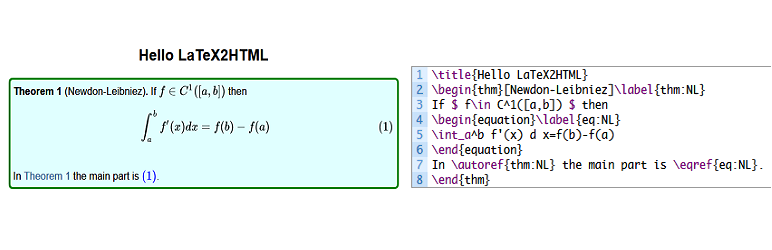
### Um Exemplo de Teste
Para um teste, você pode fazer o seguinte:
```
\title{Hello LaTeX2HTML}
\begin{thm}[Newdon-Leibniez]\label{thm:NL}
If $f\in C^1([a,b])$ then
\begin{equation}\label{eq:NL}
\int_a^b f'(x) d x=f(b)-f(a)
\end{equation}
In \autoref{thm:NL} the main part is \eqref{eq:NL}.
\end{thm}
```
Adicione um novo post (ele deve estar no modo `Editor de código` em vez de `Editor
visual`), copie o código dentro do seu novo post e então pré-visualize-o.
De fato, depois de um tempo, você verá que é quase como se estivesse escrevendo
seu documento `TeX` em vez de um post!
### How can I report security bugs?
You can report security bugs through the Patchstack Vulnerability Disclosure Program.
The Patchstack team help validate, triage and handle any security vulnerabilities.
[Report a security vulnerability.](https://patchstack.com/database/vdp/latex2html)
## Avaliações

### [Плагин удаляет любой текст после символа %](https://wordpress.org/support/topic/%d0%bf%d0%bb%d0%b0%d0%b3%d0%b8%d0%bd-%d1%83%d0%b4%d0%b0%d0%bb%d1%8f%d0%b5%d1%82-%d0%bb%d1%8e%d0%b1%d0%be%d0%b9-%d1%82%d0%b5%d0%ba%d1%81%d1%82-%d0%bf%d0%be%d1%81%d0%bb%d0%b5-%d1%81%d0%b8%d0%bc%d0%b2/)
[slavaaaaa](https://profiles.wordpress.org/slavaaaaa/) 16 maio, 2026 2 respostas
Всё бы хорошо, но… этот Плагин удаляет любой текст после символа “%”, несмотря на
то, что в строке нет формул! Весь контент сайта получается нужно переделывать под
это ограничение, заменять обычный процент на что-то другое…

### [This is one of the best plugins ever](https://wordpress.org/support/topic/this-is-one-of-the-best-plugins-ever/)
[gene172](https://profiles.wordpress.org/gene172/) 3 novembro, 2023
This is one of the best plugins ever for both LaTeX and WordPress users. While the
LaTeX part is close to perfection, references still need some refinements to match
the quality of the main part.

### [Very straightforward](https://wordpress.org/support/topic/very-straightforward-2/)
[ellankavi](https://profiles.wordpress.org/ellankavi/) 3 janeiro, 2019
I tried a couple of LaTeX plugins for my version of WP (v5), none of which worked
as expected (I didn’t try very hard to find out why). But this one worked straight
out of the box. Very intuitive and easy to use. Kudos!

### [The best LaTeX plugin in WordPress I’ve seen](https://wordpress.org/support/topic/the-best-latex-plugin-in-wordpress-ive-seen/)
[guiqiqi](https://profiles.wordpress.org/guiqiqi/) 16 novembro, 2018
Awesome! Thanks author of this plugin. You can just copy your LaTeX code into your
new article without any edition, and this plugin will help you to generate a beatiful
output.

### [真的很棒的一个插件!](https://wordpress.org/support/topic/%e7%9c%9f%e7%9a%84%e5%be%88%e6%a3%92%e7%9a%84%e4%b8%80%e4%b8%aa%e6%8f%92%e4%bb%b6%ef%bc%81/)
[XZYQvQ](https://profiles.wordpress.org/konnyakuxzy/) 13 janeiro, 2018 1 resposta
我找了很多的数学公式的插件 基本上没有哪个支持这种格式的行内公式: $E=mc^2$ 唯独那个
qicklatex支持,但那个只能图片显示公式,速度慢 突然发现这个插件,特别好!完美支持!
谢谢作者!

### [Some suggestions for improvment](https://wordpress.org/support/topic/some-suggestions-for-improvment/)
[cding](https://profiles.wordpress.org/cding/) 25 dezembro, 2017 2 respostas
A nice plugin! [ link redacted ] And I have some suggestions for improvement: (1)
The reference cannot be download; (2)I know that you have develop functions for
preview latex codes, why not share it as another plugin or integrate them into this
plugin; (3)Add a option: A blank line for new line.
[ Leia todas as 9 avaliações ](https://wordpress.org/support/plugin/latex2html/reviews/)
## Colaboradores e desenvolvedores
“LaTeX2HTML” é um programa de código aberto. As seguintes pessoas contribuíram para
este plugin.
Colaboradores
* [ Van Abel ](https://profiles.wordpress.org/van-abel/)
LaTeX2HTML” foi traduzido para 2 localidades. Agradecemos aos [tradutores](https://translate.wordpress.org/projects/wp-plugins/latex2html/contributors)
por suas contribuições.
[Traduzir o “LaTeX2HTML” para seu idioma.](https://translate.wordpress.org/projects/wp-plugins/latex2html)
### Interessado no desenvolvimento?
[Navegue pelo código](https://plugins.trac.wordpress.org/browser/latex2html/), consulte
o [repositório SVN](https://plugins.svn.wordpress.org/latex2html/) ou assine o [registro de desenvolvimento](https://plugins.trac.wordpress.org/log/latex2html/)
por [RSS](https://plugins.trac.wordpress.org/log/latex2html/?limit=100&mode=stop_on_copy&format=rss).
## Registro de alterações
#### 2.6.3
* Line comments now start only at `%%` (double percent); a single `%` is kept in
plain text (e.g. percentages like `95%`).
* Still protects `%` in URLs, escaped `\%`, and HTML attributes when removing `%%`
comments; `\documentclass`/`\usepackage` optional trailing comments use the same`%%`
rule.
#### 2.6.2
* Improved LaTeX-style comment handling (`%`) to ignore content after `%` in plain
text while preserving it inside HTML tags.
* Fixed handling of `%` inside URLs, escaped `\%`, and HTML attributes like `style
="..."`.
#### 2.6.1
* Resolved an issue where the MathJax configuration was breaking the formula display
by outputting it as raw text.
* Applied proper sanitization using wp_kses to ensure safe and correct rendering
of MathJax formulas.
#### 2.6.0
* This version includes important improvements to file handling, caching, and security.
It is recommended to back up your bibtex data before upgrading. After upgrading,
check the plugin settings to ensure everything is configured correctly.
* Improved file handling for bibtex data by utilizing the WordPress filesystem
API, which enhances compatibility and provides better error handling compared
to direct file operations.
* Implemented caching for bibtex queries to improve performance by reducing the
number of database queries and speeding up the retrieval of bibtex items.
* Enhanced security measures by sanitizing and validating user inputs more thoroughly,
including the use of nonces for form submissions and verification of user permissions.
* Updated the plugin’s version number to 2.6.0 and changed the last update date
to 01/10/2025.
* Modified the bibtex data writing process to append data to the bibtex.bib.txt
file using the WordPress filesystem API, ensuring proper file permissions and
error handling.
* Added support for PHP 8.0 by adjusting callable syntax in the l2h_bibtex_item_cleanup
function.
* Improved the handling of LaTeX commands and styles by escaping output to prevent
potential security vulnerabilities.
* Enhanced the parsing of footnotes in LaTeX content, including better handling
of nested braces and LaTeX references.
* Updated the LaTeX2HTML settings page to include nonce verification for added
security and to ensure that only authorized users can access the settings.
* Improved the display of error messages and notifications on the settings page
by using WP_Error objects and displaying user-friendly messages.
* Updated the plugin’s localization support by using esc_html__ and other escaping
functions to ensure that translated text is properly sanitized.
* Made various code improvements and optimizations, such as using prepared statements
for database queries and simplifying conditional statements.
#### 2.5.5
* Security Fix: Patched a Cross-Site Scripting (XSS) vulnerability related to unsanitized
user inputs in URL parameters.
* Sanitized and validated `$_GET['status']` and `$_GET['message']` parameters to
prevent potential XSS attacks.
* Implemented prepared statements for database queries to enhance security and
prevent SQL injection risks.
* Escaped output of user-supplied data to ensure safe display in the admin interface.
#### 2.5.4
* Fixed issue with the “%” character where it was replaced with “%” instead of
being ignored, leading to unintended replacements.
* Adjusted behavior to correctly preserve occurrences of “%” and ignore content
after “%” until the end of the line.
#### 2.5.3
* Fixed erroneous replacement of “\partial” with “tial”.
* Corrected processing limitation for figure environments, ensuring all occurrences
are processed correctly.
#### 2.5.2
* Fix the bug: “linebreak in matrix”.
#### 2.5.1
* Fix the `%` bug, ensuring that it is not ignored when using `\%`.
#### 2.5.0
* Improved the process of title/author/address/date
* Fix the abstract formart
* Add support fot `\textit`
* Support more fixable figure environment
* Support `wrapfigrue` environment
* Support `\pageref`
* Support `flushright`, `flushleft` environment
* Support `description` environment
* Improved the clean up of preamble
* Improve the process of `$bibitem` is empty
* Add new css for default options
#### 2.4.2
* fix the figure caption bug
#### 2.4.1
* fix the figure process bug
* improve the clean of preamble
* fix the unable to uninstall bug
#### 2.4.0
* fix the Error: Non-static method l2h_bibtex_class::l2h_bibtex_keychecker() cannot
be called statically
* fix the Warning: Undefined variable $footnotelist
#### 2.3.9
* I forgot to update the tag of version.
#### 2.3.8
* Test compatibility with php 7.4, please note that php8 or upper will not work
* Fix the `includegraphics` function, where the url of media is fixed
#### 2.3.7
* Teste de compatibilidade até WordPress 5.1
* Correção do erro do comando `\footnote`
* Adição da miniatura para o plugin
#### 2.3.6
* Teste de compatibilidade até WordPress 5.0
#### 2.3.5
* Adição do suporte para `\href{link}{text}` `\url{link}`
* Atualização da configuração padrão para mathjax cdn: `https://cdnjs.cloudflare.
com/ajax/libs/mathjax/2.7.5/MathJax.js?config=TeX-AMS-MML_SVG.js`
* Atualização da configuração padrão para o CSS LaTeX através da adição do símbolo
QED no final de Prova:
```
.latex_proof::after{
content: "\220E";
color: gray;
text-align: right;
display: block;
font-size: 1.2em;
}
```
* Manual do usuário atualizado
#### 2.3.4
* Correção do erro de origem do link na página de configurações
#### 2.3.3
* Atualização do modelo de tradução
#### 2.3.2
* Correção menor na CSS do Manual
#### 2.3.1
* Correção menor: alguns erros de digitação no manual
#### 2.3.0
* Correção da CSS para listas aninhadas
* Adição do Manual do usuário na página de configurações
* Adição das instruções para tradução
#### 2.2.1
* Teste de compatibilidade até a versão mais nova do WordPress (atualmente 4.9.1)
#### 2.2.0
* Remoção do processo de atualização duplicado. Agora os usuários só precisam confirmar
ao atualizar a partir de uma versão antiga (menor que 1.2.3) para uma mais nova
* Remoção do arquivo de idioma sob `lang/`. Conservado somente `latex2html.pot`,
pois nós podemos usar a tradução online fornecida pela WordPress
* Atualização do guia de tradução online (sob `Suporte & Créditos` -> `Como fazer
a tradução para seu idioma`)
#### 2.1.4
* Correção menor: correção dos erros de digitação Excise->Exercise e infomation-
>Information (apenas para a versão em inglês)
#### 2.1.3
* Correção menor: corrigida a tag ``
* Atualização de compatibilidade com WordPress 4.8
#### 2.1.2
* Adição: suporte para notas de rodapé para fórmulas e texto
* atualização do manual do usuário
* Adição às Perguntas Frequentes: Como traduzir o LaTeX2HTML para seu idioma nativo.
#### 2.1.1
* Correção: Declaração da flag text-domain” errada no cabeçalho do plugin: deve
ser a igual ao nome do plugin em vez de “val2h”
* Novo: adição do suporte a nomes de cabeçalho de ambiente em espanhol (como Teorema),
sugerido por S. Ching
#### 2.1.0
* Correção das tags text-domain ausentes na tradução
* Adição de suporte para ambientes figura
#### 2.0.11
* Verificação da existência de bibtex.bib.txt antes de escrever dados BibTeX
#### 2.0.10
* Mudança de bibtex.bib.txt para o diretório de uploads raiz
#### 2.0.9
* Mudança do nome do arquivo bibtex.bib para bibtex.bib.txt para pré-visualização
direta em navegador.
#### 2.0.8
* Correção do backup BibTeX antes das atualizações
#### 2.0.7
* Nova CSS para impressão (tamanho de papel A4)
#### 2.0.6
* correção do erro da remoção do %
#### 2.0.5
Correção de erro:
* O MathJax não ser carregado automaticamente na homepage com as configurações
padrão
* O erro de sintaxe de criação do MySQL
* Adição:
* Escrita dos dados originais BibTeX para bibtex.bib
#### 2.0.4
* correção da questão do Mathjax quando é acelerado pelo rocket.js da [Cloudfare](https://www.cloudflare.com/)
#### 2.0.3
* correção da função de atualização do bando de dados; os métodos podem não existir.
#### 2.0.2
Correção de erro:
* verificação da existência de funções/métodos antes das chamadas;
* Correção da tradução no conteúdo;
* Correção do erro que impede a remoção do plugin;
* Atualização do Manual do Usuário para suporte á citação BibTeX
#### 2.0.1
* Correção dos erros ao usar as seções `\ref{secnum}` e `\autoref{secnum}`
* Adição do manual do usuário completo
#### 2.0.0
* Total reconstrução baseada nas funções mais recentes do WordPress
* Adição do suporte para referências estilo BibTeX
#### 1.2.3
* Remoção da função auto-numeração, uma vez que isso pode ser feito pelo MathjaX
após a versão 2.1
* Mudança da tipografia padrão do mathjax para `svg`
#### 1.2.2
* Correção do lugar errado do `Estilo CSS Personalizado LaTeX`.
#### 1.2.1
* Compatibilização com `Simple MathJaX`
#### 1.2.0
* Mudança do padrão “carregar LaTeX2HTML somente para Post Único” em uma Opção
* Personalização da folha de estilo CSS do LaTeX
* Correção do erro “preamble-position”
* Adição do suporte ao idioma Chinês
#### 1.1.0
* Adição do [Documento LaTeX de Demonstração LaTeX2HTML](http://wamath.sinaapp.com/?p=2374)
* Remoção de coisas como `\documentclass...` e `\usepackage...`no post. Isso será
conveniente se seu post for copiado e colado de um documento TeX.
* Adição do documento Demo Tex `LaTeX2HTML_TeX_Demo.tex` e do arquivo PDF que é
obtido rodando `latex LaTeX2HTML_TeX_Demo.tex`
* Adição do comando \newcommand no preâmbulo da `Página de configuração do LaTeX2HTML`
* Atualização das instruções da `Página de configuração do LaTeX2HTML`
#### 1.0.2
* Resolução do problema de compatibilidade com `simple mathjax` (Se você não pára
o `simple mathjax` antes de atualizar o `LaTeX2HTML`, ocorre um erro de `redeclaração`
de função)
* Adição de uma página de configuração na página `Plugins|Ativos`
#### 1.0.1
* Atualização do readme.txt
#### 1.0.0
* Integração do `simple mathjax` no `LaTeX2HTML`
* Somente carrega MathjaX em `páginas únicas` com fórmulas matemáticas (demarcadas
com $ e $ ou \[ e \])
#### 0.0.5
* a versão original
## Meta
* Versão **2.6.3**
* Última atualização **2 semanas atrás**
* Instalações ativas **300+**
* Versão do WordPress ** 5.0 ou superior **
* Testado até **6.7.5**
* Idiomas
* [Chinese (China)](https://cn.wordpress.org/plugins/latex2html/), [English (US)](https://wordpress.org/plugins/latex2html/)
e [Portuguese (Brazil)](https://br.wordpress.org/plugins/latex2html/).
* [Traduzir para seu idioma](https://translate.wordpress.org/projects/wp-plugins/latex2html)
* Tags
* [html](https://br.wordpress.org/plugins/tags/html/)[latex](https://br.wordpress.org/plugins/tags/latex/)
[MathJaX](https://br.wordpress.org/plugins/tags/mathjax/)
* [Visualização avançada](https://br.wordpress.org/plugins/latex2html/advanced/)
## Classificações
4.8 de 5 estrelas.
* [ 8 avaliações com 5 estrelas ](https://wordpress.org/support/plugin/latex2html/reviews/?filter=5)
* [ 0 avaliação com 4 estrela ](https://wordpress.org/support/plugin/latex2html/reviews/?filter=4)
* [ 1 avaliação com 3 estrela ](https://wordpress.org/support/plugin/latex2html/reviews/?filter=3)
* [ 0 avaliação com 2 estrela ](https://wordpress.org/support/plugin/latex2html/reviews/?filter=2)
* [ 0 avaliação com 1 estrela ](https://wordpress.org/support/plugin/latex2html/reviews/?filter=1)
[Your review](https://wordpress.org/support/plugin/latex2html/reviews/#new-post)
[Ver todas avaliações](https://wordpress.org/support/plugin/latex2html/reviews/)
## Colaboradores
* [ Van Abel ](https://profiles.wordpress.org/van-abel/)
## Suporte
Tem algo a dizer? Precisa de ajuda?
[Ver fórum de suporte](https://wordpress.org/support/plugin/latex2html/)
## Doar
Gostaria de contribuir para o desenvolvimento deste plugin?
[ Doe para este plugin ](https://www.paypal.me/abelvan)