Pular para o conteúdo
WordPress.org

Brasil

  • Temas
  • Plugins
  • Novidades
    • Documentação
    • Fóruns
  • Sobre
    • Participe da comunidade
    • Guias e diretrizes
  • Baixar o WordPress
Baixar o WordPress
WordPress.org

Plugin Directory

SEO Media Manager

  • Enviar um plugin
  • Meus favoritos
  • Acessar
  • Enviar um plugin
  • Meus favoritos
  • Acessar

SEO Media Manager

Por David Gwyer
Baixar
  • Detalhes
  • Avaliações
  • Instalação
  • Desenvolvimento
Suporte

Descrição

Stop fixing media titles by hand. Keep every upload clean and consistent.

SEO Media Manager turns attachment titles such as coastal_walk-uk-2026 into readable, consistently formatted text using rules you choose. Preview the result before saving, protect abbreviations such as UK and PDF, and choose whether to copy the result to alternative text, captions and descriptions.

The original media file is never renamed or modified.

Start with Free for future uploads

  • Automatically format attachment titles when media is uploaded.
  • Replace hyphens, underscores, periods, tildes and plus signs with spaces.
  • Choose letter case and capitalisation.
  • Keep selected whole-word abbreviations uppercase.
  • Try an editable example filename in the live preview before saving your rules.
  • Optionally copy the formatted result to alternative text, captions and descriptions.

Free starts with the attachment title assigned by WordPress. It does not batch-process existing library items.

Use Pro for the backlog already in your library

If your future uploads are tidy but years of existing media still need attention, SEO Media Manager Pro applies saved rules to a selection or the complete Media Library.

  • Choose exactly which attachments to process, including file-type filters for images, SVG, PDF, documents, audio or video.
  • Leave the settings screen while a saved background job continues, then return to its progress.
  • Cancel further processing after the current worker finishes.
  • Add original-filename and fixed-title sources for new uploads, extended cleanup and phrase removal, and parsing at capital letters or number groups.
  • Receive Pro updates and priority email support.

Pro uses Action Scheduler in bounded groups of up to 20 attachments. Your server must run WordPress scheduled work. Back up the database and check a small sample before changing existing metadata; cancellation does not undo completed changes.

Compare Free and Pro

Explore live Free and Pro examples

Read the setup guide

Choose the right text for each field

Tidying a title is not the same as writing a useful image description. Review whether your source text is suitable before copying it to alternative text or captions. Decorative images can need empty alternative text. The plugin does not guarantee search rankings or automatically rewrite image attributes already stored in post content.

Developer filters remain available for defaults, formatted titles and alternative text.

Capturas de tela

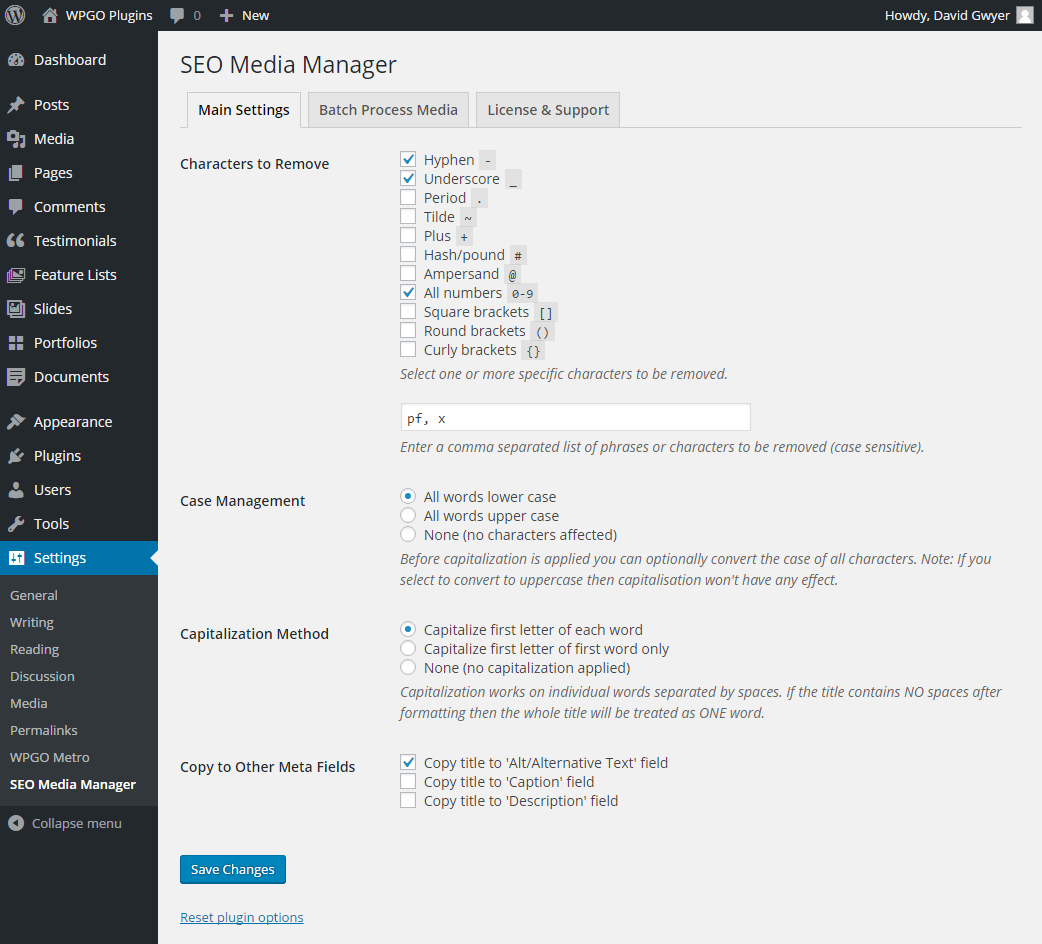
Free formatting settings with the complete four-step workflow and editable live preview.
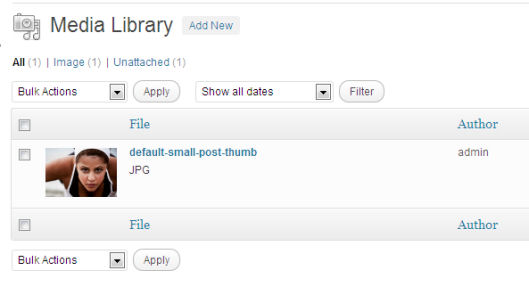
A newly uploaded Media Library item before its generated title and metadata are cleaned up.
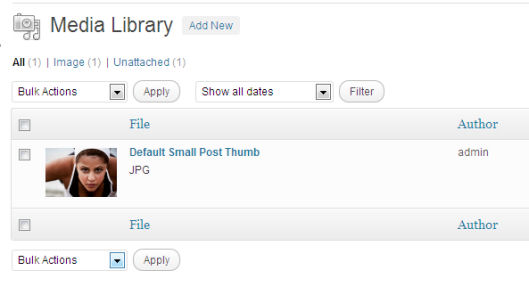
The same Media Library item after Free formatting has populated the chosen fields.
Pro version: the product Home with quick-start guidance, Pro tools, support, and other WPGO plugins.
Pro version: the full formatting workspace with original-filename rules and the live transformation preview.
Pro version: source, phrase-removal, parsing, and extended cleanup controls shown in detail.
Pro version: background-processing scope and the file-type filter for a selected media set.
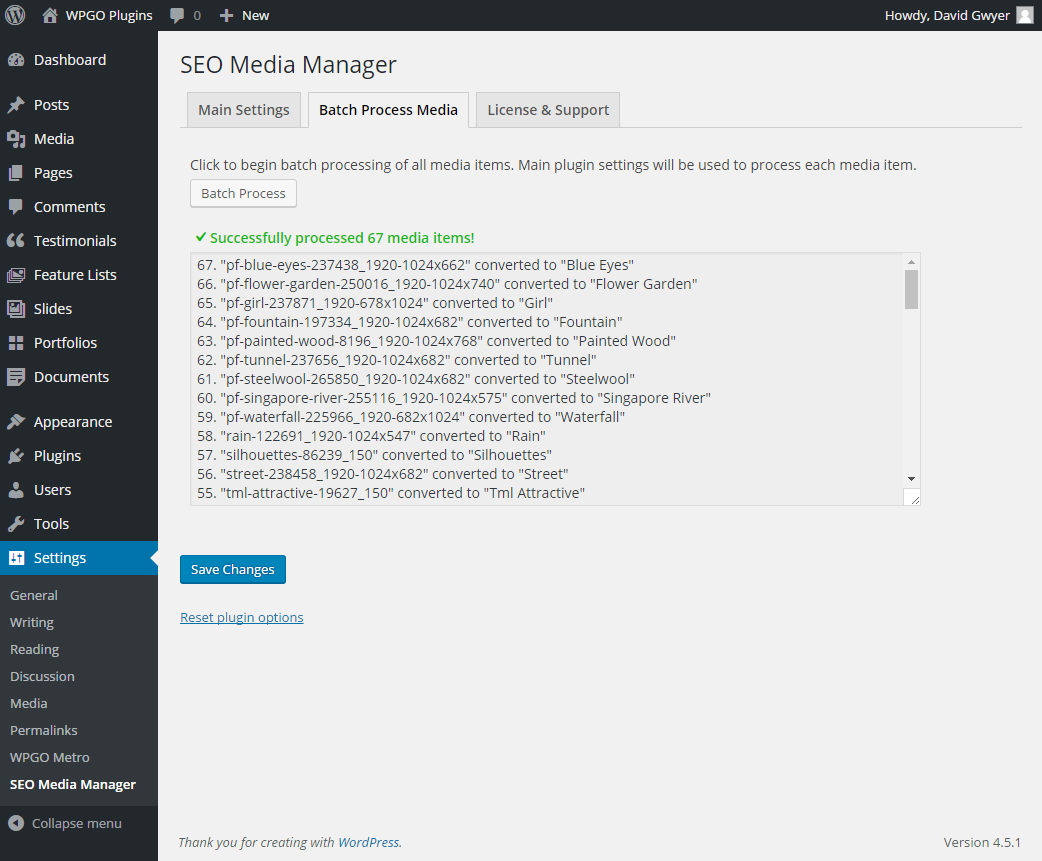
Pro version: a running background job with saved progress, recent results, and safe cancellation.
Pro version: a completed background job with final totals and its retained recent results.

Instalação

  1. Install SEO Media Manager from the WordPress plugin directory, or upload a Pro ZIP from your WPGO Plugins account.
  2. Activate SEO Media Manager.
  3. Open SEO Media Manager > Settings and review the formatting rules.
  4. Pro users can activate a licence from the Account screen to enable the paid features, updates, and support.

Back up the site database before batch-changing existing media metadata.

Perguntas frequentes

Does batch processing change the original media files?

No. It updates WordPress attachment metadata only. The stored file is not renamed or modified.

Can I process only selected attachments?

Yes, with Pro. Open the Batch processing tab, choose Custom selection, select the attachments, and start the background job.

Can I process only one kind of media?

Yes. The Pro batch screen can limit either the complete library or a custom selection to images, SVG, PDF, documents, audio, or video. The chosen filter is saved with the job.

Do I need to keep the settings screen open?

No. Action Scheduler processes the library in small background groups and saves progress between requests. You can leave the screen and return later. As with other WordPress scheduled tasks, a site with WP-Cron disabled needs a working server-side cron runner.

Will this update images already inserted into posts?

No. The plugin changes attachment metadata in the Media Library. Image attributes already saved in post content are not automatically synchronised, so review existing embedded images separately.

Will a batch preserve existing alternative text and captions?

Version 1.3.0 replaces the output fields you select; it does not have a fill-missing-only mode. Turn off copying to fields you want to keep, or exclude those attachments from the batch. Back up the database and test a small selection first.

What happens when I deactivate a Pro licence?

The plugin stays active and shows the Free interface. Your paid settings remain stored, but paid rules and batch processing are unavailable until a valid licence is activated again.

Will existing Format Media Titles settings be kept?

Yes. Version 1.3.0 imports the established fmt_options settings and keeps a compatibility copy for a safe rollback. The WordPress.org slug remains format-media-titles, so existing sites continue to receive updates from the same listing.

Are developer filters available?

Yes. The established seo_media_manager_defaults, seo_media_manager_title, and seo_media_manager_alt filters are preserved.

Avaliações

Works for Greek

athinaok 4 junho, 2022
Works for Greek

Perfect solution for auto renaming media files

kreator69 29 dezembro, 2018 1 resposta
Works perfectly, easy to use, good for SEO. Saves a lot of time!

Save a lot of time

ktsnnet 2 dezembro, 2018 1 resposta
Before I found this plugin, I used to copy details from image title to other form. Few images no problem, bunch of images now that's the problem. With this plugin I can skip that filling form thing and save a lot of time.

Useless – Does nothing on it’s own

gespot 22 outubro, 2018 1 resposta
While this plugin creates a nice formatted title, it is worthless without installing yet another plugin, that ads the title tag into your posts and pages. Wordpress has removed the title tag since version 3.5 (5 years ago). When I finally took the time to explain the issue to the developer, he added the feature to the PAID version, but not to the free version. He then offered me a 50% discount to buy my own ideas… If you don't want to pay for having your image titles in your post, simply install the "Restore Image Title" plugin together with the free version and you're all set.

Brilliant timesaver

Anonymous User 21 dezembro, 2017 1 resposta
This is one of my go-to plugins for all my sites, particularly image-heavy ones. Saves so much time and very simple to use.

Time-saver

Steven Gliebe 20 dezembro, 2016 1 resposta
I had been meaning to search for a plugin like this for a while. I was glad to find that it exists while preparing an article with dozens of images. It definitely saved me some time re-typing the title in a pretty way. The option to copy to ALT is handy too. Thanks for this, David.
Leia todas as 18 avaliações

Colaboradores e desenvolvedores

“SEO Media Manager” é um programa de código aberto. As seguintes pessoas contribuíram para este plugin.

Colaboradores
  • David Gwyer
  • wpgoplugins

SEO Media Manager” foi traduzido para 1 localidade. Agradecemos aos tradutores por suas contribuições.

Traduzir o “SEO Media Manager” para seu idioma.

Interessado no desenvolvimento?

Navegue pelo código, consulte o repositório SVN ou assine o registro de desenvolvimento por RSS.

Registro de alterações

1.3.0

  • Merge the former Free and Pro codebases into one SEO Media Manager source and Freemius product while keeping the format-media-titles WordPress.org slug and the seo-media-manager Pro folder.
  • Add a compatibility loader that keeps existing Free installations active during the main-file transition and preserves their saved settings.
  • Make an unlicensed Pro package fall back to the Free interface; activating or deactivating the licence now switches the available feature set without replacing the plugin.
  • Keep Pro settings stored while the licence is inactive so they return after reactivation.
  • Add the redesigned four-step settings screen and editable live preview to Free.
  • Add durable server-side background processing for large existing Media Libraries, powered by Action Scheduler.
  • Save progress between 20-item groups so work can continue after the settings screen is closed or refreshed.
  • Add a Pro file-type filter for images, SVG, PDF, documents, audio, and video.
  • Add safe cancellation, duplicate-worker protection, and a clear saved progress summary.
  • Keep each job consistent by using the selected settings and library boundary captured when it starts.
  • Add a top-level Home, Settings, and New Features experience with clearer first-run guidance and a privacy-safe support summary.
  • Add an outcome-led Free-to-Pro comparison on Home with a real background-processing preview and transparent annual pricing, while keeping the Pro Home focused on its available tools.
  • Add the shared More from WPGO Plugins companion section to the bottom of Home.
  • Redesign the formatting-rules screen and add a live filename preview that follows the current unsaved settings.
  • Show a short Settings saved confirmation without keeping a timestamp or repeating it after refresh.
  • Keep notices raised by this or another plugin out of the header across every SEO Media Manager-owned admin screen.
  • Show the discounted first-year price and regular annual renewal price together on the in-plugin upgrade screen, and apply the matching licence-tier coupon at checkout.
  • Show the SEO Media Manager product mark in the in-plugin pricing header.
  • Clarify when a new upload uses its WordPress attachment title or original filename, and confirm compatibility with WordPress 7.1.

1.2.0

  • Add a protected uppercase-word rule for abbreviations such as SEO, PDF, and UK.
  • Import the uppercase-word list from Format Media Titles 1.1.0 during a free-to-Pro migration.
  • Apply the new rule to automatic uploads and safe existing-library batches.

1.1.2

  • Keep the installed premium functionality running after a subscription expires while updates and support remain licence-controlled.
  • Reject malformed batch scopes and attachment IDs before any media is changed.
  • Prevent formatting rules from overwriting attachment metadata with an empty title.
  • Avoid a partial alternative-text update when the attachment post update fails.
  • Improve handling of the plugin folder and main file during Freemius updates.

1.1.1

  • Import existing Format Media Titles settings without deleting the free plugin configuration.
  • Prevent both Free and Pro upload callbacks from formatting the same attachment.

1.1.0

  • Process existing media in sequential, bounded server-side batches instead of loading the complete library and firing concurrent requests.
  • Require administrator capability and a valid nonce for batch mutation requests.
  • Return structured JSON results with error handling and accessible progress feedback.
  • Add Unicode-aware title parsing, casing, capitalization, and whitespace normalization.
  • Prevent duplicate image and gallery title attributes.
  • Modernize the settings screen and update WPGO Plugins account and support links.
  • Raise the supported PHP baseline to 7.4 for current WordPress compatibility.

1.0.6

  • Correct the Pro plugin folder name for Freemius installation and updates.

1.0.4

  • Gate the premium-only runtime with Freemius licensing so the deployment processor can generate distinct free and paid artifacts.

1.0.0

  • Migrate licensing and updates from the legacy EDD integration to Freemius.
  • Preserve the established settings and formatting behavior.
  • Harden batch processing, reset actions, input validation, and output escaping.

Meta

  • Versão 1.3.0
  • Última atualização 1 semana atrás
  • Instalações ativas 5.000+
  • Versão do WordPress 6.8 ou superior
  • Testado até 7.1.3
  • Versão do PHP 7.4 ou superior
  • Idiomas

    English (US) e Spanish (Mexico).

    Traduzir para seu idioma

  • Tags
    Alt Textimagesmediametadataseo
  • Visualização avançada

Classificações

4.8 de 5 estrelas.
  • 17 avaliações com 5 estrelas 5 estrelas 17
  • 0 avaliação com 4 estrela 4 estrelas 0
  • 0 avaliação com 3 estrela 3 estrelas 0
  • 0 avaliação com 2 estrela 2 estrelas 0
  • 1 avaliação com 1 estrela 1 estrela 1

Sua avaliação

Ver todas avaliações

Colaboradores

  • David Gwyer
  • wpgoplugins

Suporte

Tem algo a dizer? Precisa de ajuda?

Ver fórum de suporte

  • Sobre
  • Notícias
  • Hospedagem
  • Privacidade
  • Vitrine
  • Temas
  • Plugins
  • Padrões
  • Aprender
  • Suporte
  • Desenvolvedores
  • WordPress.tv ↗
  • Participar
  • Eventos
  • Doar ↗
  • Swag ↗
  • WordPress.com ↗
  • Matt ↗
  • bbPress ↗
  • BuddyPress ↗
WordPress.org

Brasil

The WordPress® trademark is the intellectual property of the WordPress Foundation.

  • Acessar nossa conta do X (antigo Twitter)
  • Acessar nossa conta do Bluesky
  • Acessar nossa conta do Mastodon
  • Acessar nossa conta do Threads
  • Acessar nossa página do Facebook
  • Acessar nossa conta do Instagram
  • Acessar nossa conta do LinkedIn
  • Acessar nossa conta do TikTok
  • Acessar nosso canal do YouTube
  • Acessar nossa conta no Tumblr
Código é poesia.