WordPress.org

Brasil

  • Temas
  • Plugins
  • Novidades
    • Documentação
    • Fóruns
  • Sobre
    • Participe da comunidade
    • Guias e diretrizes
  • Baixar o WordPress
Baixar o WordPress
WordPress.org

Plugin Directory

Advanced Category and Custom Taxonomy Image

  • Enviar um plugin
  • Meus favoritos
  • Acessar
  • Enviar um plugin
  • Meus favoritos
  • Acessar

Advanced Category and Custom Taxonomy Image

Por Sajjad Hossain Sagor
Baixar
Pré-visualização ao vivo
  • Detalhes
  • Avaliações
  • Instalação
  • Desenvolvimento
Suporte

Descrição

Now its easier to include category / custom taxonomy image with this plugin for different platforms. No need to overload mobile bandwidth with high pixel image size. You can now select different image for different devices. Upload Different Image For Different Devices ex: Mobile, Tablet, Desktop, iOS, Android, Windows Phone.
Built-in Template Tag To Use Anywhere You Want In Your Theme : get_taxonomy_image( $term_id, $return_img_tag, $class );

Documentation

$taxonomy_img = get_taxonomy_image( int $term_id = get_queried_object()->term_id , boolean $return_img_tag = false , string $class = '' );

get taxonomy image url if $return_html = true then return  tag

Parameters :
$term_id
(int) (Required) Taxonomy ID of the term.

$return_img_tag
(boolean) (Optional) Formatted Image with  tag for the field during output.

$class
(string) (Optional) A space separated string of CSS classes to add to the  tag. classes ex: "your custom class list separated by space" but $return_img_tag should be true to add image class.

echo $taxonomy_img; // taxonomy image url

where $term_id is ‘category / term id’

Shortcode : use the shortcode anywhere to get taxonomy image. If you don’t provide “term_id” value then it will be current queried page taxonomy automatically.

echo do_shortcode( '[ad_tax_image term_id="" return_img_tag="true" class="your custom class list seperated by space"]' ); // keep term_id empty if you want to show current visited taxonomy archive image.

Features

  • Option To Enable Custom Image Upload for different taxonomies
  • Option To Enable Custom Image Upload for different devices
  • Very simple to use & WP Default Media Uploaded to upload image
  • Built-in Template Tag to use in your theme template
  • Shortcode to use anywhere.

Capturas de tela

  • Settings page for enabling taxonomy image upload for different taxonomies

  • Settings page for enabling taxonomy image upload for different devices
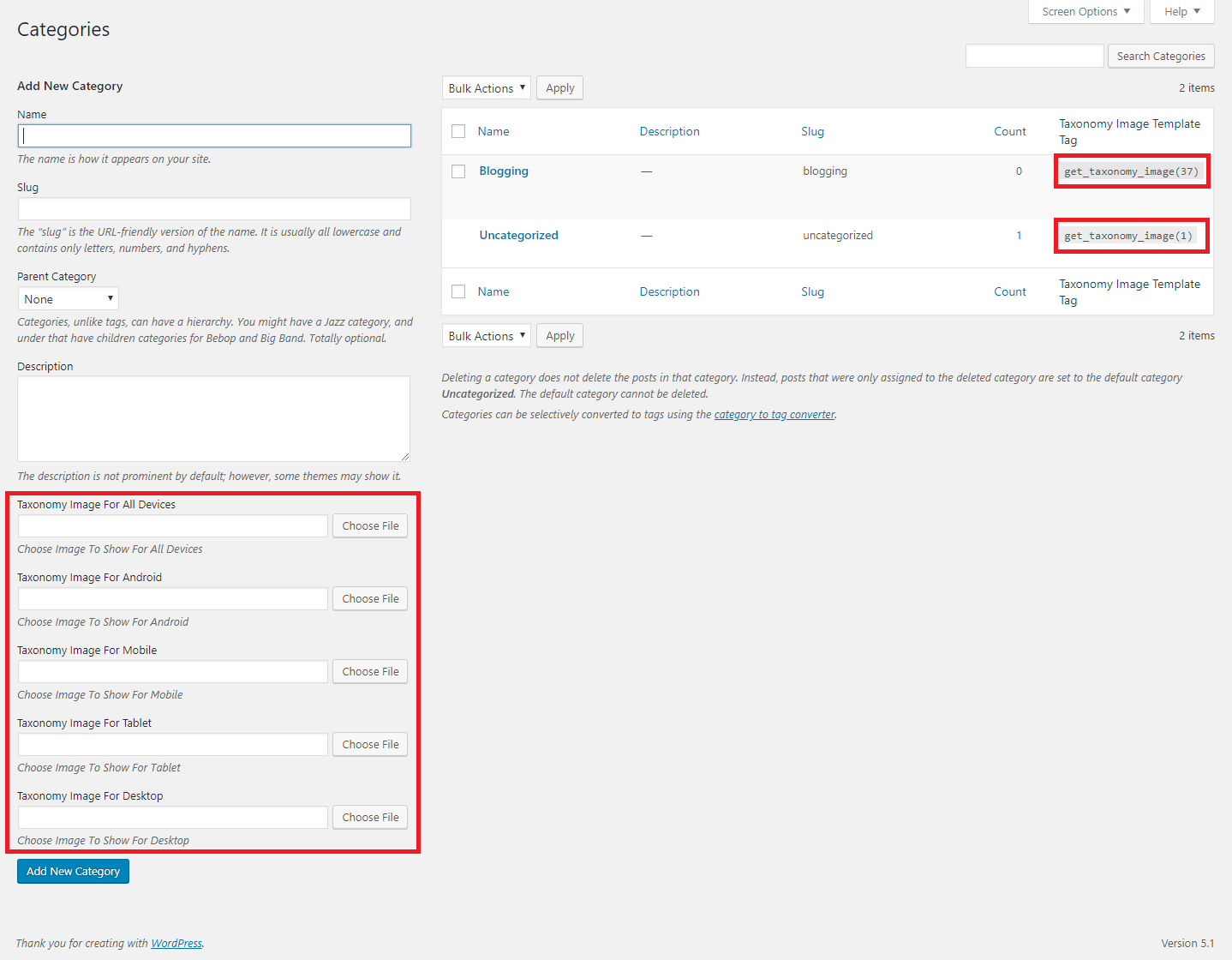
  • Auto Template Tag Generation
  • Taxonomy Edit Page

Instalação

  1. Go to WordPress plugin page
  2. Click Add New & Upload Plugin
  3. Drag / Click upload the plugin zip file
  4. The resulting installation screen will list the installation as successful or note any problems during the install.
    If successful, click Activate Plugin to activate it, or Return to Plugin Installer for further actions.
  5. Go to your Dashboard ->Settings -> Advanced Category & Taxonomy Image.
  6. There You Will Find Fields To Enable Taxonomy & Device Filters.
  7. After Enabling Go To Your Taxonomy Add/Edit Page To Upload Image

Perguntas frequentes

  1. How can i use the image i uploaded?
    Get Your Taxonomy tag_ID and use get_taxonomy_image( $term_id ) to get the image url and use it in your theme’s template area where you want to show it. (Note : In the taxonomy list there you will find already created template tag to use see screenshot 3)

Avaliações

Great support

zydecon 7 novembro, 2025
Great support. The plugin had a bug and the plugin author fixed it immediately.

Simple, effective plugin.

fwuk 8 julho, 2022
I have used it. Works fine. Thank you for a useful plugin.

This plugin is a life saver

30 janeiro, 2021
Really good plugin, the author responds quickly and is very friendly.

How display image on single.php

Taher Almahdi 5 julho, 2020 1 resposta
I try to display taxonomy images on single post using <?php get_taxonomy_image(1455); ?>, but images don’t show. How does slove this issue?

Nice plugin!!!

Rigo Sandoval Uribe 6 setembro, 2019
Excellent plugin for different images for each device.
Leia todas as 5 avaliações

Colaboradores e desenvolvedores

“Advanced Category and Custom Taxonomy Image” é um programa de código aberto. As seguintes pessoas contribuíram para este plugin.

Colaboradores
  • Sajjad Hossain Sagor

Traduzir o “Advanced Category and Custom Taxonomy Image” para seu idioma.

Interessado no desenvolvimento?

Navegue pelo código, consulte o repositório SVN ou assine o registro de desenvolvimento por RSS.

Registro de alterações

2.0.7

  • Fixed issue: Tax image was not updating for any device type.
  • Enhancements: Now you can see selected image real time.

2.0.6

  • Fixed issue: typo giving fatal error

2.0.5

  • Fixed issue: when there are no device enabled it gives fatal error

2.0.4

  • Minor changes in the code styling

2.0.3

  • Compatibility checkup for latest wp version 6.8

2.0.2

  • If for specific device image is not set yet, it will opt for default any device image now

2.0.1

  • Fixed bug function get_taxonomy_image() was not found

2.0.0

  • Major changes in codebase. Compatibility checkup for latest wp version 6.7

1.1.0

  • Previous version had a bug where Image were not showing even after upload, it has been fixed. Everyone is recommended to update to the latest version. Any device filter is removed from Advanced tab and added as a global device.

1.1.0

  • Major Update.. Please do take backup and update the plugin. Applied wp standard security sanitizations and escaping output to avoid any vulnerability. After update please go check your settings thoroughly and check if it works properly.

1.0.9

  • Minor Update.. tested for latest wp compatibility..

1.0.8

  • Added a new shortcode for dynamic usage in any template or dnd builder. Plus tested for latest wp compatibility..

1.0.7

  • Minor Update.. tested for latest wp compatibility..

1.0.6

  • Minor Update.. tested for latest wp compatibility.. added any device option and code style changed and beautified.

1.0.5

  • Minor Update.. now tax template tag won’t be visible if no image is added

1.0.4

  • Minor Update.. updated for translations ready..

1.0.3

  • Minor Update.. tested for latest wp compatibility..

1.0.2

  • Minor Update.. tested for latest wp compatibility..

1.0.1

  • Minor Update.. tested for latest wp compatibility..

1.0

  • Initial release.

Meta

  • Versão 2.0.7
  • Última atualização 4 semanas atrás
  • Instalações ativas 1.000+
  • Versão do WordPress 5.6 ou superior
  • Testado até 6.8.3
  • Versão do PHP 8.0 ou superior
  • Idioma
    English (US)
  • Tags
    category imagecategory-logofeatured imagetaxonomy imageterm image
  • Visualização avançada

Classificações

5 de 5 estrelas.
  • 5 avaliações com 5 estrelas 5 estrelas 5
  • 0 avaliação com 4 estrela 4 estrelas 0
  • 0 avaliação com 3 estrela 3 estrelas 0
  • 0 avaliação com 2 estrela 2 estrelas 0
  • 0 avaliação com 1 estrela 1 estrela 0

Adicionar minha avaliação

Ver todas avaliações

Colaboradores

  • Sajjad Hossain Sagor

Suporte

Tem algo a dizer? Precisa de ajuda?

Ver fórum de suporte

  • Sobre
  • Notícias
  • Hospedagem
  • Privacidade
  • Vitrine
  • Temas
  • Plugins
  • Padrões
  • Aprender
  • Suporte
  • Desenvolvedores
  • WordPress.tv ↗
  • Participar
  • Eventos
  • Doar ↗
  • Five for the Future
  • WordPress.com ↗
  • Matt ↗
  • bbPress ↗
  • BuddyPress ↗
WordPress.org
WordPress.org

Brasil

  • Acessar nossa conta do X (antigo Twitter)
  • Acessar nossa conta do Bluesky
  • Acessar nossa conta do Mastodon
  • Acessar nossa conta do Threads
  • Acessar nossa página do Facebook
  • Acessar nossa conta do Instagram
  • Acessar nossa conta do LinkedIn
  • Acessar nossa conta do TikTok
  • Acessar nosso canal do YouTube
  • Acessar nossa conta no Tumblr
Código é poesia.