
Descrição
Advanced Access Manager (aka AAM) is a powerfully robust WordPress plugin designed to help you control every aspect of your website, your way.
Few Quick Facts
- The only plugin that gives you the absolute freedom to define the most granular access to any aspect of your website, and most of the features are free.
- Bullet-proven solution used on over 100,000 websites where all features are well-tested and documented. The low amount of support tickets speaks for quality.
- It is the only plugin that allows managing access to your website content for any role, individual user, and visitor or configuring the default access to all posts, pages, custom post types, categories, and custom taxonomies.
- AAM is a developer-oriented plugin. It has dozens of hooks and configurations. It is integrated with WordPress RESTful and XML-RPC APIs and has numerous abstract layers to simplify coding.
- No ads or other promotional crap. The UI is clean and well-crafted, so you can focus only on what matters.
- No need to be a “paid” customer to get help. Request support at any time.
- Some features are limited or available only with premium add-ons. AAM functionality is transparent and you will know when the premium add-on is required.
The Most Popular Features
- [free] Manage Backend Menu. Manage access to the backend menu for any user or role.
- [free] Manage Roles & Capabilities. Manage all your WordPress roles and capabilities.
- [free] All necessary sets of tools to manage authentication with JWT.
- [free] Create temporary user accounts. Create and manage temporary user accounts.
- [limited] Content access. Granular access to an unlimited number of posts, pages, custom post types, terms, taxonomies, or custom taxonomies.
- [free] Manage Admin Toolbar. Filter out unnecessary items from the top admin toolbar for any role or user.
- [free] Backend Lockdown. Restrict access to your website’s backend side for any user or role.
- [free] Secure Login Widget & Shortcode. Drop the AJAX login widget or shortcode anywhere on your website.
- [free] Ability to enable/disable RESTful and XML-RPC APIs.
- [limited] URI Access. Allow or deny access to any page of your website by the page URL as well as how to redirect a user when access is denied;
- [free] Manage access to RESTful or XML-RPC individual endpoints for any role, user, or visitor.
- [free] Passwordless login with URL.
- [free] Content Filter. Filter or replace parts of your content with AAM shortcodes.
- [free] Login/Logout Redirects. Define custom login and logout redirect for any user or role;
- [free] 404 Redirect. Redefine where a user should be redirected when a page does not exist.
- [free] Access Denied Redirect. Define custom redirect for any role, user, or visitor when access is denied for a restricted area on your website.
- [free] Manage Metaboxes & Widgets. Filter out restricted or unnecessary metaboxes and widgets on both frontend and backend for any user, role, or visitor.
- [paid] Manage access based on an IP address or referred domain. Manage access to the entire website or any specific page or post based on referred host or IP address.
- [free] Multiple role support.
- [and even more…]
Non-Negotiable
We take security and privacy very seriously, that is why there are several non-negotiable items that we obey for all cost in the basic AAM version.
- AAM does not create new or alter existing website database tables;
- AAM does not read any files outside of the AAM plugin’s folder;
- AAM does not create new, write or delete any existing files or folders on a server;
- AAM does not capture or send externally any information about how it is used;
- AAM does not capture or send externally any information about a website server. The only exception is a website domain that is assigned to a premium license during activation;
- AAM does not integrate with any other plugins directly;
- AAM does not impersonate or swap user login sessions. All the authentication is handled by WordPress core where AAM may provide only verified and trusted information as means of authentication;
- AAM does not include advertisement of any kind (no banners, cross-sales pitches or affiliate links);
Imagens de tela
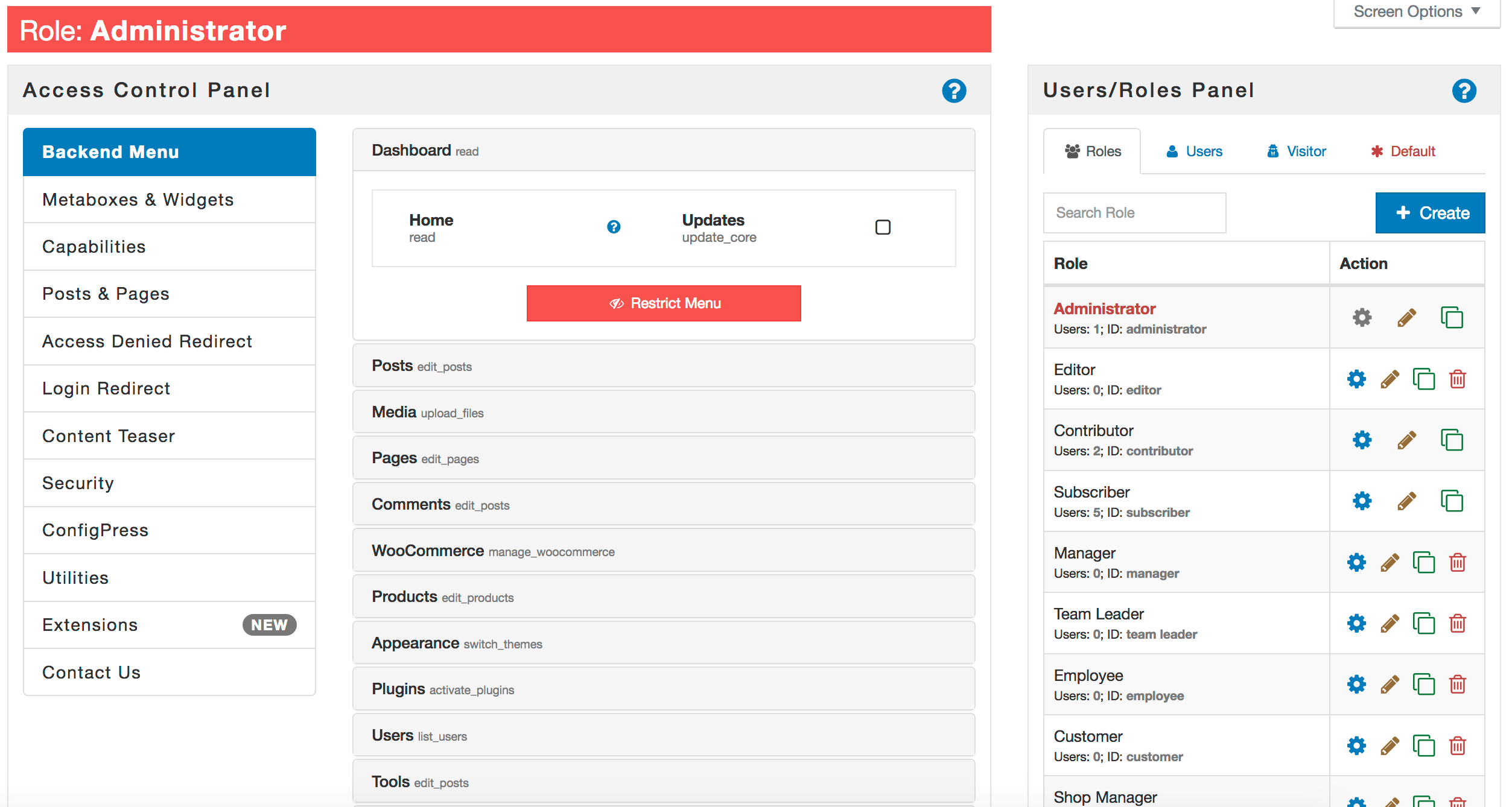
Manage access to backend menu 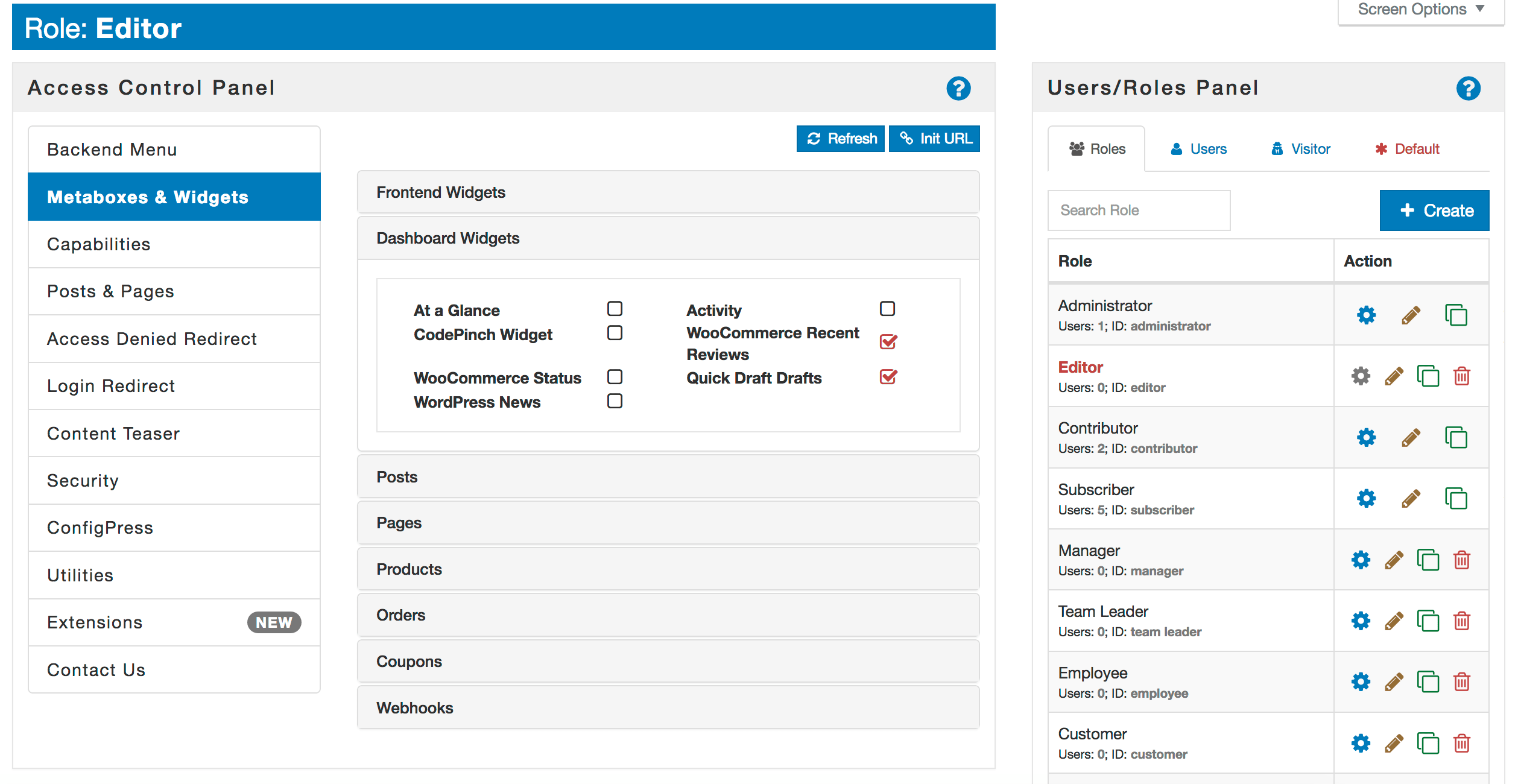
Manage access to metaboxes & widgets 
Manage capabilities for roles and users 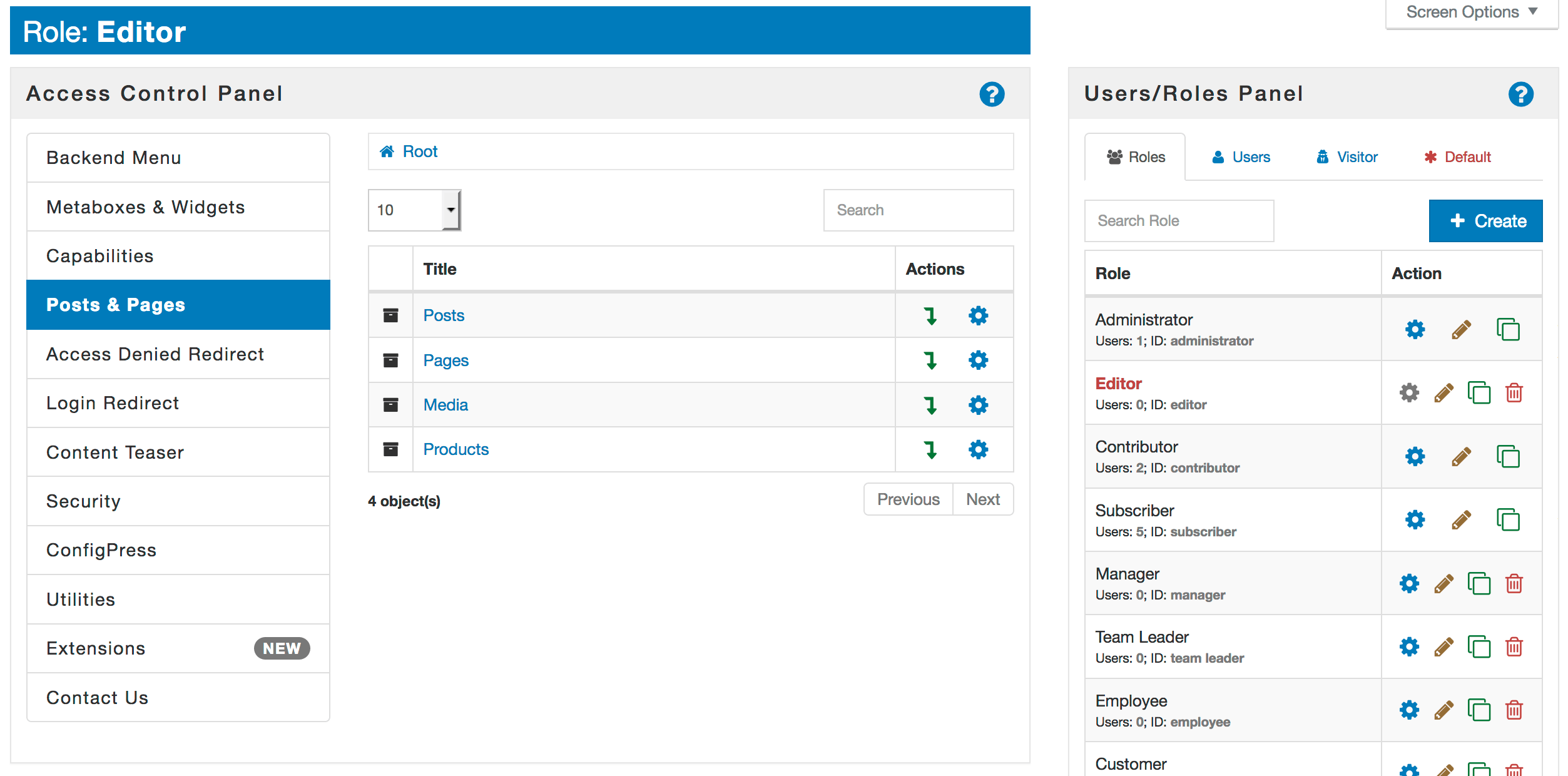
Manage access to posts, pages, media or custom post types 
Posts and pages access options form 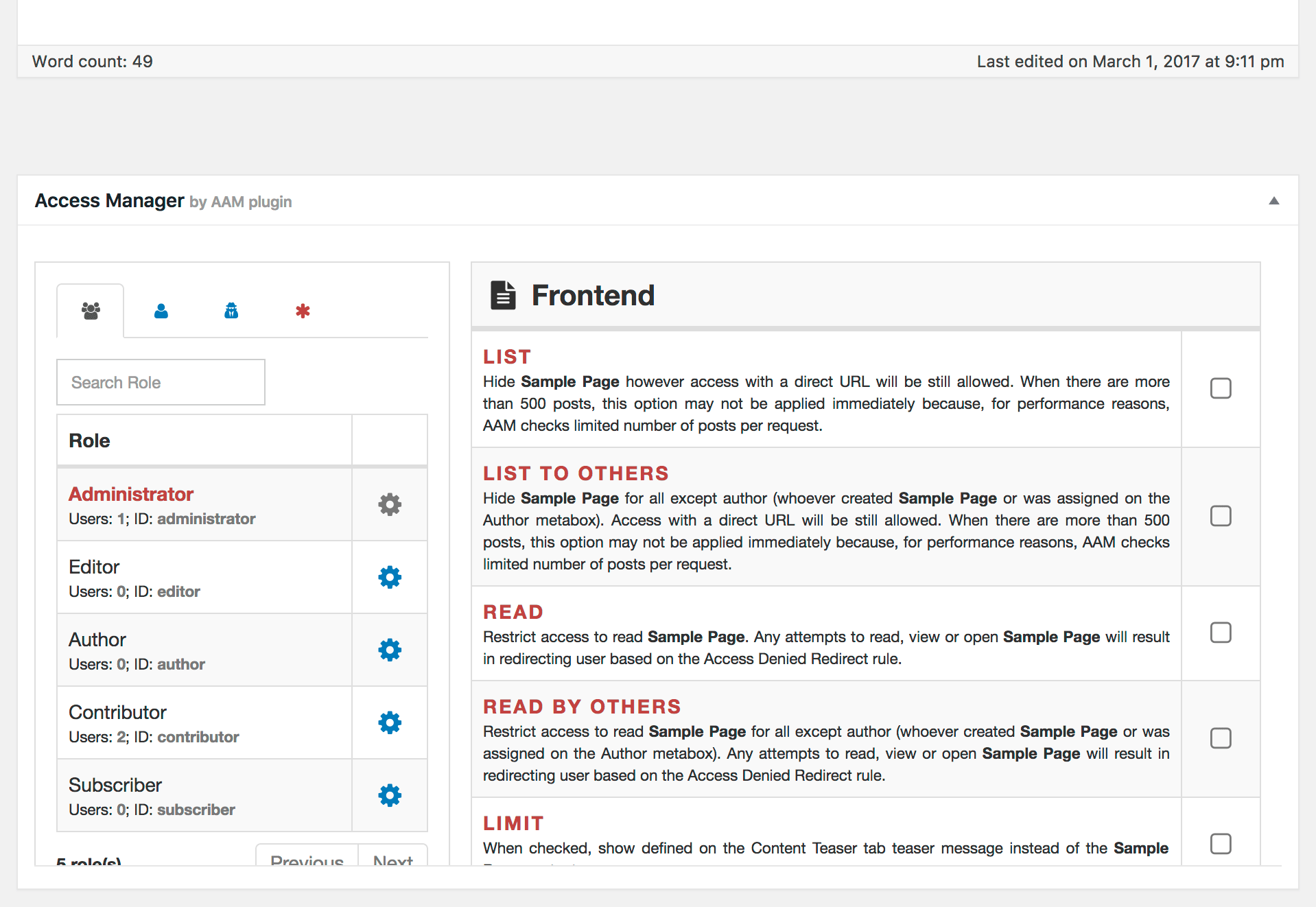
Define access to posts and categories while editing them 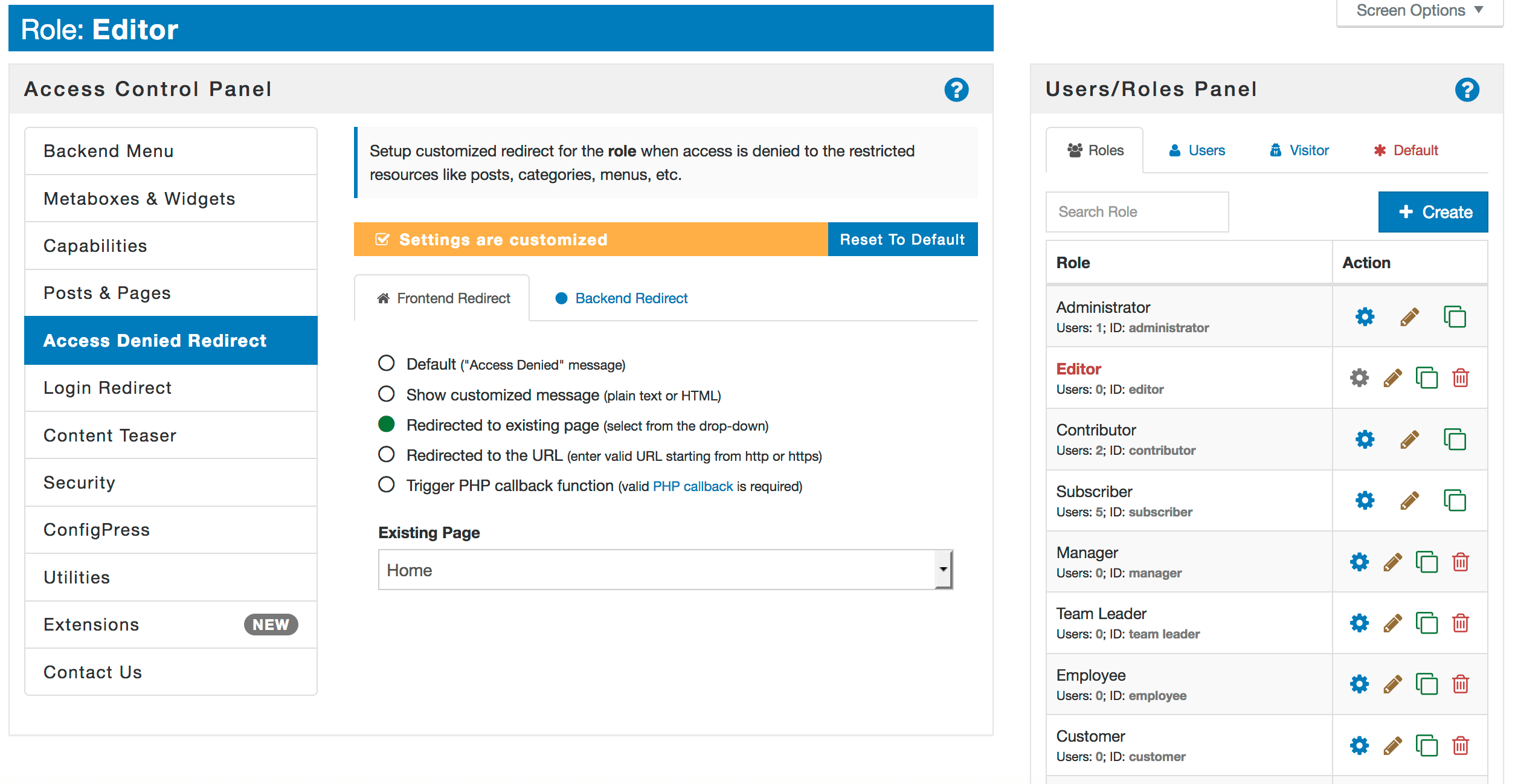
Manage access denied redirect rule 
Manage user login redirect 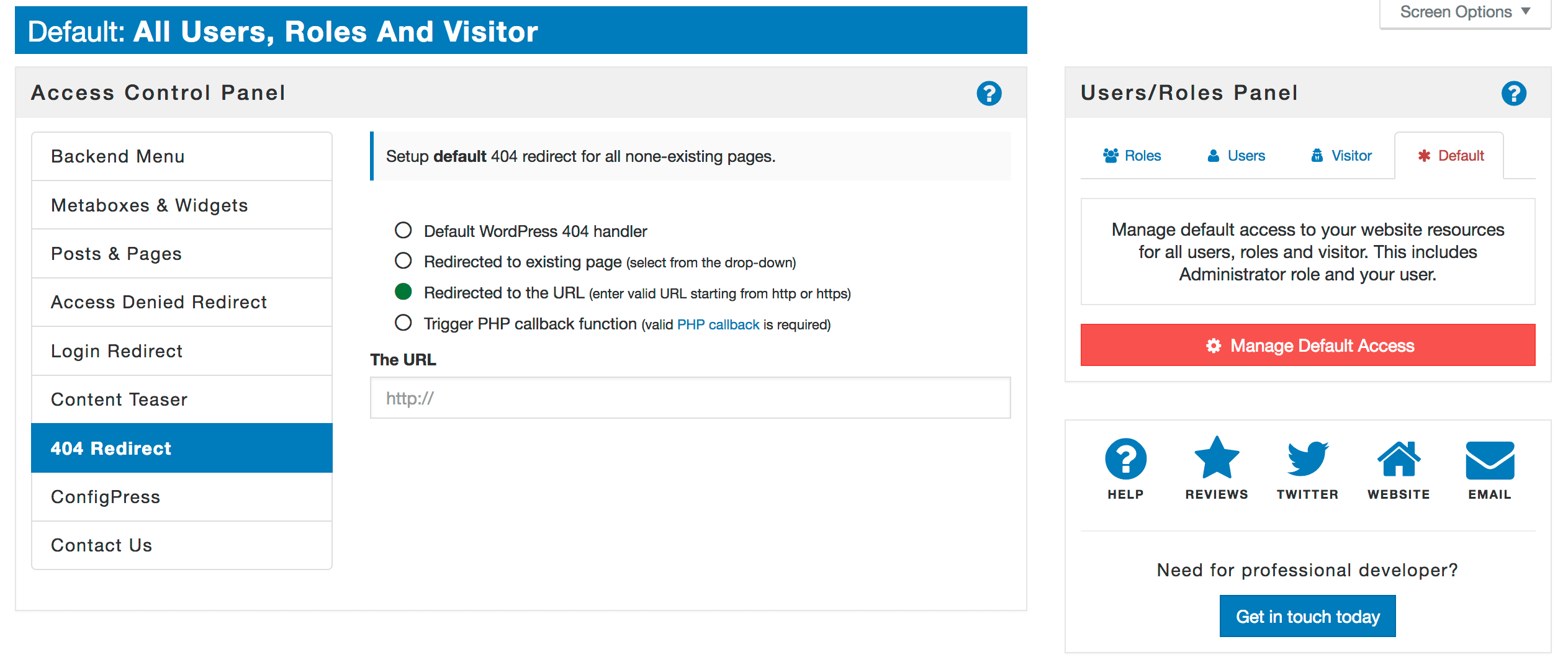
Manage 404 redirect 
Create your own content teaser for limited content 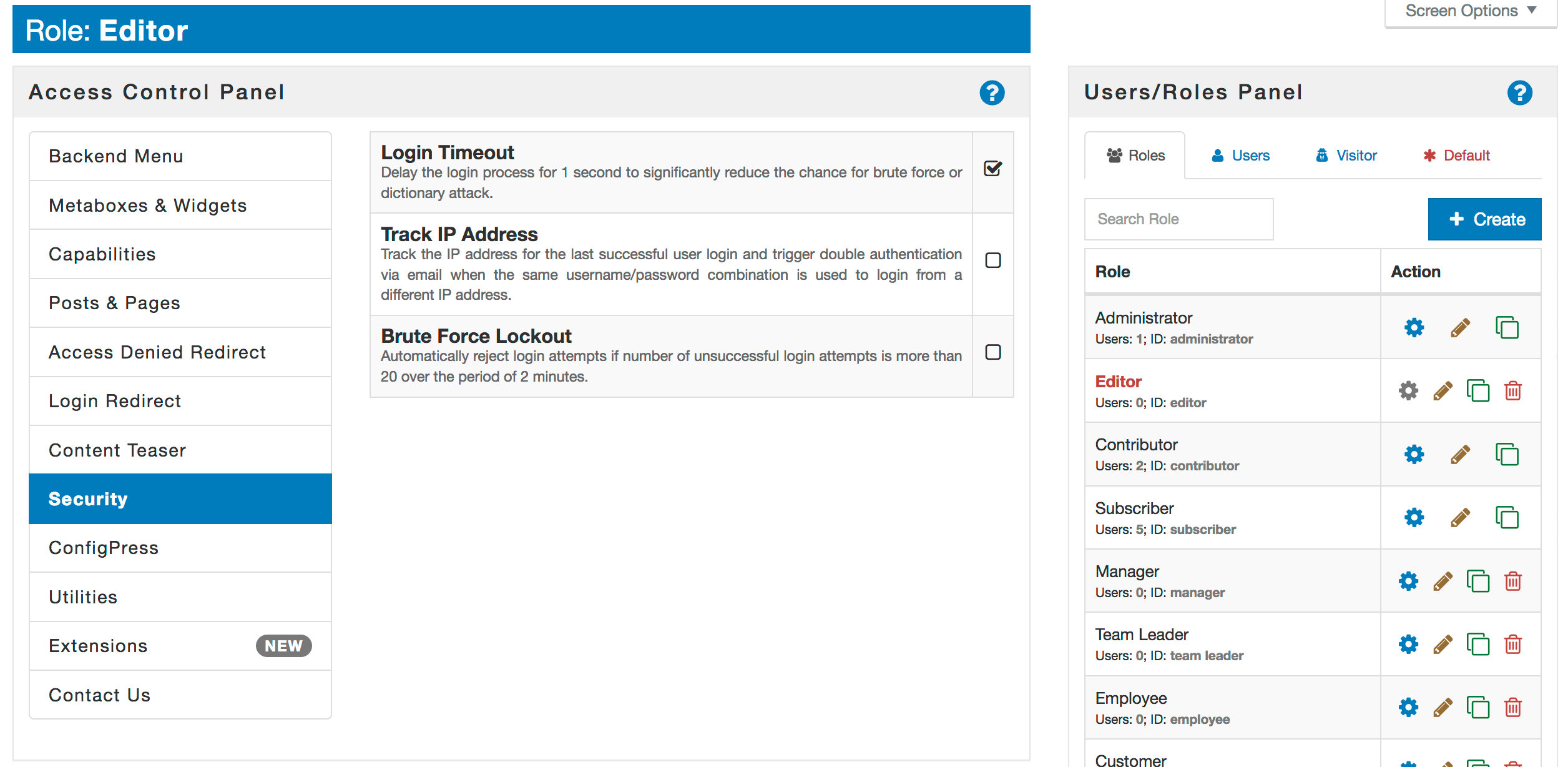
Improve your website security
Instalação
- Upload
advanced-access-managerfolder to the/wp-content/plugins/directory - Ative o plugin por meio do menu “Plugins” no WordPress
Avaliações


Colaboradores e desenvolvedores
“Advanced Access Manager – Restricted Content, Users & Roles, Enhanced Security and More” é um software com código aberto. As seguintes pessoas contribuíram para este plugin.
Colaboradores
“Advanced Access Manager – Restricted Content, Users & Roles, Enhanced Security and More” foi traduzido para 6 localizações. Agradecemos aos tradutores por suas contribuições.
Interessado no desenvolvimento?
Navegue pelo código, dê uma olhada no repositório SVN ou assine o registro de desenvolvimento via RSS.
Registro de alterações
= 6.9.25
* Fixed: Access Policy Param “Enforce” did not enforce https://github.com/aamplugin/advanced-access-manager/issues/355
* Fixed: Uncaught TypeError: AAM_Core_Policy_Token::evaluate(): Argument #3 ($args) must be of type array, null given https://github.com/aamplugin/advanced-access-manager/issues/353
* Added: Enhance Hook Access Policy Resource https://github.com/aamplugin/advanced-access-manager/issues/354
6.9.24
- Fixed: Incorrectly merged access controls with 3 or more roles https://github.com/aamplugin/advanced-access-manager/issues/352
- Fixed: Unnecessary forward slashes escapes in Access Policies https://github.com/aamplugin/advanced-access-manager/issues/350
- New: Added the “Operator” option for Access Policies Conditions https://github.com/aamplugin/advanced-access-manager/issues/351
- New: Added support for IP CIDR annotations for Access Policies https://github.com/aamplugin/advanced-access-manager/issues/349
6.9.23
- Fixed: Type E_Error in Visibility.php https://github.com/aamplugin/advanced-access-manager/issues/347
- Fixed: The previous selected role does not visually uncheck if switched to manage visitors or default https://github.com/aamplugin/advanced-access-manager/issues/348
- Changed: The minimum required WordPress version was lifted from 5.0.0 to 5.2.0.
6.9.22
- Fixed: Redirect to login page for visitors does not work https://github.com/aamplugin/advanced-access-manager/issues/346
- Fixed: Fatal error: Uncaught TypeError: method_exists() https://github.com/aamplugin/advanced-access-manager/issues/344
- Changed: Added “mergeAlign.limit” property https://github.com/aamplugin/advanced-access-manager/issues/345
- Changed: Change how ${USER.ip} marker works https://github.com/aamplugin/advanced-access-manager/issues/338
6.9.21
- Fixed: Content visibility issue with multi-role setup https://github.com/aamplugin/advanced-access-manager/issues/342
- Fixed: URL Access feature does not save “Redirect to page” https://github.com/aamplugin/advanced-access-manager/issues/339
- Changed: Enhance plugins security pasture https://github.com/aamplugin/advanced-access-manager/issues/341
6.9.20
- Fixed: When deleting URL Access rule, the “Unexpected Application Error” is displayed https://github.com/aamplugin/advanced-access-manager/issues/337
- Fixed: URL Access does not correctly handle multiple roles https://github.com/aamplugin/advanced-access-manager/issues/336
- Changed: Add-ons page overhaul https://github.com/aamplugin/advanced-access-manager/issues/335
6.9.19
- Fixed: Handling “Profile” submenu access https://github.com/aamplugin/advanced-access-manager/issues/334
- Fixed: Passing null to parameter #2 ($string) of type string is deprecated in /../Content.php on line 223 https://github.com/aamplugin/advanced-access-manager/issues/333
- Fixed: Undefined array key 2 in /../application/Core/Object/Menu.php on line 136
- Changed: Improve Login Redirect Shortcode redirect https://github.com/aamplugin/advanced-access-manager/issues/332
6.9.18
- Fixed: DataTables alert when URL Access service has at least one rule https://github.com/aamplugin/advanced-access-manager/issues/330
- Fixed: AAM core caching override https://github.com/aamplugin/advanced-access-manager/issues/329
- Fixed: PHP Deprecated: preg_replace(): Passing null to parameter https://github.com/aamplugin/advanced-access-manager/issues/326
- Changed: Update core API to allow defining option autoload https://github.com/aamplugin/advanced-access-manager/issues/328
- Changed: Update the “Welcome” service to include most common use-cases https://github.com/aamplugin/advanced-access-manager/issues/327
6.9.17
- Fixed: Fatal error: array_merge(): Argument #2 must be of type array, string given in …/LoginForm.php:46 https://github.com/aamplugin/advanced-access-manager/issues/318
- Fixed: Custom HTML message is escaped https://github.com/aamplugin/advanced-access-manager/issues/322
- Added New: Add the ability to add additional properties to URL Access form https://github.com/aamplugin/advanced-access-manager/issues/320
- Added New: Enhance Access Policy Hook resource https://github.com/aamplugin/advanced-access-manager/issues/323
- Changed: Move away from WP core transients https://github.com/aamplugin/advanced-access-manager/issues/319
- Changed: Move xpath resolver to its own class https://github.com/aamplugin/advanced-access-manager/issues/321
- Changed: Change the RESTful API rest_pre_dispatch filter priority https://github.com/aamplugin/advanced-access-manager/issues/324
- Changed: Changed the minimum required WP version to 5.0.0 https://github.com/aamplugin/advanced-access-manager/issues/325
6.9.16
- Fixed: Error when trying to edit the menu https://github.com/aamplugin/advanced-access-manager/issues/315
- Breaking Change: Removed
callbackattribute fromaamshortcodes https://github.com/aamplugin/advanced-access-manager/issues/316 - Changed: Improved shortcode remote IP detection https://github.com/aamplugin/advanced-access-manager/issues/317
6.9.14
- Fixed: PHP deprecated notices https://github.com/aamplugin/advanced-access-manager/issues/305
- Fixed: Admin Menu get corrupted if the first submenu is restricted https://github.com/aamplugin/advanced-access-manager/issues/307
- Fixed: Multipage role list malfunction https://github.com/aamplugin/advanced-access-manager/issues/306
- Fixed: Empty error message when role fail to create https://github.com/aamplugin/advanced-access-manager/issues/310
- Changed: Adding ref=plugin query param to all links that point to aamportal.com https://github.com/aamplugin/advanced-access-manager/issues/308
- Added New: Introduce Access Denied Redirect RESTful API https://github.com/aamplugin/advanced-access-manager/issues/309
6.9.13
- Fixed: User object does not initialize after login https://github.com/aamplugin/advanced-access-manager/issues/300
- Fixed: Wildcard for URL Access malfunction https://github.com/aamplugin/advanced-access-manager/issues/296
- Fixed: Restoring a previous Policy Revision adds backslashes (thank you @solaceten) https://github.com/aamplugin/advanced-access-manager/issues/294
- Fixed: Incorrectly handled login redirect with access policy https://github.com/aamplugin/advanced-access-manager/issues/299
- Changed: Move toolbar cache to transient & increase cache ttl https://github.com/aamplugin/advanced-access-manager/issues/297
- Added New: Add additional helpful tips to the AAM UI https://github.com/aamplugin/advanced-access-manager/issues/298
- Added New: Introduce Metaboxes & Widgets RESTful API https://github.com/aamplugin/advanced-access-manager/issues/301
- Added New: Introduce Backend Menu RESTful API https://github.com/aamplugin/advanced-access-manager/issues/293
- Added New: Introduce Admin Toolbar RESTful API https://github.com/aamplugin/advanced-access-manager/issues/302
- Added New: Add notification about premium add-on update availability https://github.com/aamplugin/advanced-access-manager/issues/303
- Added New: Introduce restricted mode for RESTful API https://github.com/aamplugin/advanced-access-manager/issues/304
6.9.12
- Fixed: URL Access skips query params for new rules https://github.com/aamplugin/advanced-access-manager/issues/283
- Fixed: Access policy does not apply for newly logged in user https://github.com/aamplugin/advanced-access-manager/issues/286
- Fixed: Compatibility with PHP 5.6 https://github.com/aamplugin/advanced-access-manager/issues/287
- Changed: Rewrite the Login Redirect service to use RESTful API https://github.com/aamplugin/advanced-access-manager/issues/285
- Changed: Rewrite the Logout Redirect service to use RESTful API https://github.com/aamplugin/advanced-access-manager/issues/291
- Changed: Rewrite the 404 Redirect service to use RESTful API https://github.com/aamplugin/advanced-access-manager/issues/292
- Changed: Backend Menu UI improvement https://github.com/aamplugin/advanced-access-manager/issues/288
- Changed: Admin toolbar UI improvement https://github.com/aamplugin/advanced-access-manager/issues/289
- Changed: Metaboxes & Widgets UI improvement https://github.com/aamplugin/advanced-access-manager/issues/290
- Added New: Allow redefining the login message when access is restricted https://github.com/aamplugin/advanced-access-manager/issues/284
6.9.11
- Fixed: Change role does not work for expired access https://github.com/aamplugin/advanced-access-manager/issues/279
- Changed: Enhance JWT Token RESTful API https://github.com/aamplugin/advanced-access-manager/issues/278
- Changed: Replace deprecated DateTime format https://github.com/aamplugin/advanced-access-manager/issues/281
- Changed: Improve user experience during plugin activation https://github.com/aamplugin/advanced-access-manager/issues/282
6.9.10
- Fixed: Can’t see AAM settings when editing page https://github.com/aamplugin/advanced-access-manager/issues/270
- Fixed: The set_slug should not sanitize key https://github.com/aamplugin/advanced-access-manager/issues/271
- Fixed: Admin Menu restriction edge-case https://github.com/aamplugin/advanced-access-manager/issues/272
- Changed: Refactor JWT Token Service https://github.com/aamplugin/advanced-access-manager/issues/273
- Changed: Refactor the API Route Service https://github.com/aamplugin/advanced-access-manager/issues/274
- Changed: Normalize Role ID https://github.com/aamplugin/advanced-access-manager/issues/275
- Changed: Stop using user_status column https://github.com/aamplugin/advanced-access-manager/issues/276
6.9.9
- Fixed: Undefined array key “callback” https://github.com/aamplugin/advanced-access-manager/issues/264
- Fixed: PHP Deprecated: strpos(): Passing null to parameter #1 ($haystack) of type string https://github.com/aamplugin/advanced-access-manager/issues/265
- Changed: Disabling the “Render Access Manager Metabox” by default https://github.com/aamplugin/advanced-access-manager/issues/268
- Changed: https://github.com/aamplugin/advanced-access-manager/issues/266 https://github.com/aamplugin/advanced-access-manager/issues/266
- Added: Include MU plugins in the policy dependency check https://github.com/aamplugin/advanced-access-manager/issues/267
6.9.8
- Fixed: Fix the missing token_expires https://github.com/aamplugin/advanced-access-manager/issues/263
- Fixed: DataTables warning: table id=role-list – Ajax error https://github.com/aamplugin/advanced-access-manager/issues/262
- Fixed: List of users does not filter https://github.com/aamplugin/advanced-access-manager/issues/261
6.9.7
- Fixed: DataTables warning: table id=role-list https://github.com/aamplugin/advanced-access-manager/issues/258
- Fixed: PHP Fatal error: Uncaught ArgumentCountError https://github.com/aamplugin/advanced-access-manager/issues/259
- Added New: Warn user about disabling RESTful API https://github.com/aamplugin/advanced-access-manager/issues/260
6.9.6
- Fixed: Role XXX already exists https://github.com/aamplugin/advanced-access-manager/issues/250
- Fixed: Clean-up deprecated warnings https://github.com/aamplugin/advanced-access-manager/issues/252
- Added New: RESTful API to manage Roles https://github.com/aamplugin/advanced-access-manager/issues/253
- Added New: Introducing AAM Developer Framework https://github.com/aamplugin/advanced-access-manager/issues/254
- Added New: Enhance AAM API to allow settings reset https://github.com/aamplugin/advanced-access-manager/issues/249
- Changed: Simplify premium offering functionality further https://github.com/aamplugin/advanced-access-manager/issues/255
- Changed: Remove all references to aamplugin.com https://github.com/aamplugin/advanced-access-manager/issues/256
6.9.5
- Fixed: Duplicated ConfigPress editor https://github.com/aamplugin/advanced-access-manager/issues/241
- Changed: Switch to aamportal.com API for the premium add-ons https://github.com/aamplugin/advanced-access-manager/issues/243
- Changed: Improve AAM Admin Menu feature performance https://github.com/aamplugin/advanced-access-manager/issues/240
6.9.4
- Fixed: Incorrectly escaped string values https://github.com/aamplugin/advanced-access-manager/issues/239
- Fixed: Incorrectly handled revoked token validation https://github.com/aamplugin/advanced-access-manager/issues/238
- Fixed: Super-Admin is unable to re-assign roles in network sites https://github.com/aamplugin/advanced-access-manager/issues/180
6.9.3
- Fixed: Fatal error: Uncaught TypeError: count(): Argument #1 ($value) must be of type Countable… https://github.com/aamplugin/advanced-access-manager/issues/236
- Fixed: Warning: Undefined variable $value in… https://github.com/aamplugin/advanced-access-manager/issues/235
- Changed: Deprecating offering of some AAM premium add-ons https://github.com/aamplugin/advanced-access-manager/issues/237
6.9.2
- Fixed: Compliance with WordPress.org code quality https://github.com/aamplugin/advanced-access-manager/issues/229
6.9.1
- Fixed: Incorrectly stripped backslashes for Access Policy https://github.com/aamplugin/advanced-access-manager/issues/228
- Fixed: PHP Notice: Function AAM_Backend_Subject::hasCapability was called incorrectly https://github.com/aamplugin/advanced-access-manager/issues/227
- Fixed: PHP Notice: Undefined offset: -1 in https://github.com/aamplugin/advanced-access-manager/issues/226
- Added New: Add the ability to hook into filter https://github.com/aamplugin/advanced-access-manager/issues/225
6.9.0
- Fixed: Revoking JWT token via UI causes current user to logout https://github.com/aamplugin/advanced-access-manager/issues/224
- Fixed: Notice: Undefined variable: cache https://github.com/aamplugin/advanced-access-manager/issues/223
- Changed: Update JWT vendor https://github.com/aamplugin/advanced-access-manager/issues/221
6.8.5
- Fixed: Redirect may not always work https://github.com/aamplugin/advanced-access-manager/issues/214
- Fixed: PHP Notice: Undefined index: 404.redirect.** https://github.com/aamplugin/advanced-access-manager/issues/215
- Changed: Update DataTables to 1.12.1 https://github.com/aamplugin/advanced-access-manager/issues/217
- Added New: Allow value chaining for PHP_GLOBAL marker https://github.com/aamplugin/advanced-access-manager/issues/216
- Added New: Add the ability to filter assigned/unassigned capabilities https://github.com/aamplugin/advanced-access-manager/issues/218
6.8.4
- Fixed: PHP Notice: Undefined property: stdClass::$override https://github.com/aamplugin/advanced-access-manager/issues/211
- Changed: Upgraded iFrame resizer library https://github.com/aamplugin/advanced-access-manager/issues/213
- Changed: Replace CodeMirror with WP default instance https://github.com/aamplugin/advanced-access-manager/issues/212
6.8.3
- Fixed: PHP Deprecated: filter_var(): Passing null to parameter https://github.com/aamplugin/advanced-access-manager/issues/208
- Added New: Extend CALLBACK to support inline arguments https://github.com/aamplugin/advanced-access-manager/issues/206
- Added New: Add support for the THE_POST token https://github.com/aamplugin/advanced-access-manager/issues/205
- Added New: Add support for new resource types Filter & Action https://github.com/aamplugin/advanced-access-manager/issues/207
6.8.2
- Fixed: Fix jquery 1.9 incompatibility with attr ‘checked’ by @Tofandel https://github.com/aamplugin/advanced-access-manager/pull/204
6.8.1
- Fixed: Translation issues https://github.com/aamplugin/advanced-access-manager/issues/199
- Fixed: Undefined class constant ‘DB_VIOLATION_OPTION’ https://github.com/aamplugin/advanced-access-manager/issues/198
- Changed: Add “Free” tab to the add-ons page https://github.com/aamplugin/advanced-access-manager/issues/203
6.8.0
- Changed: Enhanced security pasture by escaping potentially harmful output, if information was directly modified in the DB or not escaped during storing AAM settings, reported by WordPress Plugin Review Team
- Fixed: Cleared potentially corrupted data about status of premium add-ons.
- Changed: Re-opened direct communication with the AAM developer through the Slack channel https://aamplugin.com/support
6.7.9
- Changed: Enhanced security pasture by escaping potentially harmful input from users that do not have unfiltered_html capability, reported by WordPress Plugin Review Team https://github.com/aamplugin/advanced-access-manager/issues/192
- Changed: Disabling the “User Role Filter” by default for all new AAM installations https://github.com/aamplugin/advanced-access-manager/issues/193
6.7.8
- Changed: Adjusted suite of automated tests, confirmed that AAM is compatible with the latest WP version
6.7.7
- Changed: A notice “Object of class WP_User…” reported by @it4joy https://github.com/aamplugin/advanced-access-manager/issues/184
6.7.6
- Fixed Bug: Incorrectly handled “Add User” for with multisite setup by @terrance-orletsky-d7 https://github.com/aamplugin/advanced-access-manager/issues/179
- Fixed Bug: WP Notice in logs for fread by @terrance-orletsky-d7 https://github.com/aamplugin/advanced-access-manager/issues/177
6.7.5
- Fixed Bug: Access Policy breaks Broadcaster Plugin by @SEA-NET https://github.com/aamplugin/advanced-access-manager/issues/170
- Changed: Enhanced the premium life-cycle management https://github.com/aamplugin/advanced-access-manager/issues/173
6.7.4
- Fixed Bug: Access settings are not saved, reported by @argolein https://github.com/aamplugin/advanced-access-manager/issues/167
- Changed: INI format warning, reported by @dannysummerlinjstartorg https://github.com/aamplugin/advanced-access-manager/issues/160
- Changed: Minor change. Improved the UI consistency between views.
6.7.3
- Fixed Bug: Incorrectly handled .attr(‘checked’) by the latest jQuery update https://github.com/aamplugin/advanced-access-manager/issues/166
6.7.2
- Fixed Bug: PHP Warning: preg_match(): Compilation failed https://github.com/aamplugin/advanced-access-manager/issues/163
- Added New: Thx to @sigysmund. Support for OpenSSL RSA private keys, to have a passphrase https://github.com/aamplugin/advanced-access-manager/issues/165
- Changed: Remove Support Message Modal from UI https://github.com/aamplugin/advanced-access-manager/issues/164
6.7.1
- Fixed Bug: PHP Fatal error: Uncaught Error: Class name must be a valid object or a string https://github.com/aamplugin/advanced-access-manager/issues/156
6.7.0
- Fixed Bug: Incorrectly merged settings with multi-role enabled https://github.com/aamplugin/advanced-access-manager/issues/152
- Changed: Simplify the Route service https://github.com/aamplugin/advanced-access-manager/issues/153
- Changed: Unexpected Application Error Message Misleads https://github.com/aamplugin/advanced-access-manager/issues/151
- Added New: AAM CLI: Allow the ability import/export settings https://github.com/aamplugin/advanced-access-manager/issues/150
6.6.4
- Fixed Bug: DataTables warning: table id=post-ipcheck-list – Cannot reinitialise DataTable https://github.com/aamplugin/advanced-access-manager/issues/149
- Changed: User Level Filter Service: Performance Request by @dannysummerlinjstartorg https://github.com/aamplugin/advanced-access-manager/issues/142
6.6.3
- Fixed Bug: Initial access settings for post are not loaded https://github.com/aamplugin/advanced-access-manager/issues/143
6.6.2
- Fixed Bug: Reported by Wordfence research team issue with multi-role support https://github.com/aamplugin/advanced-access-manager/issues/138
- Changed: Simplify
aam/v2/authenticateoutput https://github.com/aamplugin/advanced-access-manager/issues/139
6.6.1
- Fixed Bug: register_rest_route was called incorrectly in WP 5.5 https://github.com/aamplugin/advanced-access-manager/issues/136
- Fixed Bug: When AAM is active, the Password Protected cannot be set https://github.com/aamplugin/advanced-access-manager/issues/137
6.6.0
- Fixed Bug: No ability to “allow” API Route https://github.com/aamplugin/advanced-access-manager/issues/131
- Fixed Bug: Passwordless login sets cookie that might logout issues https://github.com/aamplugin/advanced-access-manager/issues/129
- Fixed Bug: AAM does not retain selected time https://github.com/aamplugin/advanced-access-manager/issues/133
- Changed: Logout user automatically if JWT token is revoked https://github.com/aamplugin/advanced-access-manager/issues/118
- Changed: Enhance Backend Menu service https://github.com/aamplugin/advanced-access-manager/issues/114
- Added New: The ability to export/import access policies https://github.com/aamplugin/advanced-access-manager/issues/130
- Added New: Add
rolesclaim to the issued JWT token https://github.com/aamplugin/advanced-access-manager/issues/100 - Added New: [aam-login] shortcode that renders AAM secure login form https://github.com/aamplugin/advanced-access-manager/issues/90
6.5.4
- Fixed Bug: Incorectly evaluated best candidate for the conditional statement https://github.com/aamplugin/advanced-access-manager/issues/128
6.5.3
- Fixed Bug: PHP Warning: Parameter must be an array or an object that implements Countable in /service/core.php https://github.com/aamplugin/advanced-access-manager/issues/126
- Added New: Allow to target the same resource with multiple statements https://github.com/aamplugin/advanced-access-manager/issues/124
- Added New: Enhance “In” condition for the access policies https://github.com/aamplugin/advanced-access-manager/issues/123
- Changed: Change the access policy initialization order https://github.com/aamplugin/advanced-access-manager/issues/122
6.5.2
- Fixed Bug: Passwordless authentication disregards “redirect_to” query param https://github.com/aamplugin/advanced-access-manager/issues/117
- Fixed Bug: Failing to reset user expiration settings https://github.com/aamplugin/advanced-access-manager/issues/119
- Fixed Bug: IP Check: Inherited rule cannot be deleted https://github.com/aamplugin/advanced-access-manager/issues/116
6.5.1
- Fixed Bug: edit_category_form_fields is deprecated since version 3.0.0! https://github.com/aamplugin/advanced-access-manager/issues/115
- Fixed Bug: Incorrectly loading iframe resizer https://github.com/aamplugin/advanced-access-manager/issues/113
6.5.0
- Fixed Bug: No visual loading process in the Post Access metabox https://github.com/aamplugin/advanced-access-manager/issues/111
- Fixed Bug: Safari browser cropps the modals https://github.com/aamplugin/advanced-access-manager/issues/107
- Fixed Bug: Backend menu IDs with upper-case letters fail to restrict https://github.com/aamplugin/advanced-access-manager/issues/105
- Fixed Bug: Deleting role does not reload the main panel https://github.com/aamplugin/advanced-access-manager/issues/102
- Fixed Bug: Incorrect user login redirect with passworless URL https://github.com/aamplugin/advanced-access-manager/issues/98
- Added New: The ability to reset access settings for any specific subject https://github.com/aamplugin/advanced-access-manager/issues/109
- Added New: Slug to the Posts & Terms tab https://github.com/aamplugin/advanced-access-manager/issues/108
- Added New: Use
Authorizationheader with fallback toAuthenticationhttps://github.com/aamplugin/advanced-access-manager/issues/99 - Added New: Filter post’s content with [aam] shortcode and capability https://github.com/aamplugin/advanced-access-manager/issues/96
- Added New: The ability to manage access to navigation menuhttps://github.com/aamplugin/advanced-access-manager/issues/89
- Changed: Simplify support message payload https://github.com/aamplugin/advanced-access-manager/issues/106
- Changed: Update bootstrap to 3.4.1 https://github.com/aamplugin/advanced-access-manager/issues/95
- Changed: Dynamically adjust AAM iFrame to its content https://github.com/aamplugin/advanced-access-manager/issues/104
- Changed: Enhance role cloning feature https://github.com/aamplugin/advanced-access-manager/issues/97
6.4.3
- Fixed Bug: Invalid AAM notifications https://github.com/aamplugin/advanced-access-manager/issues/92
- Fixed Bug: HTTP redirect status code must be a redirection code, 3xx https://github.com/aamplugin/advanced-access-manager/issues/94
- Fixed Bug: PHP Deprecated: contextual_help is “deprecated” since version 3.3.0 https://github.com/aamplugin/advanced-access-manager/issues/93
6.4.2
- Fixed Bug: Plus Package add-on: Call to undefined function wp_parse_list() https://github.com/aamplugin/advanced-access-manager/issues/87
- Added New: Backward compatibility, return v1/authenticate endpoint https://github.com/aamplugin/advanced-access-manager/issues/91
- Added New: Implement “New update is available” feature https://github.com/aamplugin/advanced-access-manager/issues/88
6.4.1
- Fixed Bug: Access Policy does not allow to use token in the param’s value https://github.com/aamplugin/advanced-access-manager/issues/84
- Fixed Bug: Warning: count(): Parameter must be an array or an object that implements Countable https://github.com/aamplugin/advanced-access-manager/issues/82
- Fixed Bug: Fatal error: Call to undefined function get_main_site_id() https://github.com/aamplugin/advanced-access-manager/issues/81
- Fixed Bug: Plus Package add-on: Incorrect handling of tags with white space https://github.com/aamplugin/advanced-access-manager/issues/86
- Added New: Plus Package add-on: Define multiple default terms (including tags) https://github.com/aamplugin/advanced-access-manager/issues/83
6.4.0
- Fixed Bug: URI Access: Changing existing URI rule puts it in the end of the list https://github.com/aamplugin/advanced-access-manager/issues/74
- Fixed Bug: URI Access: Incorrect handling of the inherited rules https://github.com/aamplugin/advanced-access-manager/issues/77
- Fixed Bug: CSS issue with add-on button when it is inactive https://github.com/aamplugin/advanced-access-manager/issues/78
- Fixed Bug: IP Check add-on: Failure to delete rules https://github.com/aamplugin/advanced-access-manager/issues/65
- Fixed Bug: IP Check add-on: Incorrectly evaluated multiple rules https://github.com/aamplugin/advanced-access-manager/issues/66
- Fixed Bug: Plus Package add-on: Warning: Invalid argument supplied for foreach() in …ContentHooks.php on line 800 https://github.com/aamplugin/advanced-access-manager/issues/73
- Fixed Bug: Plus Package add-on: Terms & Taxonomies settings take effect when Post & Terms service is off https://github.com/aamplugin/advanced-access-manager/issues/69
- Added New: Plus Package add-on: Support for the “ADD NEW” term access option to access policy https://github.com/aamplugin/advanced-access-manager/issues/57
- Added New: Plus Package add-on: Wildcard support for the API Routes in access policies https://github.com/aamplugin/advanced-access-manager/issues/56
- Added New: Plus Package add-on: More granular access to taxonomy/term visibility https://github.com/aamplugin/advanced-access-manager/issues/54
- Added New: IP Check add-on: Integration with Access Policy https://github.com/aamplugin/advanced-access-manager/issues/68
- Added New: The ability to define “Access Denied Redirect” rules with access policy https://github.com/aamplugin/advanced-access-manager/issues/61
- Added New: The ability to define “Login Redirect” rules with access policy https://github.com/aamplugin/advanced-access-manager/issues/62
- Added New: The ability to define “Logout Redirect” rules with access policy https://github.com/aamplugin/advanced-access-manager/issues/63
- Added New: The ability to define “404 Redirect” rules with access policy https://github.com/aamplugin/advanced-access-manager/issues/64
- Added New: Allow the ability to programmatically get AAM service https://github.com/aamplugin/advanced-access-manager/issues/71
- Added New: The ability to change role’s slug https://github.com/aamplugin/advanced-access-manager/issues/72
- Added New: The ability to issue refreshable JWT token through RESTful API https://github.com/aamplugin/advanced-access-manager/issues/16
- Added New: The “Manage Access” toolbar menu item https://github.com/aamplugin/advanced-access-manager/issues/26
- Added New: AAM WP-CLI add-on. Allows to install premium AAM add-ons and access policies. Check for more details
- Changed: Use slugs instead of post/term IDs during policy generation https://github.com/aamplugin/advanced-access-manager/issues/80
- Changed: Policy Generate button does not have tooltip https://github.com/aamplugin/advanced-access-manager/issues/79
- Changed: Access Policy Generator split across services https://github.com/aamplugin/advanced-access-manager/issues/76
- Changed: Enhanced AAM API https://github.com/aamplugin/advanced-access-manager/issues/75
- Changed: The 404 (Not Found) Redirect now is allowed to be customized per user and role https://github.com/aamplugin/advanced-access-manager/issues/64
6.3.3
- Change: Updated core to allow geolocation functionality with IP Check
- Change: Enhanced IP Check add-on with ability to define geolocation rules https://aamplugin.com/article/how-to-manage-access-to-wordpress-website-based-on-location
- Change: Enhanced Plus Package
6.3.2
- Fixed Bug: *_OTHERS posts & terms access options malfunction https://github.com/aamplugin/advanced-access-manager/issues/52
6.3.1
- Fixed Bug: Draft policy still applicable if attached to user or role https://github.com/aamplugin/advanced-access-manager/issues/49
- Fixed Bug: Resetting all AAM settings still keep legacy settings in DB https://github.com/aamplugin/advanced-access-manager/issues/48
- Fixed Bug: PHP Warning: Invalid argument supplied for foreach() in …/Repository.php on line 71 https://github.com/aamplugin/advanced-access-manager/issues/47
- Fixed Bug: User’s capabilities, populated through policy, are gone when rebased https://github.com/aamplugin/advanced-access-manager/issues/45
- Fixed Bug: Cannot lock user with AAM UI https://github.com/aamplugin/advanced-access-manager/issues/43
- Fixed Bug: Teaser Message modified with added backslashes to single and double quotes https://github.com/aamplugin/advanced-access-manager/issues/42
6.3.0
- Fixed Bug: PHP Notice about missing license key https://github.com/aamplugin/advanced-access-manager/issues/12
- Fixed Bug: Fatal error: Allowed memory size of XXX bytes exhausted https://github.com/aamplugin/advanced-access-manager/issues/15
- Fixed Bug: PHP Notice: Undefined index: path https://github.com/aamplugin/advanced-access-manager/issues/18
- Fixed Bug: PHP Notice: Undefined index: password https://github.com/aamplugin/advanced-access-manager/issues/31
- Fixed Bug: NGIX compatibility for URI Access https://github.com/aamplugin/advanced-access-manager/issues/33
- Fixed Bug: URI Access service does not protect the homepage https://github.com/aamplugin/advanced-access-manager/issues/17
- Fixed Bug: New rule is created if URI Access endpoint is updated https://github.com/aamplugin/advanced-access-manager/issues/35
- Fixed Bug: Conflict with Jatpack plugin https://github.com/aamplugin/advanced-access-manager/issues/25
- Fixed Bug: Potentially incorrectly used PHP core
listfunction https://github.com/aamplugin/advanced-access-manager/issues/38 - Added New: Access Policy token PHP_GLOBAL
- Added New: Access Policy token WP_NETWORK_OPTION
- Added New: Allow to attach Access Policies to Default subject https://github.com/aamplugin/advanced-access-manager/issues/13
- Added New: Ability to create new access policy from generated https://github.com/aamplugin/advanced-access-manager/issues/27
6.2.2
- Fixed Bug: Backend Dashboard index.php still could be restricted with Backend Menu service
- Fixed Bug: Policy Generator – Fatal error with PHP lower than 7.0.0
- Fixed Bug: Policy Validator – Improper dependency validation when if it is not installed
- Fixed Bug: Default access settings not propagated to user that does not have any roles (multisite setup)
- Fixed Bug: Reset settings where not synced across all subsites in multisite setup
- Added New: Ability to define wildcard BackendMenu resource with Access Policy
- Added New: Ability to define wildcard Metabox resource with Access Policy
- Added New: Ability to define wildcard Widget resource with Access Policy
- Added New: Ability to define wildcard Toolbar resource with Access Policy
6.2.1
- Fixed Bug: Very minor UI issue with Access Policy Delete pop-up
- Added New: Enhanced Access Policy with new POLICY_META token
- Change: Access Policy post type supports custom fields now
6.2.0
- Fixed Bug: Access policy was not applied to visitors
- Fixed Bug: Bug fixing that is related to unwanted PHP notices https://forum.aamplugin.com/d/456-notice-undefined-index-expire
- Fixed Bug: Failing to delete multiple Access URI rules without reloading the page
- Added New: Ability to generate Access Policy from user’s or role’s settings https://forum.aamplugin.com/d/446-announcement-about-upcoming-features/2
- Added New: More granular control over the HIDDEN access option https://forum.aamplugin.com/d/446-announcement-about-upcoming-features
- Added New: Export/Import AAM settings https://aamplugin.com/article/how-to-export-and-import-aam-settings
- Added New: Ability to send support request from the AAM UI
- Added New: Multisite Settings Sync service that allows to sync access settings changes across all sites
- Added New: New hook
aam_updated_access_settingsthat is triggered when access settings are stored - Added New: New data type casting (*date) for Access Policy https://aamplugin.com/reference/policy#markers
- Added New: New POLICY_PARAM access policy token https://aamplugin.com/reference/policy#policy_param
- Added New: New WP_SITE access policy token https://aamplugin.com/reference/policy#wp_site
- Change: DATETIME access policy token returns time in UTC timezone
- Change: Enhanced security over AAM UI
- Change: Multiple internal simplifications and refactoring
6.1.1
- Fixed Bug: Unnecessary backslashes before displaying the access policy https://forum.aamplugin.com/d/432-access-policy-ui-escaping-slashes
- Fixed Bug: aam_access_dashboard custom capability caused “Access Denied”
- Change: Enforcing default
307Temporary Redirect code if none is provided for any AAM redirect functionality - Change: Persisting the last managed role, user or visitor on the AAM page
- Change: Improved safety by using the last role on the list instead of the default Administrator role
- Change: Optimized access policy service. Changed the way it is applied to any given object
- Added New: Migration script that clears previously detected migration errors
6.1.0
- Fixed Bug: Access Policy UI – the “Attach to Default” button was not rendering correctly
- Fixed Bug: Role Management UI – the PHP notice where
Undefined variable: parent - Fixed Bug: AAM UI page – improperly compressed HTML response if server config does not match PHP executable INI settings
- Fixed Bug: Login Redirect Settings – incorrectly merged settings for multi-role support
- Fixed Bug: Logout Redirect Settings – incorrectly merged settings for multi-role support
- Fixed Bug: Access Denied Redirect Settings – incorrectly merged settings for multi-role support
- Fixed Bug: API Route Settings – incorrectly halted inheritance mechanism
- Fixed Bug: Admin Toolbar Settings – incorrectly halted inheritance mechanism
- Fixed Bug: URI Access Settings – incorrectly halted inheritance mechanism
- Fixed Bug: Content Visibility Settings – incorrectly merged settings for multi-role support
- Fixed Bug: Access Policy Core – incorrectly managed internal cache
- Fixed Bug: AAM Core – incorrectly managed internal object cache
- Fixed Bug: Content Service – incorrectly mapped
do_not_allowcapability if any of the registered post types have it - Fixed Bug: Content Service – fatal error
Cannot use object of type Closure as arrayhttps://forum.aamplugin.com/d/354-php-fatal-error-cannot-use-object-of-type-closure-as-array - Fixed Bug: The
aam_show_toolbarcapability was not taken in consideration - Fixed Bug: Logout Redirect Service – White screen occurs if “Default” option is explicitly selected https://wordpress.org/support/topic/blank-log-out-page-on-6-0-5/
- Change: Refactored internal inheritance mechanism where AAM objects no longer responsible to check for inheritance flag. This eliminates several constrains that we discovered recently.
- Change: Multiple minor changes to the codebase to consume internal AAM API in more consistent way
- Change: JWT & Secure Login Services – enriched RESTful API error responses with more details about an error
- Change: Content Service – optimization improvements
- Added New: Implemented new filter
aam_token_typecast_filterfor Access Policy for custom type casting - Added New: Implemented support for the
=>(map to) operator for the Access Policy - Added New: Implemented support for the AAM_CONFIG marker for the Access Policy
6.0.5
- Fixed Bug: Refactored the license managements. Fixed bugs with license registration https://forum.aamplugin.com/d/356-unregistered-version-message
- Fixed Bug: Some servers do not allow WP core string concatenation. This was causing 403 https://forum.aamplugin.com/d/389-message-loading-aam-ui-please-wait-403-forbidden
- Fixed Bug: Media list on Posts & Terms tab is not rendered correctly due to improperly managed DB query for post type
attachment - Fixed Bug: AAM core getOption method did not deserialized settings properly in some cases
- Fixed Bug: Access Manager metabox was rendered for users that have ability to manage other users https://forum.aamplugin.com/d/371-you-are-not-allowed-to-manage-any-aam-subject
- Fixed Bug: Logout redirect was no working properly https://forum.aamplugin.com/d/339-problem-with-login-shortcode-and-widget
- Fixed Bug: The Drill-Down button was not working on Posts & Terms tab
- Fixed Bug: Access policy Action “Create” was not converted at all for the PostType resource
- Change: Simplified the first migration script by removing all error emissions. We captured enough migration logs to be confident about proper migration of the most critical settings
- Change: Changed verbiage for the Enterprise Package on the Add-ons area
- Change: Added info notification to the Posts & Terms tab for proper Media access controls
- Change: Merge internal Settings service with Core service
- Change: Added new migration script that fixed issues with legacy names for premium add-ons
- Change: Added new internal AddOn manager class
- Added New: Added the ability to check for new add-on updates from the Add-ons area
- Added New: Published free AAM add-on AAM Protected Media Files https://wordpress.org/plugins/aam-protected-media-files/
6.0.4
- Fixed Bug: https://forum.aamplugin.com/d/367-authentication-jwt-expires-fatal-error
- Fixed Bug: JWT validation endpoint did not check token’s expiration based on UTC timezone
- Fixed Bug: Removed unnecessary console.log invocations from the aam.js library
- Fixed Bug: Fixed the potential bug with improperly merged options when access policy Param’s Value is defined as multi-dimensional array
- Fixed Bug: https://forum.aamplugin.com/d/339-problem-with-login-shortcode-and-widget
- Fixed Bug: https://forum.aamplugin.com/d/371-you-are-not-allowed-to-manage-any-aam-subject
- Fixed Bug: Incompatibility with plugins that are extremely aggressive and modify the WP_Query “suppress_filters” flag. Shame on you guys!
6.0.3
- Fixed Bug: Fatal Error – Class ‘AAM_Core_Server’ not found. https://forum.aamplugin.com/d/358-uncaught-error-class-aam-core-server-not-found
- Fixed Bug: Fixed the bug where post types that do not have Gutenberg enabled are not shown on the Metaboxes & Widgets tab https://wordpress.org/support/topic/in-metaboxes-widgets-no-pages/
- Fixed Bug: Not all possible post types are shown on the Posts & Terms tab
6.0.2
- Fixed Bug: https://forum.aamplugin.com/d/361-uncaught-error-call-to-a-member-function-settimezone-on-boolean
- Fixed Bug: https://forum.aamplugin.com/d/378-aam-6-0-1-conflict-with-acf-advanced-custom-fields
- Fixed Bug: Migration script, fixed couple more minor bugs that were causing warnings
6.0.1
- Fixed Bug: Numerous bugs fixed in the migration script. New script prepared to do additional clean-up and fix corrupted data
- Fixed Bug: https://forum.aamplugin.com/d/369-notice-undefined-offset-1-service-content-php-on-line-509
- Fixed Bug: https://wordpress.org/support/topic/6-0-issues/
- Fixed Bug: https://forum.aamplugin.com/d/353-comment-system-activated
- Fixed Bug: Migration script was skipping access settings conversion for roles that have white space in slug
- Added New: Additional migration script for clean-up and fixing corrupted data
6.0.0
- Complete rewrite of the entire plugin. For more information, check this article
5.9.7.1
- Fixed the bug with Access Policy for Capability resource
- Fixed the bug with Nginx redirect rules for media access
5.9.7
- Prep for upcoming AAM v6 release. Converting all extensions to plugins
- Covered odd use-case when some plugins decide to register CPT capabilities during plugin activation
- Improved Backend Menu feature functionality
5.9.6.3
- Fixed the bug with merging access settings for multiple roles
- Improved the way capabilities are managed internally by AAM
- Fixed PHP notice reported by jaerlo https://forum.aamplugin.com/d/207-indirect-modification-of-overloaded-property-aam-core-subject-user-roles
- Fixed PHP fatal error reported by kevinagar https://wordpress.org/support/topic/fatal-error-3199/
- Fixed the bug with Backend Menu feature where all the menu items that require “administrator” capability where not shown
5.9.6.2
- Fixed the bug added slashes to the Access Policy JSON document
- Fixed the bug with Metaboxes & Widgets to prevent PHP warning for widgets that registered with Closure callback
- Fixed the bug in URI Access feature that causes PHP warning when data is merged for multiple roles
- Fixed the bug with Access Policy rules that are not initialized correctly for Visitors
- Fixed the bug reported on GitHub https://github.com/aamplugin/advanced-access-manager/issues/6
- Changed the way AAM hooks into get_options pipeline with Access Policy “Params”. This is done to support array options
- Changed the way Login Widget is registered to reduce code
5.9.6.1
- Fixed the fatal error related to URI object
5.9.6
- Fixed the bug with URI Access feature for URIs with trailing forward slash “/”
- Fixed the bug with Access Policy where incorrect default value was propagated
- Fixed the bug with API Routes not merged properly with multiple-roles support
- Added HTTP Redirect Code to URI Access, Posts & Terms features
- Added new Access Policy marker type QUERY that is alias for the GET
- Added support for the null data type for Access Policy data type casting
- Improved the way password-protected feature works; enhanced Access Policy to support it https://aamplugin.com/reference/policy#post
- Deprecated and removed internal AAM cache by optimizing AAM performance. Cache became major constrain for the dynamic Access Policy conditions
5.9.5
- Fixed the bug with Access Policy
Paramvalue that was not evaluating embedded markers - Fixed the bug that was causing PHP Warning for users that have none-existing role assigned
- Fixed the bug with Customizer that was blocking user from publishing changes
- Added support for
tags– the ability to manage access to posts by none-hierarchical terms - Added the ability to define dynamic Resource names with markers in Access Policies
- Added new Access Policy marker USERMETA https://aamplugin.com/reference/policy#usermeta
5.9.4
- Fixed the bug with incorrectly identifying CPT capabilities
- Fixed the bug with URI Access where there where no way to override wildcard rule
- Fixed multiple bugs related to JWT authentication
- Fixed the bug with Access Policy that triggers PHP Notice for visitors
- Removed support for ConfigPress option
core.settings.setJwtCookieAfterLogin - Added the ability to obtain Login URL from the “Manage User” modal
- Added the ability to control AAM cache size https://aamplugin.com/reference/plugin#core-cache-limit
- Refactored Capabilities feature to follow the best practices for integration with WP Core
- Refactored JWT authentication so it can be more seamlessly integrated with user status
5.9.3
- Fixed the bug with LIST and LIST TO OTHERS options for multiple roles support
- Fixed the bug with managing access to custom post types that contain “-” in name
- Added ability to refresh JWT token with new RESTful endpoint /refresh-jwt
- Added ability to filter out metabox by its name with Access Policy
- Improved Posts & Terms access control with Access Policy
5.9.2.1
- Fixed several bugs that are related to post, page or custom post type editing
5.9.2
- Fixed the bug with Access Policy access control
- Fixed the bug with Access Policy tab shows only 10 last Policies
- Fixed the bug where AAM was not determining correct max user level
- Fixed the bug where user was able to manage his roles on the profile page
- Fixed the bug with Access Policy “Between” condition
- Optimized AAM to support unusual access capabilities for custom post types https://forum.aamplugin.com/d/99-custom-post-type-does-not-honor-edit-delete-publish-overrides/5
- Enhanced Access Policy with few new features. The complete reference is here https://aamplugin.com/reference/policy
- Enabled ‘JWT Authentication’ by default
- Significantly improved AAM UI page security
- Added new JWT Tokens feature to the list of AAM features https://aamplugin.com/reference/plugin#jwt-tokens
- Added new capability aam_manage_jwt
- Added “Add New Policies” submenu to fix WordPress core bug with managing access to submenus
- Removed “Role Expiration” feature – it was too confusing to work with
- Removed allow_ajax_calls capability support – it was too confusing for end users
5.9.1.1
- Fixed the bug with saving Metaboxes & Widgets settings
- Fixed the bug with saving Access Policy that has backward slashes in it
- Fixed the bug with fetching Param values from the Access Policies
- Fixed the bug with Access Policy resource “Role” when Effect is set to “deny”
- Adjusted AAM core …